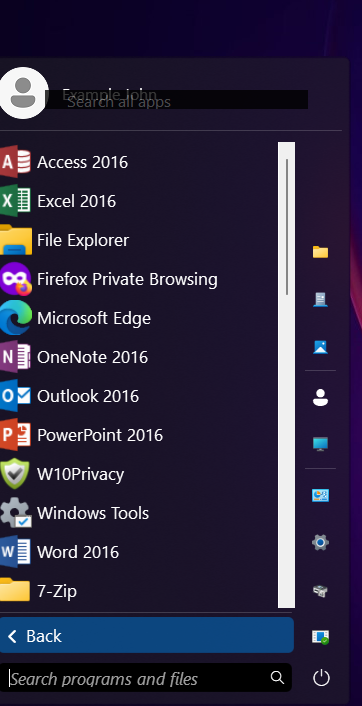
Getting rid of search all apps windows under programs.
from  Stardock Forums
Stardock Forums
Also is there a way to make the gray bar follow the formatting of windows?

 Stardock Forums
Also is there a way to make the gray bar follow the formatting of windows?
Hello,
Sorry to hear you are having issues. But, I can not reproduce and see that "Search all apps" appear on my system. Can you post on steps to do to make that box appear?
Also, include, details on your system.
Thanks
Basj,
Stardock Community Assistant.
I am not sure how this thing appears. It only shows in some dock styles but it comes across wrong on modern styles.
1. It is windows 11 version 23H2 (22631.2861).
2. Its start 11v2.
3. I don't have any search specific software.
Also do you know why the grey bar is the wrong color?

Which gray bar? Please point to it.
Thank you,
Basj,
Stardock Community Assistant
The program scroll bar in the all programs section that appear in the above picture. Its a light gray and does not fit the dark theme.
It but renders older styles useless .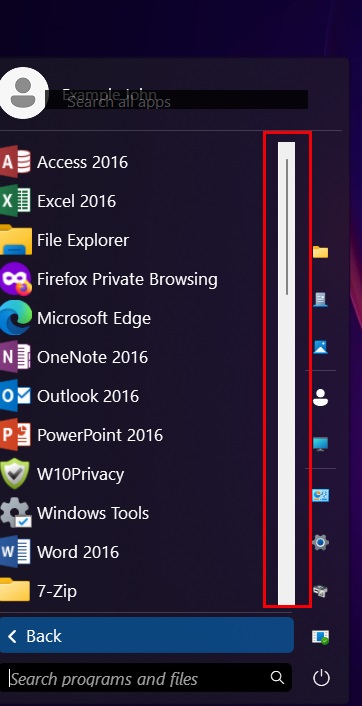
That is normal, its a slider bar. I believe there is no setting to change that in Start11.
Thank you,
Basj,
Stardock Community Assistant
I don't recall having this issue with start 10. Is there a way to switch my license to the older program.
This is the only scroll bar in all of windows that looks like this.
No, this same appear on Start10. Unless you have Windowblinds skin that use dark scroll.

Thank you,
Basj,
Stardock Community Assistant
Welcome Guest! Please take the time to register with us.
Select a reason for giving karma:
You're about to visit an external site:
Sign up here to get the latest news, updates, and special offers delivered directly to your inbox.