Can't remove pinned Start Menu folders

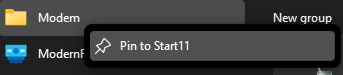
I tend to pin a lot of folders all over the place and I've been having trouble with folders pinned to the start menu.  Once pinned a shortcut is also added to the actual start menu list.  When I right-click the listing to remove it the only option that shows up is 'Pin to Start11' and choosing this simply pins the item to the right side of the start menu again.  I'm looking to remove the shortcut from the start listing.  

It is currently very cumbersome to move the folder to another location, then open the shortcut to then be prompted to remove the shortcut due to it no longer being found.

I'm on Start11 version 1.47 and Windows version 22H2 (OS Build 22621.2861)

4,870 views 9 replies
Reply #1 Top

Which menu style are you using?

Reply #3 Top

How did you pin the folder in the first place?

Reply #4 Top

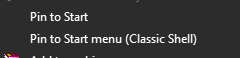
right click add to start menu, which pins it to both the start menu listing and the icons to the right of the listing.  when unpinning from the right side the item is orphaned on the left.  I only think of it as a Start11 issue because when I then right-click them it only has that Start11 option available.  No option to remove or delete.

Reply #5 Top

Quoting Insulinboy, reply 4

right click add to start menu, which pins it to both the start menu listing and the icons to the right of the listing.  when unpinning from the right side the item is orphaned on the left.  I only think of it as a Start11 issue because when I then right-click them it only has that Start11 option available.  No option to remove or delete.
End of Insulinboy's quote

Just to be more clear here, when you say right click add to start menu you mean from explorer.  What exactly is the menu item called as there is a Start11 one and a non Start11 one.

Reply #6 Top

my only options are from the standard explorer shell and classic shell, I don't see an option from Start11 when right clicking.

for further clarification I'm doing this from windows explorer the navigation pane on the left. (though it is available from both navigation and content panes)

Reply #8 Top

Quoting Insulinboy, reply 7

here's the right click that I'm talking about:


End of Insulinboy's quote

If you open shell:Appsfolder (press Win+r) do you have a Modem item in there too?

Reply #9 Top

no, it's not in the location. (EDIT: it is in that location)

I have MacGyver'd a workaround.  The shortcut gets added to this location but not removed when unpinning.  delete it from here does remove it from the listing.  not sure how it's relating back to Start11, but at the very least I guess I'm making you aware of it.  

C:\Users\*username*\AppData\Roaming\Microsoft\Windows\Start Menu\Programs