
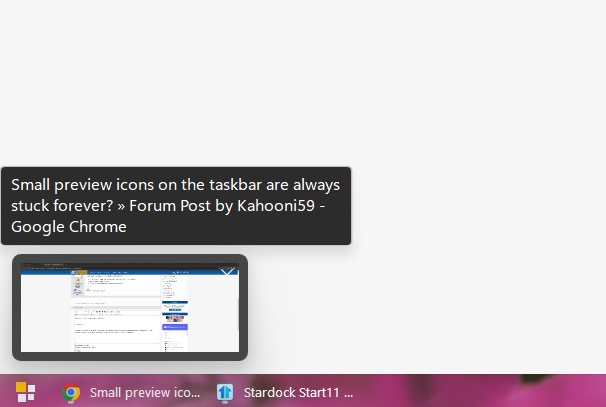
Small preview icons on the taskbar are always stuck forever?

So I recently used the trial version of Start11. I now bought a license because I enjoyed it, and the time ran out.


But I still have this insanely annoying problem - Whenever I have programs / anything open on the taskbar, and I hover my mouse over it, the usual "preview" window appears, everyone knows it. But it usually also disappears when you go somewhere else with your mouse cursor.


Problem here is, that the freaking preview window just.. stays. It stays forever, and doesn't go away, until I hit the windows button on my keyboard. What's this annoying problem? Has this always been a bug or something, or did I miss to remove the tick from the "please keep the preview icon always on the desktop until it gets annoying" option?


I'm on Windows 11, up-to-date everything. I don't know what else to give as information, but I'll post anything to have a chance to resolve this problem, because it's insanely annoying.
1,057 views 3 replies
Reply #1 Top

Hello,
Sorry to hear you are having issues. Need more information.

  1. Windows 11 full version numbers. Use Winver.exe that come with your Windows.
  2. Start11 installed version number.
  3. Is the issue still there is you try rebooting your system?

Thanks
Basj,
Stardock Community Assistant.

Reply #2 Top

Windows 11 Version 23H2 OS Build 22631.2861


Start11 Version 2.03


This problem has been there from the beginning in the trial, but randomly. Sometimes the preview windows disappeared normally, sometimes they stayed up forever. It's mostly random, but more often the windows will just stay up like this:


Today I bought the full license because the trial was over, and it keeps happening. Maybe I can upload the Start11 backup file I created, something might be set incorrectly? I went through every setting, but couldn't find anything that responded to this problem. I disabled touch mode, checked every other setting, but no fix yet.


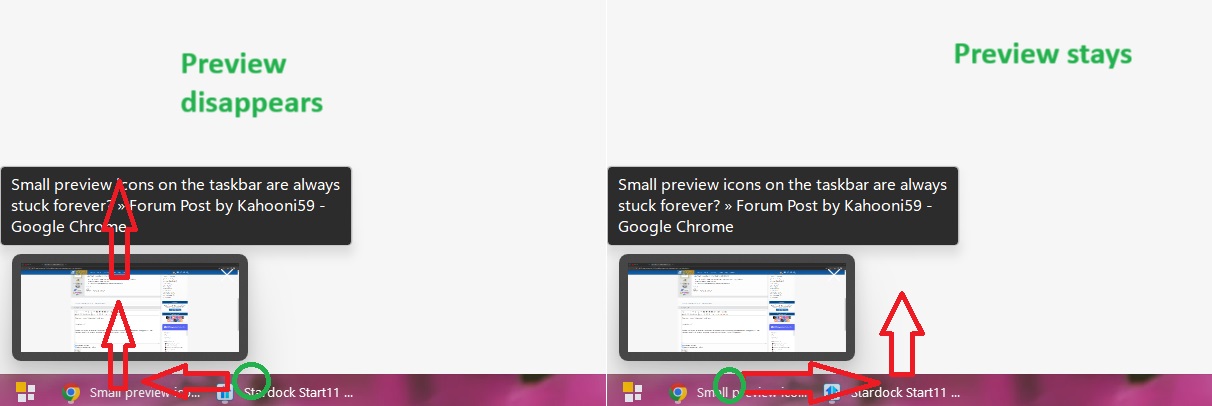
EDIT: Okay, so I found the temporary fix, or more the "mouse movement command" for it to stop. 


When I move my cursor OVER the tab on the taskbar, so the preview appears, and then OVER the preview upwards, the preview disappears correctly.


When I move my cursor OVER the tab on the taskbar, so the preview appears, and then UNDER the preview to the side, the preview stays forever.

Reply #3 Top

Have you tried testing if the issue happen without Start11 install at all? I believe, there were mentioned before that the preview popup is not control by Start11 at all. Please try this, uninstall Start11, reboot immediately, test it for few moment and see if the issue return. If not download the latest Start11 v2.04 and install it. Remember to reboot immediately after installation finished. Retest it and report back.

Start11 v2.04 (Beta) should be available in your account produce page: https://store.stardock.com/myaccount/products

Thank you,

Basj,
Stardock Community Assistant