
Start 11 v2 Glitch in windows 11 - Microsoft Surface
To support Team
Found a glitch in Start 11 since ver. 1.47 and after that in ver 2. Menu bar is distorted and icons misplaced. Restarting Explorer won't fix it. I'm using ´Microsoft Surface pro.

Stardock will be closed for the week starting on Monday, June 29th and we will be returning on Monday, July 6th. We will be monitoring support tickets and forums during this time but expect delays in responses during this time.
To support Team
Found a glitch in Start 11 since ver. 1.47 and after that in ver 2. Menu bar is distorted and icons misplaced. Restarting Explorer won't fix it. I'm using ´Microsoft Surface pro.

Hello,
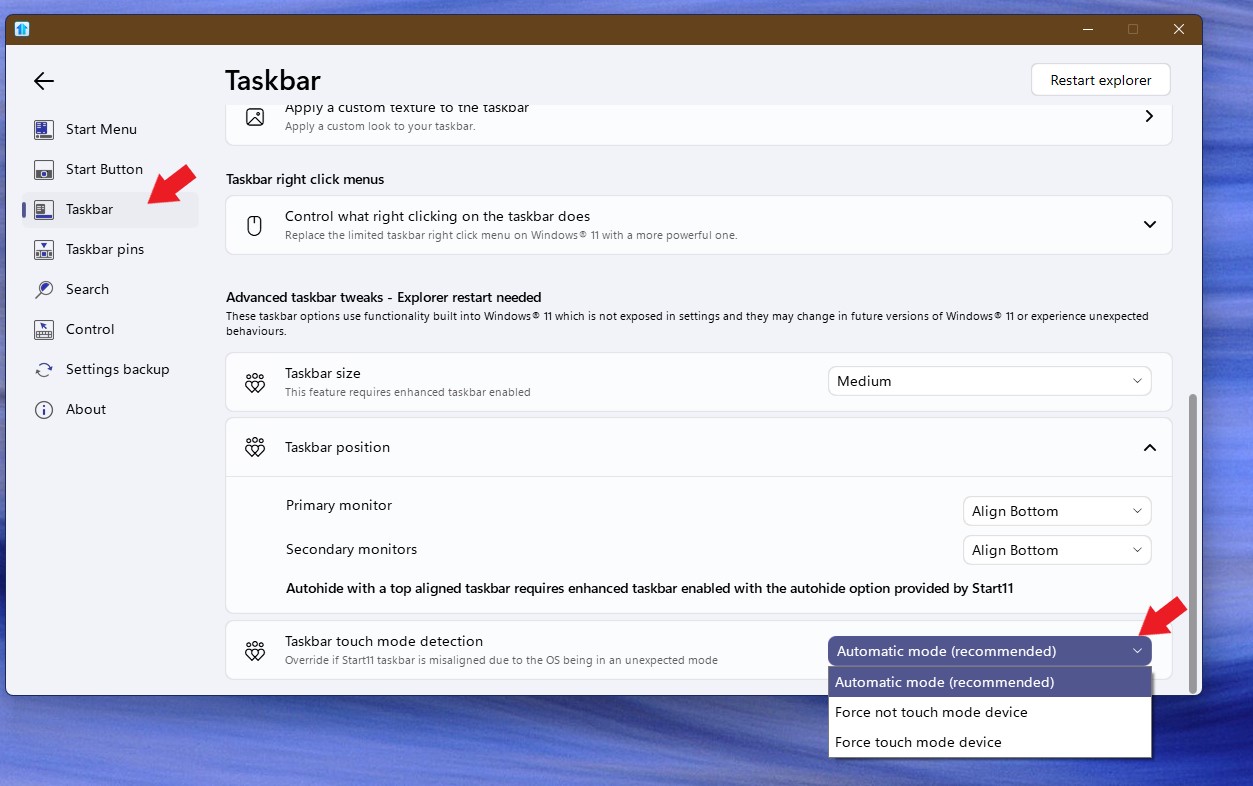
Sorry to hear you are having issues. Which v2 version you're trying it on? Also have you tried setting these touch mode detection options. Try one at a time, restart Explorer.exe and see if it help with your issue.

Thanks
Basj,
Stardock Community Assistant.
Thanks!!! I'll give it a try!!
Welcome Guest! Please take the time to register with us.