
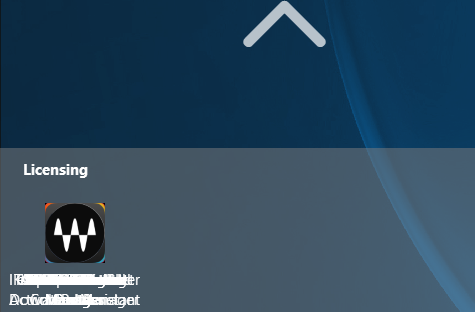
Having an issue with Start 11 v2.03 with the icons in any folder are positioned on top of each other and cannot be moved.  The menu is not locked.  I never had this issue with version 1.  I find this on the Pro, App, and 11 styles of the Start menu.
Thanks

1,198 views 3 replies
Reply #1 Top

Just discovered I that by turning off "Use Windows 10 Style Folders" I can get folders to open properly as a pop-up but it still seems I should be able to use the traditional style.

Reply #2 Top

Hello,
Sorry to hear you are having issues. I can reproduce this issue on my Windows 10 and 11 system. You on Windows 10 too?

I have forwarded your problem/question to Stardock Support Team for their assistance. Please keep an eye on this thread for any updates. We appreciate your feedback and patience.

Thanks
Basj,
Stardock Community Assistant.

Reply #3 Top

Hello,

Sorry to hear you are having trouble.

I have placed an internal ticket to have it reviewed.

Internal ref: ODNT-7462

Thank you for the feedback.

Sean Drohan
Stardock Product Lifecycle Manager