Manual Start11

I am a new user of Start11 but do not seem able to get the program to work where is the manuals so I can follow step by step.  I have been looking but haven't found it yet. Seeking assistance on this Thank You

2,012 views 5 replies
Reply #1 Top

Hello,
Sorry to hear you are having issues. You can refer here : https://support.stardock.com/space/SHC/1334935553/Start+Menu+Products+Information+%26+Usage. Do know that for Start11 v2 is not updated yet. If you need any guidance. You can post any question here and we will try to help you. Also most option that you might be looking for should have a short explanation on the button/option itself.

Thanks
Basj,
Stardock Community Assistant.

Reply #2 Top

May be I was not clear enough I do not understand how to use this product it does not make any changes to my computer there fore I am not doing the right thing to enable the program I require step by step instructions on how to make it work on Win 11. eg I have selected Win 7 start menu, biohazard start button nothing changes how do i make it work, I wanted to pin Documents Folder on Taskbar that is not working either. 


Reply #3 Top

Okay let us help you see why it is not working in your system. First, let try to make sure you have properly install Start11.

Uninstall Start11, since it is not working for you at this stage, please select "Remove setting" when ask. After un-installation finished. Reboot immediately. Check if your system back to just like it was before Start11 ever install. Download again the latest version from your account page: https://store.stardock.com/myaccount/products. Reinstall it. check if there is any error message popup while installing. If all goes well. Reboot again after the installation finished. Open up Start11 configuration. Select any Start11 style. Test it by pressing the "Win" key on your keyboard or left mouse click on your Start button. See if the Start Panel open up as Windows 7 style. Check that and report back.

Thank you,

Basj,
Stardock Community Assistant

Reply #4 Top

That was the Problem I Have it working now Tell me do you have a program that makes the folders open like Win 7/10 Ribbon, Win 11 is useless I am in the folders all the time and I need functionality not multiple clicks and obscure items that one can't find, at the moment I am using Windows Tools to get Win11 to open with the Ribbon but it is also a couple of clicks that are not needed to get it to display

Thank you

Reply #5 Top

Not sure what you trying to do, but Stardock Fences does have Portal Fences which you can link to any folder you wish to appear on your desktop.

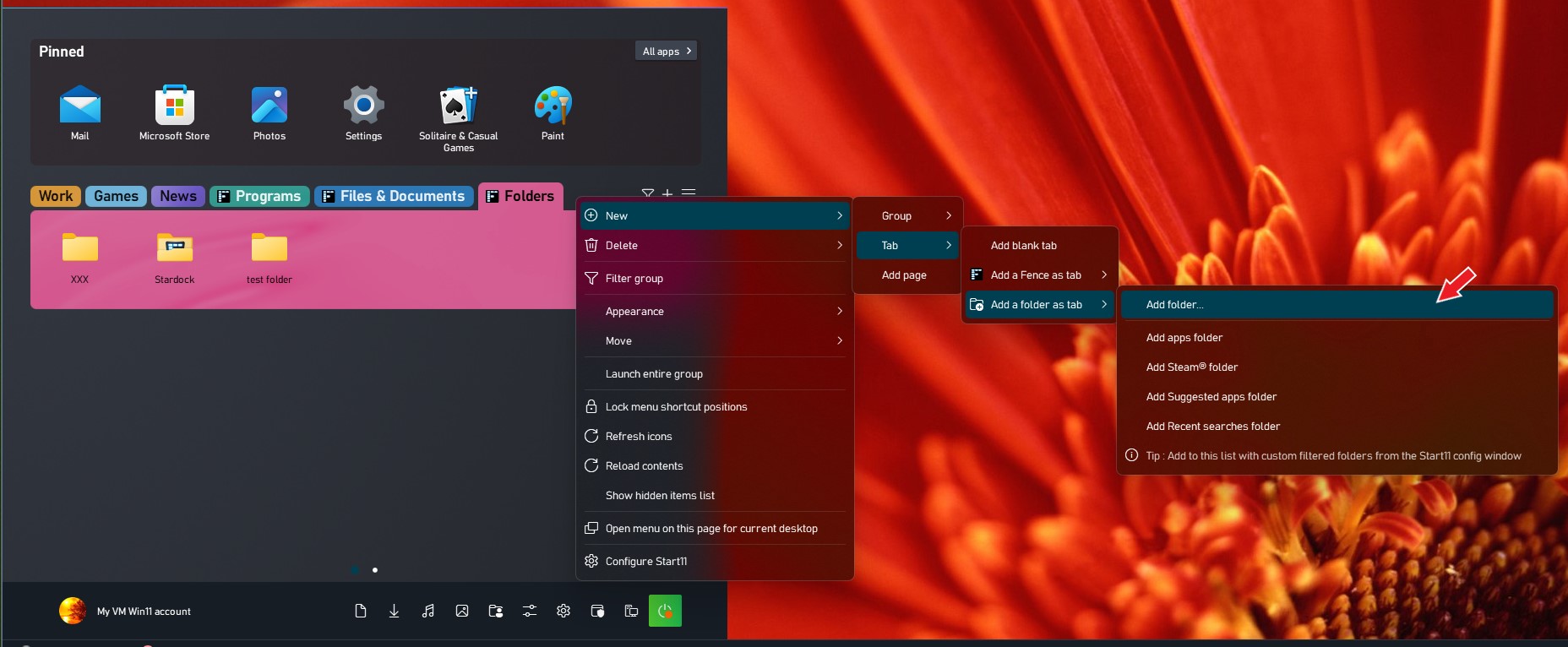
Also, there is a function in Start11 to have a folder show up inside your Start menu as a tabs. Setting it up is easy please refer a video on how to create tabs in Start11 here.

and to add a folder as tab you just do : Right click on a group-> New ->tab->Add a forder as tab-> add folder-> choose a folder-> Click open. Start11 will create a new tab with all the files show up in a tab.

Thank you,

Basj,
Stardock Community Assistant