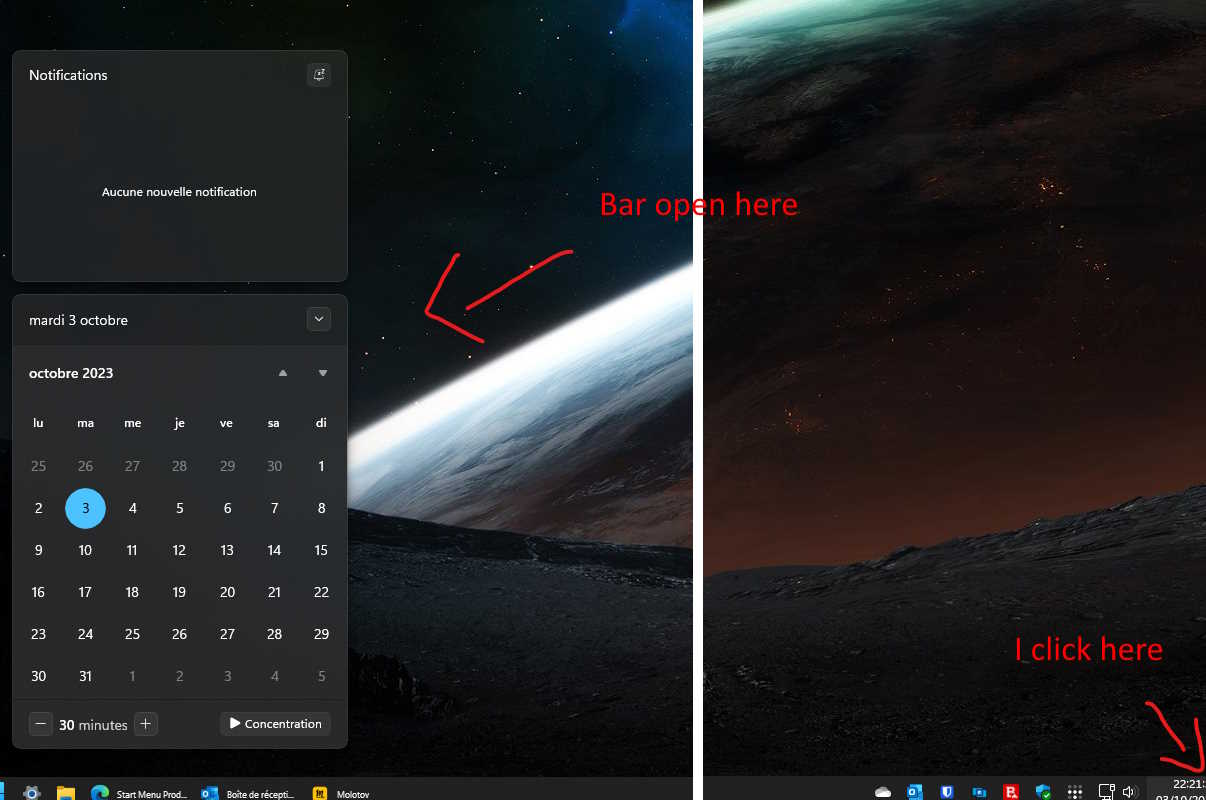
Two systems are very close
Windows 11 22H2 ( 22621.2361 )
Start11 1.47
Taskbar with button at left and icon size little
One monitor ( 2 systems with Multiplicity ) 1920x1200
No other GUI enhancer
After an explorer.exe restart, issue disapear during few minutes
I deleted items with groups and search for privacy
Windows Registry Editor Version 5.00
[HKEY_CURRENT_USER\Software\Stardock\Start8]
[HKEY_CURRENT_USER\Software\Stardock\Start8\Start8.ini]
[HKEY_CURRENT_USER\Software\Stardock\Start8\Start8.ini\Groups]
"0"="$PINNEDDEF$||0|0|0|0|0|1|0|0|"
"1"="GRP2001||0|0|0|0|0|1|0|0|"
[HKEY_CURRENT_USER\Software\Stardock\Start8\Start8.ini\Groups11]
"0"="$$APPS$$|Épinglés|0|0|0|0|0|0|0|0|"
[HKEY_CURRENT_USER\Software\Stardock\Start8\Start8.ini\Recent]
"RecentClickTime"="1694457277"
[HKEY_CURRENT_USER\Software\Stardock\Start8\Start8.ini\Right]
"6"="0"
[HKEY_CURRENT_USER\Software\Stardock\Start8\Start8.ini\Search]
"RebuildNeeded"="0"
[HKEY_CURRENT_USER\Software\Stardock\Start8\Start8.ini\Start8]
"TextLookupD"="1"
"QC"="Paramètres rapides"
"LastSeenOS2"="22621"
"NewInstall"="1"
"Image"="C:\\Program Files (x86)\\Stardock\\Start11\\StartButtons\\default.png"
"MenuMode"="2"
"StandardStartMenu"="1"
"LS"="1694710691"
"StartedOnce"="1"
"SetupLnk"="1"
"SetupLnk11"="1"
"UpgradedRightSide2"="1"
"CreatedPinned10"="1"
"UpgradedRightSide"="1"
"lRight"="9"
"FlushMetro3"="1"
"FlushMetro4"="1"
"AskedAboutStartButton2"="1"
"NewInstallDone"="1"
"CreatedPinned11"="1"
"LockedIcons"="0"
"SkinIndex"="5"
"RightIconMode"="0"
"ShowRight"="1"
"TileMode"="1"
"StandardStartMenuOLD"="1"
"HideRecentAllApps"="1"
"HideAppsList"="0"
"NoSyncPins"="0"
"EnableS11Taskbar"="1"
"CombineModePrimary"="1"
"DisableCharms"="0"
"UseCortanaSearch"="0"
"OldSearch"="0"
"CombineModeSecondary"="1"
"CaptionFontSize"="0"
"ResizeTaskbar"="0"
"TaskbarDisallowBlur"="1"
"CustomColourTaskbar"="0"
"Win10WidthC"="1"
"Win10Height"="683"
"ModernStyleSub"="2"
"Win7StyleSub"="2"
"GroupUniqueID"="2001"
"UseFullScreenMenu"="0"
"OpenAllProgs"="0"
"Win11StyleWin10"="0"
"Win10TransBackground"="0"
"AllowTabSearch"="0"
"HorzAlignS11Taskbar"="0"
"AllowAlignMiddleStartInternal"="0"
[HKEY_CURRENT_USER\Software\Stardock\Start8\Start8.ini\Start8\Locations]
"11"="Dossier personnel"
"5"="Documents"
"12"="Images"
"9"="Musique"
"SEP1"="$SEP$"
"21"="Applications universelles"
"0"="Ordinateur"
"SEP2"="$SEP$"
"2"="Panneau de configuration"
"96"="Paramètres"
"4"="Périphériques et imprimantes"
"3"="Programmes par défaut"
[HKEY_CURRENT_USER\Software\Stardock\Start8\Start8.ini\Start8\Locations10]
"5"="Documents"
"20"="Téléchargements"
"9"="Musique"
"12"="Images"
"11"="Dossier personnel"
"2"="Panneau de configuration"
"96"="Paramètres"
"14"="Exécuter..."
[HKEY_CURRENT_USER\Software\Stardock\Start8\Start8.ini\Start8\Right]
"20"="1"
"6"="0"
[HKEY_CURRENT_USER\Software\Stardock\Start8\Start8.ini\Start8\RightMode]
"11"="1"
"5"="1"
"12"="1"
"9"="1"
"21"="2"
"0"="1"
"2"="1"
"96"="1"
"4"="1"
"3"="1"
[HKEY_CURRENT_USER\Software\Stardock\Start8\Start8.ini\Start8\RightMode10]
"5"="1"
"20"="1"
"9"="1"
"12"="1"
"11"="1"
"2"="1"
"96"="1"
"14"="1"
[HKEY_CURRENT_USER\Software\Stardock\Start8\Start8.ini\Start8\RightOrder]
"11"="0"
"5"="1"
"12"="2"
"9"="3"
"SEP1"="4"
"21"="5"
"0"="6"
"SEP2"="7"
"2"="8"
"96"="9"
"4"="10"
"3"="11"
[HKEY_CURRENT_USER\Software\Stardock\Start8\Start8.ini\Start8\RightOrder10]
"5"="0"
"20"="1"
"9"="2"
"12"="3"
"11"="4"
"2"="5"
"96"="6"
"14"="7"


 Stardock Forums