How to reset windows after uninstalling Start11

I've been having a ton of issues when trying to play games while using both fences and start11, to the point where I fully uninstalled them both after deactivating their features.

What is strange is that the issues continued even after uninstall. As a test, I created a brand new local user account in windows 11 and all of the factory settings for the desktop, Taskbar, start menu, etc. were applied and I had no issues playing games.

This leads me to believe my main user profile still has a lot of settings that were applied by Start11 and Fences, even though the software is no longer installed. How do I reset all of my visual settings back to the windows 11 defaults? I assumed uninstalling would have accomplished this, but it doesn't seem like that is the case.

6,258 views 17 replies
Reply #1 Top

Here's the best I could find on just display settings. Note that this is different than resetting your computer and keeping your files (but removing all non-factory default settings and programs).

https://www.technewstoday.com/how-to-reset-display-settings-windows/

You might want to look for an IT guy to discuss what you're looking to do before setting out...

Reply #2 Top

Hello,
Sorry to hear you are having issues. But, I don't think Start11 and Fences has anything in them to change any Windows visual setting. But, to be sure. I have forward your problem/question to Stardock Support Team for their assistance. Please keep an eye on this thread for any updates. We appreciate your feedback and patience.

Thanks

Basj,
Stardock Community Assistant

Reply #3 Top

I'm referring to the start menu, the Taskbar, and any settings made my Fences or Start11. My display settings and graphics settings are fine. Maybe I should phrase it: how do I undo everything both applications did?

Reply #4 Top

Quoting jdematt1, reply 3

how do I undo everything both applications did?
End of jdematt1's quote

I'm not really convinced they made the changes you're describing...maybe give us a screen shot to relate to?

Reply #5 Top

Uninstalling and reboot immediately should return everything related to Start11 and Fences 4 back to normal. But, if it is not, yes, as Doc mentioned above, please post screenshots and show us where the issue at.

Thank you,

Basj,
Stardock Community Assistant

Reply #6 Top

I can send you a screenshot of my main profile, and then the brand new one, depicting how even though neither application is installed, my old profile still has Taskbar and start menu modified.

Would that be convincing enough? 

Reply #7 Top

Not convincing us, we just need to see which area that still unchanged. Or, if you wish, you can do the purge part of this guide, just to make sure of things.

  1. For Fences: https://forums.stardock.com/486084/fences-support-faq#reinstalling
  2. For Start11: https://forums.stardock.com/505872/start11-support-faq#reinstalling

Make sure to reboot immediately after each purge.

Thank you,

Basj,
Stardock Community Assistant

Reply #8 Top

Quoting basj, reply 7

Not convincing us, we just need to see which area that still unchanged. Or, if you wish, you can do the purge part of this guide, just to make sure of things.


    1. For Fences: https://forums.stardock.com/486084/fences-support-faq#reinstalling


    1. For Start11: https://forums.stardock.com/505872/start11-support-faq#reinstalling


Make sure to reboot immediately after each purge.

Thank you,

Basj,
Stardock Community Assistant

End of basj's quote


Now this looks promising! Let me give this a go and I'll let you know if it fixed it or not.

Basically, the old profile maintained all of the customizations that Start11 applied, and the Desktop flickers every time I Left click as if I'm trying to hide or show Fences when I'm playing anything full screen, even though they're both uninstalled. Hopefully this purge works!

Reply #9 Top

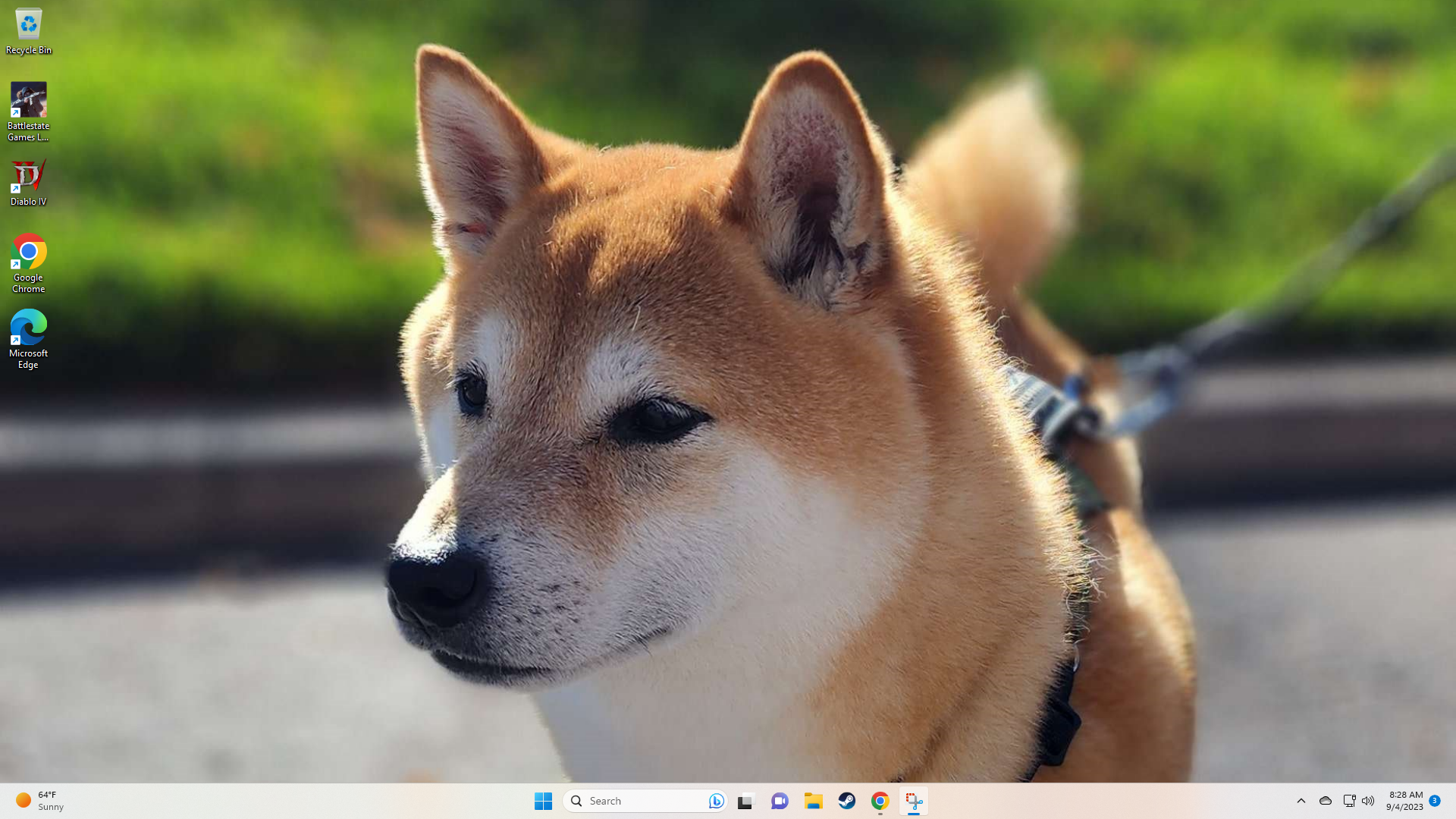
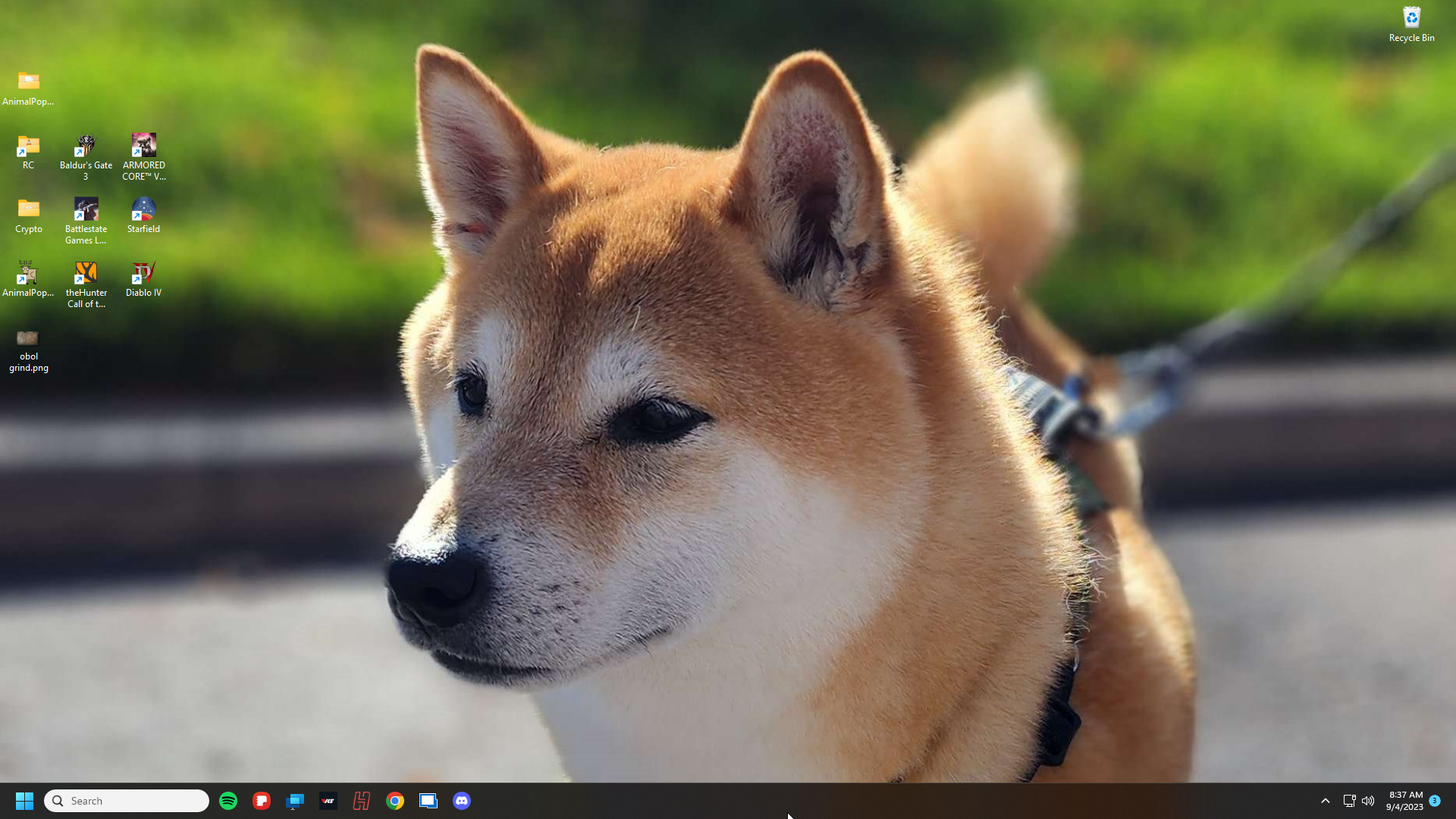
I ran both purge batch files from an elevated command prompt and rebooted after each. Unfortunately my taskbar and start menu are still customized, and I still get screen flashing to my desktop when I double left click in a full screen game. I've attached screenshots of the original (affected) and new profiles.

Original (affected):


Brand New (desired):

Reply #10 Top

Please try the following:

-Open the Start Screen, and type 'cmd'. Right-click on the search result and select 'Run as administrator' from below.

-Type: sfc /scannow

-Wait for the scan to complete (this can take several minutes)

Some help on how this looks should you need it:

https://support.microsoft.com/en-us/help/929833/use-the-system-file-checker-tool-to-repair-missing-or-corrupted-system

If the SFC finds errors, but cannot fix them, please also run the following command in the same command prompt window:

dism.exe /online /Cleanup-Image /RestoreHealth

Some help on how this looks should you need it:

https://www.windowscentral.com/how-use-dism-command-line-utility-repair-windows-10-image

The above command should assist with replacing any damaged or problematic system files. Please note, however, since it may require restoring certain files, this process can take some time and you will need to be patient until it has completed.

Please let me know whether this resolves your problem or if you have any additional questions.


Thank you,

Basj,
Stardock Community Assistant


Reply #11 Top

I already did a full SFC /SCANNOW and it found nothing.

Reply #12 Top

Did you have any additional customizing software on your system before or with Start11/Fences?

Reply #13 Top

It just looks like your taskbar is set to left align in the old account and centre in the new one and the OS set to light taskbar in the new account and dark taskbar in the old.

Both of these are Windows settings which can be changed from personalization settings.

The taskbar colour mode is not something Start11 or Fences would have touched.  The alignment mode would have been if you enabled enhanced taskbar mode in Start11.

Neither of those settings would have the slightest impact on games.

Reply #14 Top

Have to disagree, that start menu icon and taskbar are definitely not stock, they're exactly how I customized them when I was using Start11.

Regarding games, yeah, except it does.

Why else would I have made this thread to begin with? Every time I double left click when in full screen or windowed full screen, I can see my desktop background flash.


And no, I never used any other customization software aside from Start10 and Start11, and Fences.

Reply #15 Top

Did you do what basj suggested in reply #10 re dism?

Reply #16 Top

Yes, please try the dism and if that don't help. Please do cleanboot steps: https://forums.stardock.com/486084/fences-support-faq#cleanboot. Just do the create new account admin part. And see if default return.

Thank you,

Basj,
Stardock Community Assistant

Reply #17 Top

Windows PowerShell

Copyright (C) Microsoft Corporation. All rights reserved.


Install the latest PowerShell for new features and improvements! https://aka.ms/PSWindows


PS C:\WINDOWS\system32> dism.exe /online /Cleanup-Image /RestoreHealth


Deployment Image Servicing and Management tool

Version: 10.0.22621.1


Image Version: 10.0.22621.2215


[==========================100.0%==========================] The restore operation completed successfully.

The operation completed successfully.

PS C:\WINDOWS\system32>