Fences Locked Up

Hi, I have Fences Version 3.1.3.3 on my acer Laptop. It has stopped working and  my Laptop display.... is really screwed up... I keep getting a popup which says "Fences has detected that Explorer was not closed down properly and as a precaution, Fences has been temporarily disabled. To re-enable Right Click on the desktop and choose 'Enable Fences' but if I right click on the desktop, there is no option in the menu to 'Enable Fences'..... I'm at a loss and totally unable to use my Acer Laptop... The display just alternates between a blank screen and a total jumble of all the shortcuts, which would normally be arranged in around a dozen or so fences, and the Error popup just keeps appearing. Can anyone please suggest how I can fix this problem ? I would be most grateful    Thank You....

3,509 views 3 replies
Reply #1 Top

Hello,
Sorry to hear you are having issues. Need to know more on your system. Please refer here: https://support.stardock.com/space/SHC/1387954197/Contacting+Stardock+About+Fences+Issues.

  1. Need to know you on Windows 10/11? And its full version number. Use Winver.exe.
  2. Do you have any shortcut on your desktop to external/network/cloud drive? If you do, try move those shortcuts into a temporary folder and restart Fences. See if that stop the loading issue. Once that is working, you can move those shortcuts one at a time and see which one is causing the issue.

Thanks
Basj,
Stardock Community Assistant.

Reply #2 Top

Hello Basj, and thanks for your prompt response to my problem... The OS on my Acer Laptop is Windows 10 pro. with all latest updates..

However, because of the fault, I am unable Use Winver.exe. I cannot access anything on my laptop. After powering up, the Desktop just  shows a screen full of all the Shortcuts, (which normally were ordered in to a number of individual Fences),  They are all just jumbled up on top of one another, spread over the desktop display.. any attempts to click on any of the shortcuts just results in the display changing to a blank background, and then returns to the Jumbled Screen... Even clicking (Left or Right)  on the Windows ICON at the lower Left corner of the screen, produces no results, except to clear the desktop to a blank screen and the return to the 'Jumbled' Display... I could take a photo of the display and send it to you if you think it would help. But there does not appear to be any way of attaching a photo to this post.. If you have an email, I could attach a photo to it and send it to you As far as I can remember I do not have any shortcuts on the desktop to external/network/cloud drive.....


Kind Regards

Bill

Reply #3 Top

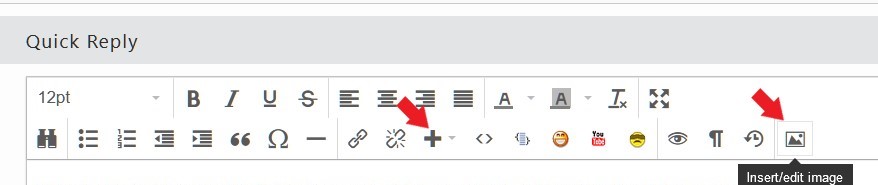
To attach an image use one of these buttons.

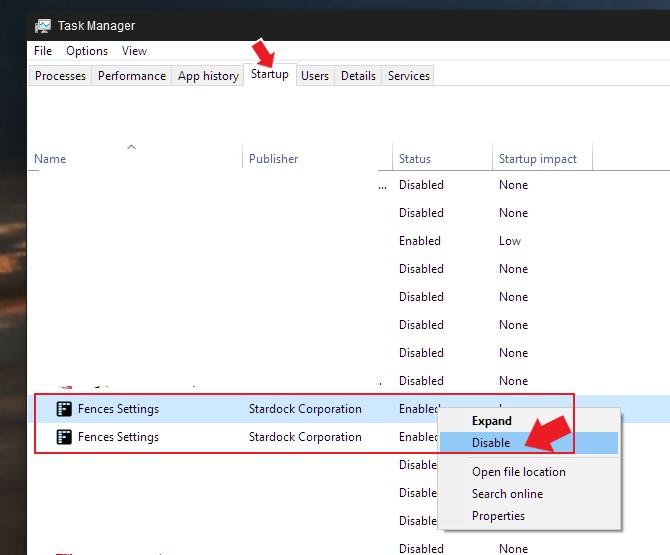
Please try, disable Fences from startup in your Taskmanager. Rigth click on taskbar->Task Manager. Disable both Fences instances from Startup.

Try that, reboot and see if Fences still loaded. If it is not loaded. Than, try purge and reinstall steps as mention here : [Link]. Just make sure to re-download the latest version 3.xx from your account page. Reboot after the purge. Reinstall and reboot again after the installation. Retest and report back here.

Thank you,
Basj,
Stardock Community Assistant.