Start11 and Windowblinds 10 problem

This is my first post so I am a bit unsure if I am in the right place. I only have Windowblinds 10 and have just purchased Start11. I didn't even consider it would make a difference, as I presumed they would be backwards compatible [incorrectly it seems], but unfortunately the 2 don't seem to play well together lol. I was wondering if I can downgrade to Start10 instead as I can't afford to move up to Windowblinds 11 just yet. Thanks in advance.

4,457 views 17 replies
Reply #1 Top

Hello,
Sorry to hear you are having issues. What is the issue you're having with Start11 and WB10?

Thanks
Basj,
Stardock Community Assistant.

Reply #2 Top

Start11 seems to prevent Windowblinds 10 from skinning the taskbar and only allows it to skin where the Start menu is and at the end where the clock is, so it looks extremly odd. I have tried different settings on Start11 but nothing changes. If I am not able to change it, I would prefer to downgrade to Start10 if that is possible as otherwise I can only use one or the other.

Reply #5 Top

Need Windows 10 Full version number please. Use Winver.exe

Thank you,

Basj,
Stardock Community Assistant

Reply #6 Top

BTW, I checked and it look like Start11+WB10 on Windows 10 system work for me. So I think there is something not working properly in your system. Please try Uninstall Start11, reboot immediately, after its done. Download the latest Start11, install it, reboot again. Retest and report back.

Thank you,

Basj,
Stardock Community Assistant

Reply #8 Top

Please try updating your Windows 10 to latest version and see if that help.

Thank you,

Basj,
Stardock Community Assistant

Reply #9 Top

Okay. I had to manually download and install the Windows Update Assistant so that I could update to Version 22H2 (OS Build 1905.2965) as my auto Updates were showing as up to date. I have now reinstalled Start11 and so far so good. Hopefully it will continue to behave lol. Thanks for your help. :)

Reply #10 Top

Great, glad it working. Do let us know if you need help later.

Thank you,

Basj,
Stardock Community Assistant

Reply #11 Top

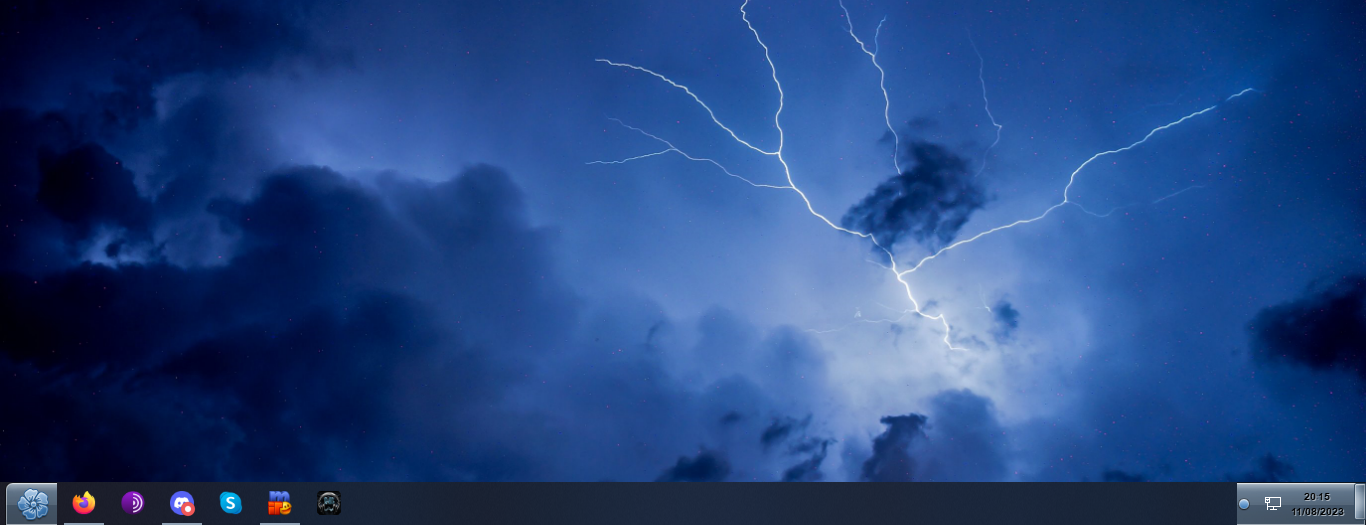
And it's happened again. I enclose a screenshot so you can see the problem. The whole taskbar should be the same colour as the 2 ends, but as you can see, it isn't skinning the middle part.


Reply #12 Top

What changed? New Windows update? New driver updates? New software install? Just a reboot? Also do you have any other 3rd party application installed that also dealing with Taskbar, Startpanel or Windows explorer?

Thank you,

Basj,
Stardock Community Assistant

Reply #13 Top

I only have Windowblinds 10 and Start11 installed that deal with Taskbar and no other updates have been installed. It was just like that again when I turned my PC on yesterday morning.

Reply #14 Top

Hello,
I have forwarded your problem/question to Stardock Support Team for their assistance. Please keep an eye on this thread for any updates. We appreciate your feedback and patience.

Basj,
Stardock Community Assistant

Reply #15 Top

Quoting HellzBella, reply 11

And it's happened again. I enclose a screenshot so you can see the problem. The whole taskbar should be the same colour as the 2 ends, but as you can see, it isn't skinning the middle part.
End of HellzBella's quote

When you see it, and you restart Windows Explorer, is it resolved?

Sean Drohan
Stardock Product Lifecycle Manager

Reply #16 Top

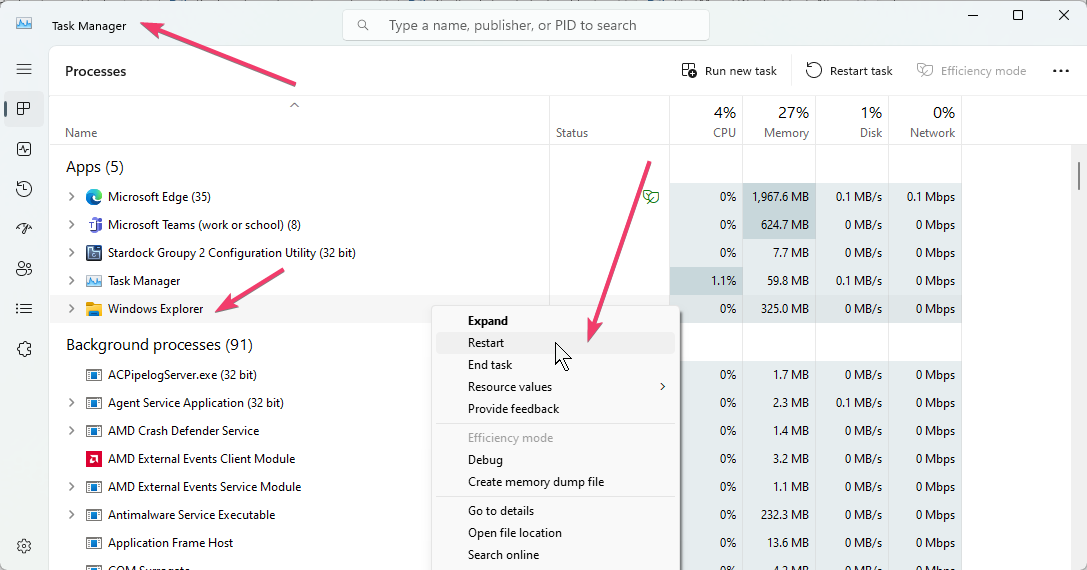
I had to work out how to show Windows Explorer in Task Manager first, but yes it resolved it. Thank you. :)

Reply #17 Top

Quoting HellzBella, reply 16

I had to work out how to show Windows Explorer in Task Manager first, but yes it resolved it. Thank you. :)
End of HellzBella's quote

Pleased to hear it worked out and you are most welcome.

Sean Drohan
Stardock Product Lifecycle Manager