Taskbar Icons Disappear

I am having trouble with icons in the taskbar disappearing at odd intervals. It happens almost every day but I can't predict it. I'm not even certain that Start11 is causing it, but as I think it is the most likely culprit, I thought I'd start here. The only ways that I've discovered so far to get the icons visible again is to either restart the computer or close and restart each application. The icons will return, but may disappear again at any time. This is what it looks like when the icons have disappeared (the space between the magnifying glass and the Outlook icon is supposed to show all my other applications):

.

Anyone else have this problem or know how to solve it? I've been thinking of uninstalling Start11 and reinstalling it, but have not actually done that yet. Thanks for any help or suggestions.


5,770 views 13 replies
Reply #1 Top

Hello,
Sorry to hear you are having issues. Yes, try that first. Uninstall Start11, important to reboot immediately after, re-download the latest version available inside your account product page. Install it, reboot immediately again. Retest and report back.

Thanks
Basj,
Stardock Community Assistant.

Reply #2 Top

I did this, waited a few days, but the problem persists. However, when doing the uninstall, it asked me if I wanted to keep settings and I responded yes. Might that make any difference? Thanks for any further help.

Reply #3 Top

That should not causing the taskbar icons disappearing issue. It might be conflicting issue. What other taskbar/start menu altering software are currently running in the background in your system? If none, this this: Cleanboot: https://forums.stardock.com/505872/start11-support-faq#cleanboot and/or Sandbox test: https://forums.stardock.com/505872/start11-support-faq#windowssandbox

Thank you,

Basj,
Stardock Community Assistant

Reply #4 Top

I don't have any other taskbar/start menu altering software on the machine (if I had, I would have suspected a conflict right away). I will give the clean boot option a go and see if that works. One thing I've noticed since the reinstall is that the icon disappearance seems to be happening less often than it did before. It just hasn't gone away completely.

Reply #5 Top

BTW, can you post a screenshot when those "missing" icons disappear? Also try to post the full length of the taskbar for both situation. Missing and not missing. And, please include information on your Windows version, use Winver.exe to get Windows full version number.

Thank you,

Basj,
Stardock Community Assistant

Reply #6 Top

Basj,

Here is the information you requested: 

Windows version 11 Pro (22H2 (OS build 22621.1992)

Icons present:

Icons missing:

I hope this is helpful. Incidentally, the disappearing icons most often occurs upon waking the system after it has been in Sleep mode (usually for a long time).

David

Reply #7 Top

Btw, have you done the cleanboot steps? What is the result?

Thank you,

Basj,
Stardock Community Assistant

Reply #8 Top

Hi, I did this a couple of weeks ago and then gave it awhile to see if the problem would recur. So far it has not. I think we can call this one solved. Thanks much for your assistance. 

Reply #9 Top

Great, glad to know it resolved. If you have time please do share which part that steps resolve your issue? The new admin account or conflicting software?

Thank you,

Basj,
Stardock Community Assistant

Reply #10 Top

Basj,

Honestly not sure. I didn't find any conflicting software. I just did the cleanboot install, rebooted normally and then waited to see if the problem recurred. Still good.


David

Reply #11 Top

Not sure what you mean by "cleanboot install". But, cleanboot usually also known to solve admin account corruption issue.

Thank you,

Basj,
Stardock Community Assistant

Reply #12 Top

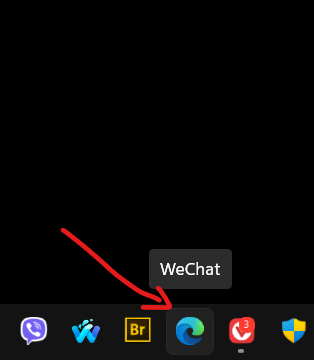
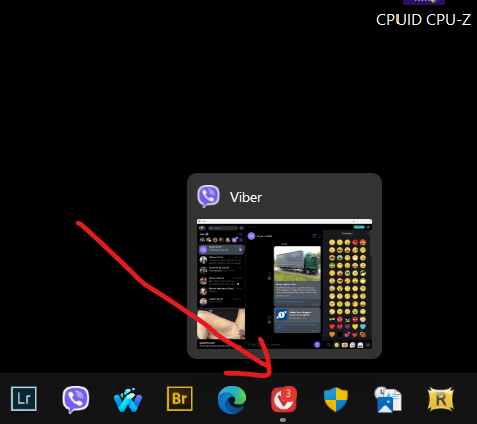
I have a similar problem, only the icons do not disappear, they just turn into others.

After every restart of the computer. For example, the PS icon looks like the Firefox icon and the opera icon is replaced by the Vibera icon
  And so all the icons on the taskbar

This has been happening for (two days) the moment you turn on the options

taskbar buttons should be combined - never

Reply #13 Top

Quoting kovikris, reply 12

I have a similar problem, only the icons do not disappear, they just turn into others.

After every restart of the computer. For example, the PS icon looks like the Firefox icon and the opera icon is replaced by the Vibera icon
  And so all the icons on the taskbar

This has been happening for (two days) the moment you turn on the options

taskbar buttons should be combined - never
End of kovikris's quote

Hello,
Sorry to hear you are having issues. Look like your issue is not the same as those mentioned here. Please start a new thread on your issue. And include more details on your system and issue. Please refer here: https://support.stardock.com/space/SHC/1387003915/Contacting+Stardock+About+Start+Product+Issues


Basj,
Stardock Community Assistant.