Cannot select or move fences

Can't move fences

All of a sudden I am unable to select a fence with my cursor and move it.  Any suggestions?  If your suggestion is to re-install fences, please tell me how I avoid losing all teh icoms I currently have on my desktop and in existing fences
 

5,755 views 6 replies
Reply #1 Top

Hello,
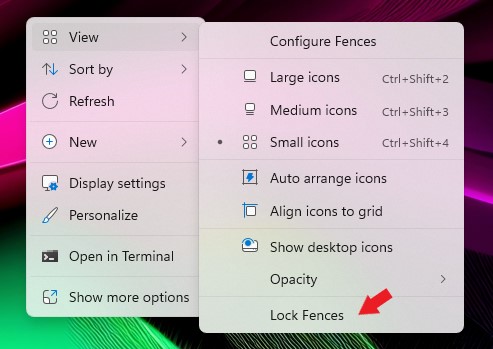
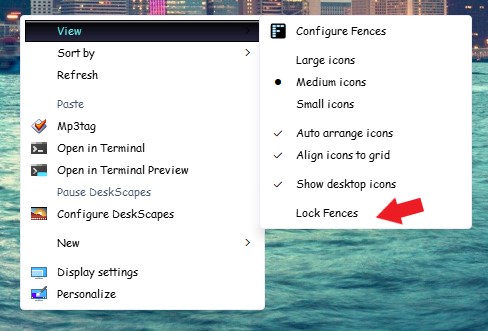
Sorry to hear you are having issues. First, have you checked if your Fences is not locked?

Thanks
Basj,
Stardock Community Assistant.

Reply #2 Top

I am sorry to be so dense, but I cannot get to a screen showing "view" as an option.  I get to Fences through the Windows icon in the taskbar and then select applications and then select Fences, but I do not get a Fences screen with a view option.

Reply #3 Top

Quoting Pic12ard, reply 2

I am sorry to be so dense, but I cannot get to a screen showing "view" as an option. I get to Fences through the Windows icon in the taskbar and then select applications and then select Fences, but I do not get a Fences screen with a view option.
End of Pic12ard's quote
Right click on your desktop and select "View" - not the Fences config screen.

Reply #4 Top

You on Windows 10 or 11? If you on Win 10, just right click on desktop and you should see the same menu as my screenshot above. If you on Win 11, you will right click on desktop and you should get something like screenshot below. Note, Win 11 right click does change a bit depends on your Win 11 version.

Thank you,

Basj,
Stardock Community Assistant

Reply #5 Top

Thank you so much!!!  I love fences and it was frustrating not being able to work with them very effectively.  I will be careful not to lock them again.  Thank you again.

Reply #6 Top

Great, glad you found it. But, do know Locking your Fences also help from accidental removing or moving of Fences.

Thank you,

Basj,
Stardock Community Assistant