Color question for Start 11

Hello,

Hoping somebody here can help me as I am new to Start 11 and Windows 11. I am using the "Modern" skin for Start 11 and would like to change the color of the background and text when hovering over a program in the start menu (see pic). How do I do that?

Thanks

1,005 views 6 replies
Reply #1 Top

Hello,
Sorry to hear you are having issues. But, I don't think there is much customization can be done on Start11 Modern skin. You can use Windows 7 style and use Windowblinds 11 skin that change that area.

Thanks
Basj,
Stardock Community Assistant.

Reply #2 Top

Well, that is strange because the reason I asked is because I have two windows 11 computers both with Start 11 and one has the shading in the pic above and the other does not so was trying to figure out how to get the shading on the one that does not have it. Both are using the "Modern" theme.

Thanks

Reply #3 Top

Please post screenshot on that other one.

Thank you,

Basj,
Stardock Community Assistant


Reply #5 Top

Both on the same Windows 11 version? Need full version numbers. Something like : V22H2 OS Build 22621.1848. Use Winver.exe. Also, on same Start11 version number?

Thank you,

Basj,
Stardock Community Assistant

Reply #6 Top

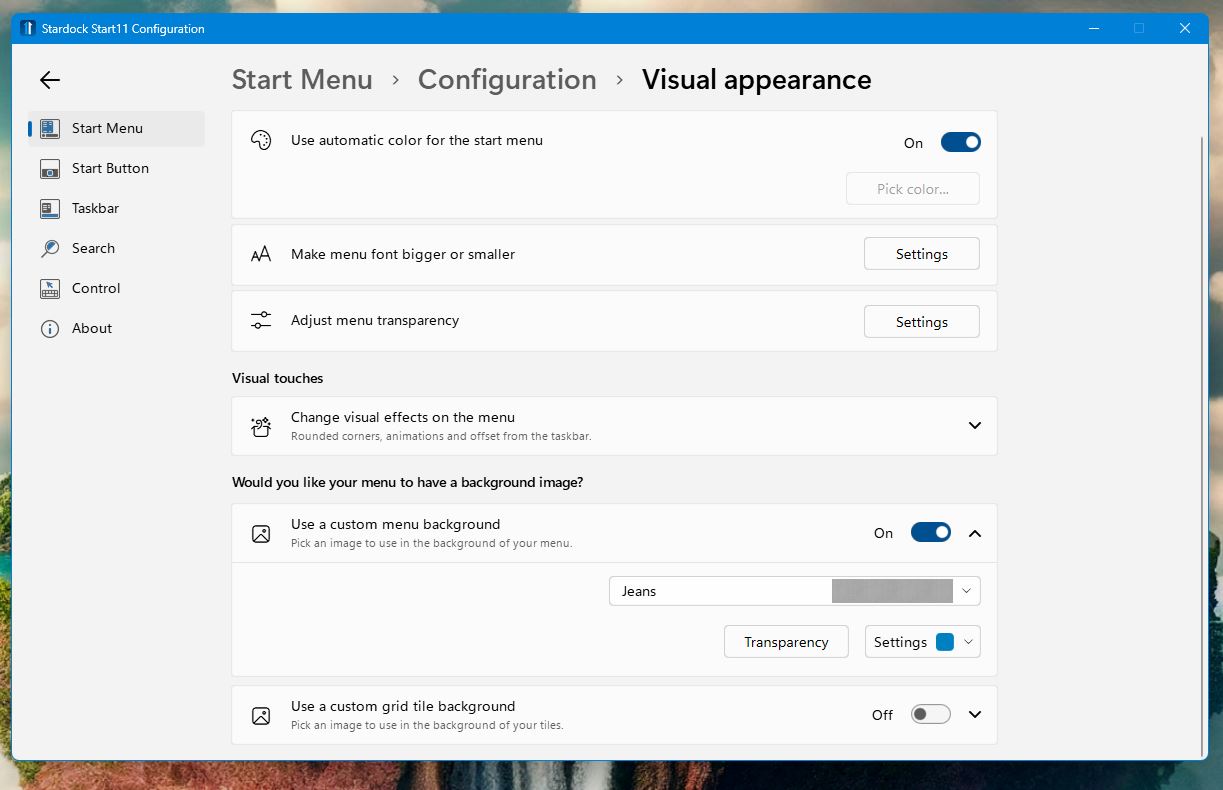
Also please post this setting. Both on the same setting?

Thank you,

Basj,
Stardock Community Assistant