
Tab's color "glitch "?

Hi,

I updated to the new version (Latest version).  

I’ve created new color profiles under the tabs and set it as default for the app (main explorer.exe process (“This PC”).

The color changed as expected and remained constant and fixed when I closed the window.  That worked great.  However,

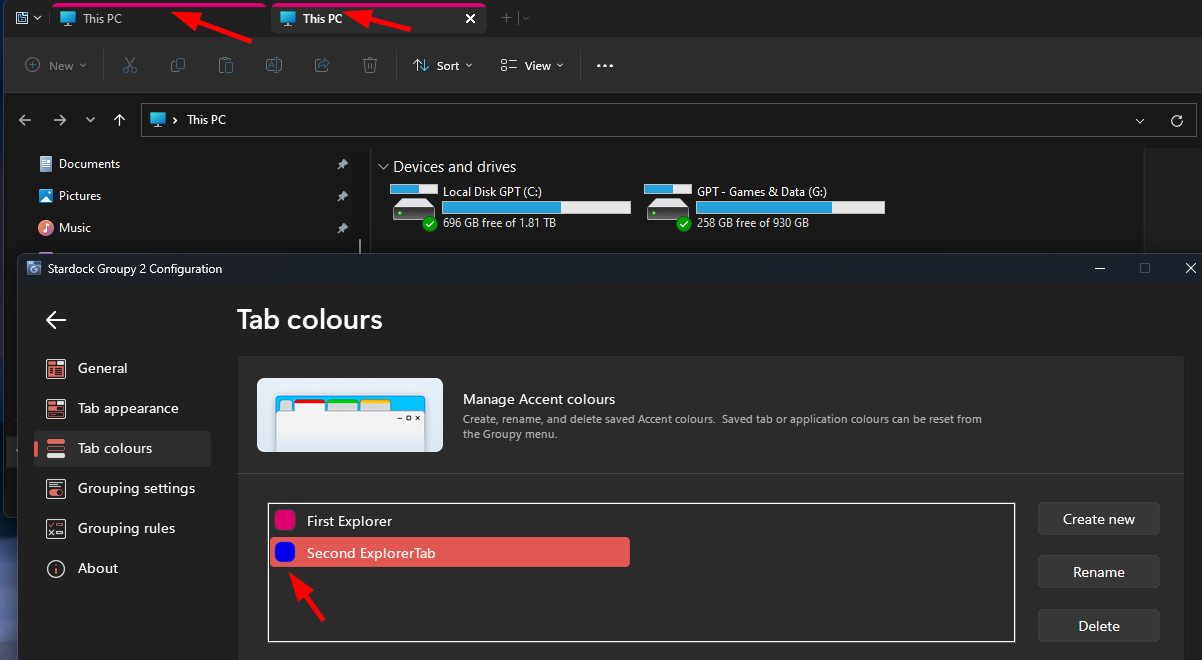
When I opened another tab, and choose a new different color profile for it, making it again the default for the app (since it’s a new explorer.exe instance, and it should have picked on that), it did not work, and it was overriding the first tab with the same color.

It did not matter if the “replace file explorer & windows notepad tabs” option was selected or not (mine is set to replace).

For whatever reason, either there isn’t an option for that by the looks of it, or the feature doesn’t work well (sure, not many users are probably using the tab’s color options, but some do, and the ones that don’t, simply don’t enable it).

If I need to pick up a custom color for every tab I open, the feature would be redundant.  All it does, is add the new profile into a list, that I can manually change the new tab to the new color (which is lost upon closing).

The idea behind it, is super great, but not effective considering each and every tab, will use the same pre-configured color scheme chosen for the first tab. (That sucks a little….  It adds around 6 mouse click choice to get each tab’s color changed) – not helping for creativity and productivity, just wasting precious seconds.

I’m sure you covered all the bases, and maybe I just can’t find the right feature to enable, but just in case….  If you can look into it, I’d really appreciate that.

Thank you in advance.
 

Kind Regards.
4,136 views 15 replies
Reply #1 Top

Hello,
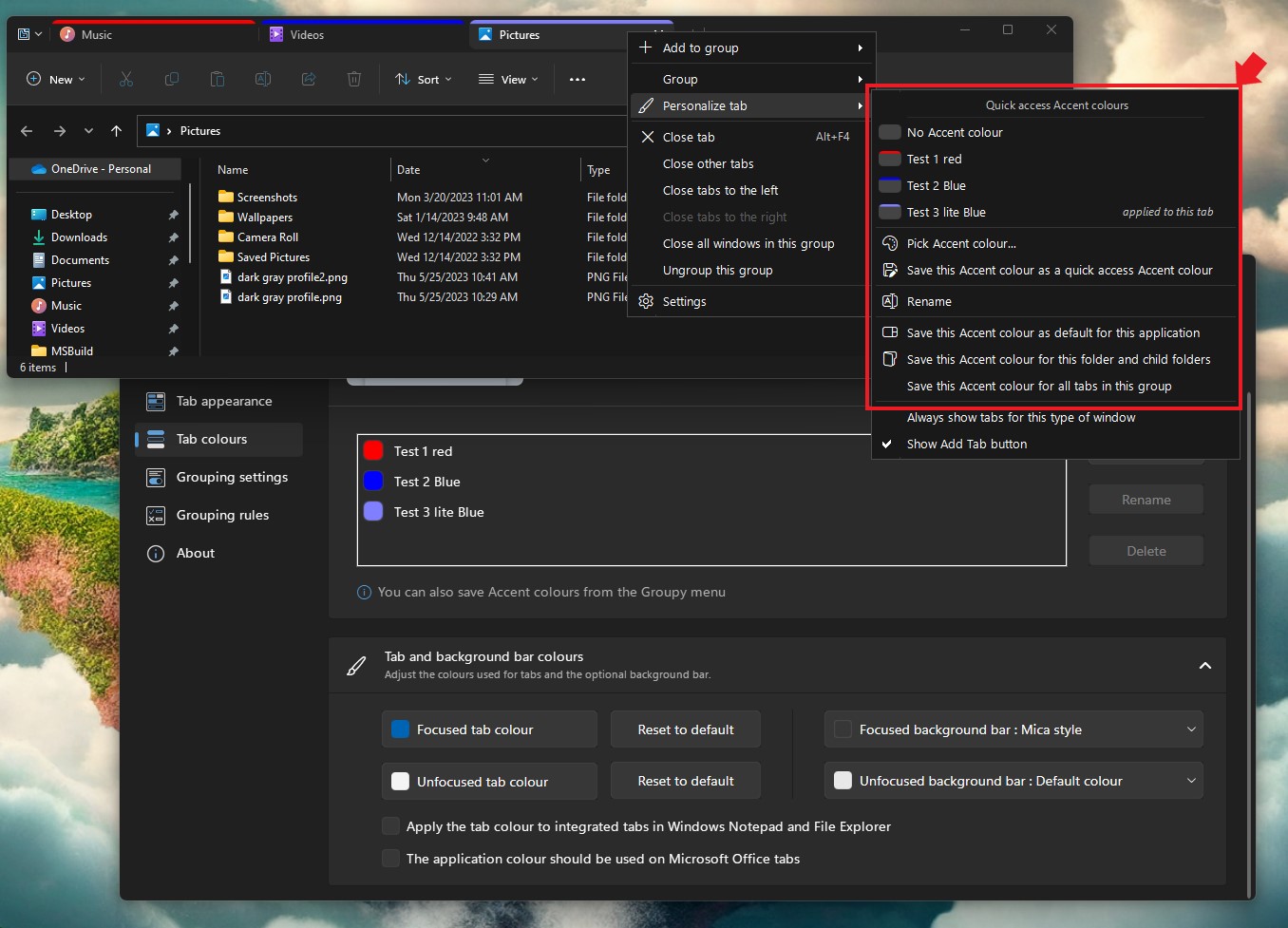
Sorry to hear you are having issues. But, I don't think those color work like that. You will need to manually assign those color individually on each tabs and save that group. And when you reopen that Groupy group the color will still be there. Or, if you can choose to use one color per application or per specific folders and its child or same color per group.


Basj,
Stardock Community Assistant.

Reply #2 Top

Thank you for your rapid response.

I had tried your suggestion on how to address it as a group.  It worked (I had to pin the group to the windows taskbar though).

On the more problematic side, (I'm on windows latest build), stardock's "Groupy" Service, is being disabled by itself automatically on restart, and I have to start it manually, even if it's set as "automatic" on the startup type.  (the previous version, did not disable itself).

So one click the taskbar, another for opening services, scrolling to startdock's groupy service, double click to open, startup type change from disabled to automatic again (until it resets back to disabled on restart), and than click on start, so i can actually use groupy. (and of course all the clicks to close the opened windows again.  A lot of work for a different tab's color.  Not that I mind, but eventually it gets old.

Kind Regards,

Me.

Reply #3 Top

On a separate note, and only for your security, I'd strongly suggest changing your user name from your email address to something else, as this is a public forum. You can do that through your account settings. 

Reply #4 Top

You on which Windows 11 version? Full version number please. Use Winver.exe.

Thank you,

Basj,
Stardock Community Assistant

Reply #5 Top

Tried to.  it won't change.  I guess it is used as a login name.  Under the "Change Your Username" I tried it, reverts back to the email.

Reply #7 Top

And I cannot change my nickname from my email address.  There are no options for that.  If someone has any idea how to take off my email displayed here in favor of a nickname, I would greatly appreciate that.  Thank you in advance.

Reply #8 Top

Changed nicks.  Finally.  Just try to fix the glitch on windows 11.  version 22H2.  build 22621.1848 (x64Bit). please and thank you.

Reply #9 Top

Try this. Uninstall Groupy 2. Reboot immediately after its done. Redownload and install Groupy 2 Beta 2. Reboot again. Retest and report back.

Thank you,

Basj,
Stardock Community Assistant

Reply #10 Top

Quoting Delicate-Flower, reply 8

Changed nicks.  Finally.  Just try to fix the glitch on windows 11.  version 22H2.  build 22621.1848 (x64Bit). please and thank you.
End of Delicate-Flower's quote

I'm glad you succeeded. 😊

Reply #11 Top

Thank you.

Uninstalled groupy 2 as advised.  Also cleaned all related registry entries.  Also made sure the folder and settings are gone as well.

Will reinstall groupy tomorrow, reboot, and check if the service is loaded and working as opposed to disabling itself and let you know as asked.  If it works, maybe it will help others as well.

Kind Regards,

Reply #12 Top

Launching multiple folders would not typically result in more than one copy of explorer running.  Even if they did, they would still be the same exe and wouldn't be able to be saved for the future as there would be nothing unique about them compared to any other explorer instance.

But there is a setting for saving it for this folder and child folders.  This will maintain that colour for that folder and any child folders whenever it is opened unless manually overridden.

Reply #13 Top

Hi,

Unfortunately, COMPLETE Uninstalling (including Registry and Folder cleaning) did NOT help.

After reboot, Stardock's Groupy windows service, is yet again disabling itself automatically at startup time.  Enclosed, the current service state after system restart:

Current Windows Services State

Hopefully, you'll manage to supply a fix or workaround.

Thank you Kindly for your patience with me.

Kind Regards.

Reply #14 Top

Quoting Delicate-Flower, reply 13

Hi,

Unfortunately, COMPLETE Uninstalling (including Registry and Folder cleaning) did NOT help.

After reboot, Stardock's Groupy windows service, is yet again disabling itself automatically at startup time.  Enclosed, the current service state after system restart:

Current Windows Services State

Hopefully, you'll manage to supply a fix or workaround.

Thank you Kindly for your patience with me.

Kind Regards.
End of Delicate-Flower's quote

Groupy is not able to set that to disabled itself so something on your computer is.

What antivirus/anti malware app are you using?

Reply #15 Top

I'm using MalwareBytes.  (but also have both windows memory integrity and local security protections ON, which prevents unsigned drivers from loading). Any previous versions of groupy loaded fine.
