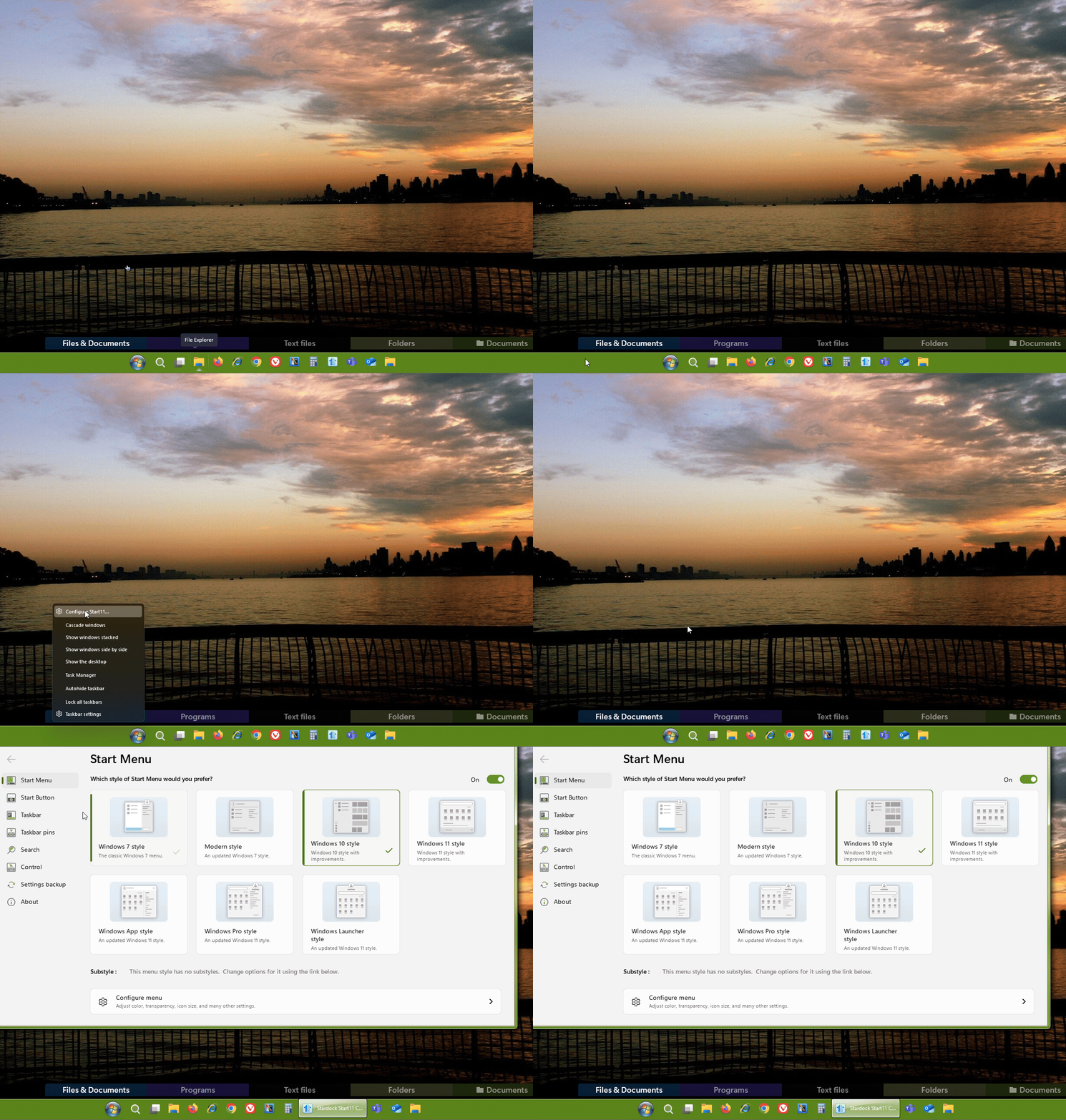
Start11 configuration missing when right clicking

After the latest Windows 11 update the Start11 menu is running but the ability to configure it seems gone when right clicking the menu icon. I reinstalled the latest Start11 but it didn't help. 

7,131 views 12 replies
Reply #1 Top

Hello,
Sorry to hear you are having issues. You on which version of Windows 11? Use Winver.exe to get the full version number. And right click on on which menu icon?

Thanks
Basj,
Stardock Community Assistant.

Reply #2 Top

Windows 11

Version 22H2 build 22612.1778

And right click on the Start Menu Icon. The menu items that come up doesn't have Configure Start11 any more.


Reply #3 Top

Try check this setting. Need to be off to have "Configure Start11" show up when right click on Start button.

Thank you,

Basj,
Stardock Community Assistant

Reply #4 Top

Thank you. That's the setting I couldn't find.

Reply #5 Top

Great, glad to help.

Thank you,

Basj,
Stardock Community Assistant

Reply #6 Top
  1. hope it'll be resolved after this:
  2. Confirm Start11 is up to date.
  3. Reinstall Start11 with proper uninstallation.
  4. Ensure Windows is fully updated.
  5. Run Start11 in compatibility mode or as admin.
  6.  
Reply #7 Top
Quoting Stryill, reply 7

hope it'll be resolved after this:

Confirm Start11 is up to date.

Reinstall Start11 with proper uninstallation.

Ensure Windows is fully updated.

Run Start11 in compatibility mode or as admin.

End of Stryill's quote

Hello,
Sorry to hear you are having issues. But, need to know what issue was  your hoping to resolve?

Thanks
Basj,
Stardock Community Assistant.

Reply #8 Top

After the recent Windows 11 update, although the Start11 menu is functioning, I've lost the ability to configure it by right-clicking the menu icon. Even after reinstalling the latest version of Start11, the issue persists.

Reply #9 Top

Quoting Stryill, reply 8

After the recent Windows 11 update, although the Start11 menu is functioning, I've lost the ability to configure it by right-clicking the menu icon. Even after reinstalling the latest version of Start11, the issue persists.
End of Stryill's quote

Hello,
Sorry to hear you are having issues. But, you right click on which icon? Also need details on:

  1. Windows full version and OS build number. Use Winver.exe.
  2. Start11 full version number

Thank you.
Basj,
Stardock Community Assistant.

Reply #10 Top

Try running Start11 as an administrator and check if the configuration option returns. If the issue persists, it might be due to compatibility with the latest Windows 11 update. Reaching out to Start11 support could also help.

Reply #11 Top

After the latest Windows 11 update, the Start11 menu still works, but I can’t open the settings when I right-click the Start button. I tried reinstalling the latest version of Start11, but the problem is still there.

Reply #12 Top

Perhaps it is how you actually trying to open the setting. Here one way you can open Start11 configuration Windows. Right click on the taskbar-> Configure Start11..

Thank you,

Basj,
Stardock Community Assistant