
Primary and secondary display - Start11 does not take setting of primary display into account

Hello,

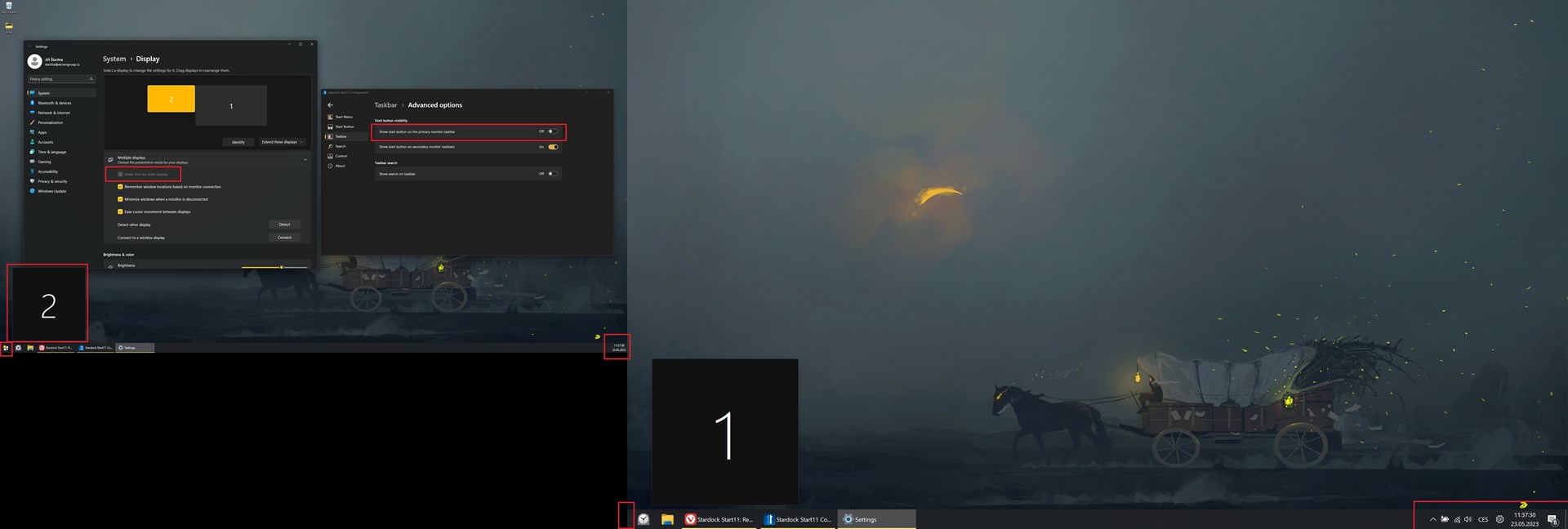
I use two monitor setup on my laptop. The main display is 2K display numbered as 2, the secondary is the 4K display numbered as 1. On my main display the only thing I see on the right side of taskbar is clock. The expected state is to have the right side of taskbar on the display 2 as on the display 1. The right side of display 1 should look like as on the display 2.

I do not see any possibility to change this within Start11 settings. Is it a configuration issue or a bug?

Start11, version 1.44

Windows 11, 22H2, 22621.1702

Thank you.
1,024 views 2 replies
Reply #1 Top

It looks like you may have applied a third party modification to try to get the Windows 10 taskbar on Windows 11.  This is not really recommended as you are likely to experience issues with OS updates at some point as I believe happened with the update in February.

However the issue you are having is nothing to do with Start11 as those areas are entirely under the control of Microsoft Windows.  My guess is you dragged the primary taskbar off the primary monitor at some point and so they have become switched.  Dragging them back may well fix that.


Reply #2 Top

Hello Neil,

I am sorry for that. You are right, I forgot that I used a third party modification. After uninstalling that modification, everything is all right!

Please, consider this issue as closed.