

Fence 4
Fence4 not the same on Desktop and on Notebook
from  Stardock Forums
Stardock Forums
Problem Statement:
installed Fence4 on Desktop first. Works beautifully.
In Folder Portal, when I select one sub folder, I see on the Fence description the folder name and below the available folders to work on

on the left is an arrow showing that it is a sub folder. This feature is absolutely great to work with a set of folders related to an application.
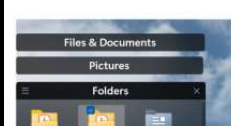
I installed Fence 4 on my Lenovo X1 Yoga, but this little feature do not appear when I select a sub folder as seen here:
 .
.
I would have expected the small up arrow showing here as well as on the Desktop.
Did something go wrong with the Install of the program ?
Any hint on how to solve this is very welcome... Francois