
Start11 Right click > Task-Manager not opening when taskbar is not focused

Hi,

when I right click on the taskbar and select "Task-Manager", the UAC dialog is not shown. Instead, the confirmation prompt is sitting in the taskbar and can not be selected. Only Alt+Tab is able to open up the dialog.
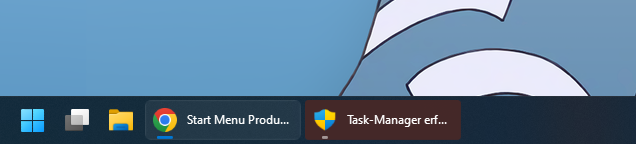
Unfortunately, I can only reproduce the issue roughly half of the time only. It seems to be dependent on what application was started (e.g. 7-zip) before. When the taskbar has focus (e.g. it was left clicked before) opening the task manager from the right click menu works consistently.

When the issue happens, the start menu also does not get focused, when it is opened for the next time.

Environment:
Windows 11 22H2 (German)
Start11 1.43 (also happened on 1.41)
User Account Control - Always notify/confirm

3,887 views 13 replies
Reply #1 Top

Hello,
Sorry to hear you are having issues. I am not sure if Start11 is the reason of the issue, but, just to make sure that Start11 is install properly, try this. Uninstall Start11, reboot immediately after, download again the latest Start11 version available in your product account page. Install it. Reboot again after. Retest and report back.

Thanks
Basj,
Stardock Community Assistant.

Reply #2 Top

Hi,

I did test Start11 with a fresh install and recorded the issue. Please see the video above. When the UAC prompt is waiting in the taskbar on the second attempt, it can not be clicked.

Reply #3 Top

Hello,
I have forwarded your problem/question to Stardock Support Team for their assistance. Please keep an eye on this thread for any updates. We appreciate your feedback and patience.

Basj,
Stardock Community Assistant

Reply #5 Top

Hello,
I have forwarded your problem/question again to Stardock Support Team for their assistance. Please keep an eye on this thread for any updates. We appreciate your feedback and patience.

Basj,
Stardock Community Assistant

Reply #7 Top

Hello,
I have forwarded your problem/question again to Stardock Support Team for their assistance. Please keep an eye on this thread for any updates. We appreciate your feedback and patience.

Basj,
Stardock Community Assistant

Reply #8 Top

I have logged the bug with the developers.

Internal reference 'ODNT-6639'

Paul Scroggins
Associate Technical Support Analyst

Reply #9 Top

Another month passed. I will not ask for an update anymore. as this makes me feel silly.

Reply #10 Top

Hello,

Sorry, but have you tried Start11 latest version V1.47 beta? I can not reproduce your issue on this version.

Thank you,

Basj,
Stardock Community Assistant

Reply #11 Top

I have not seen the issue addressed in 1.47 Beta's changelog. I tried it just now regardless, rebooted and could reproduce the issue on the first try.

Reply #12 Top

Great, thank you for reporting back. I'll forward your report to Stardock Support Team for their review. We appreciate your feedback and patience.

Thanks

Basj,
Stardock Community Assistant

Reply #13 Top

Would you forward my report to Stardock Support Team for their review and appreciate my feedback and patience again?