Fences 4: Font sizes in title bars are not all the same

Version 4.0.7.2, Windows 10.  On my desktop, periodically some (not all) of the rolled-up fences change to a smaller font than normal for my computer.  When these fences are opened, the icons and labels are compressed vertically (icons on any lower row overlay the icon labels on the row above).  This doesn't happen all the time.  It does not always happen to the same fence, either.  I have seven fences on my desktop and 3 or 4 of them are affected at any given time.  I have tried opening Fences to adjust its settings with no effect.  I have tried refreshing my desktop, again with no effect.  I have attached a screenshot of the left side of my screen as an example.  If it helps, my video card is an Nvidia GeForce RTX3090 and my monitor is a Samsung UltraWide resolution set at 5120x1440, 120Hz,  with text etc set at 125% and HDR on.

3,193 views 8 replies
Reply #1 Top

Hello,
Sorry to hear you are having issues. Please Refer here: https://support.stardock.com/space/SHC/1387954197/Contacting+Stardock+About+Fences+Issues and provide us with information request for in there.

Thank you.
Basj,
Stardock Community Assistant.

Reply #2 Top

I believe I provided everything but the version of Windows:  Windows 10 Version 21H2 (OS Build 19044.2604).

New issue, occurs regularly now.

Reply #3 Top

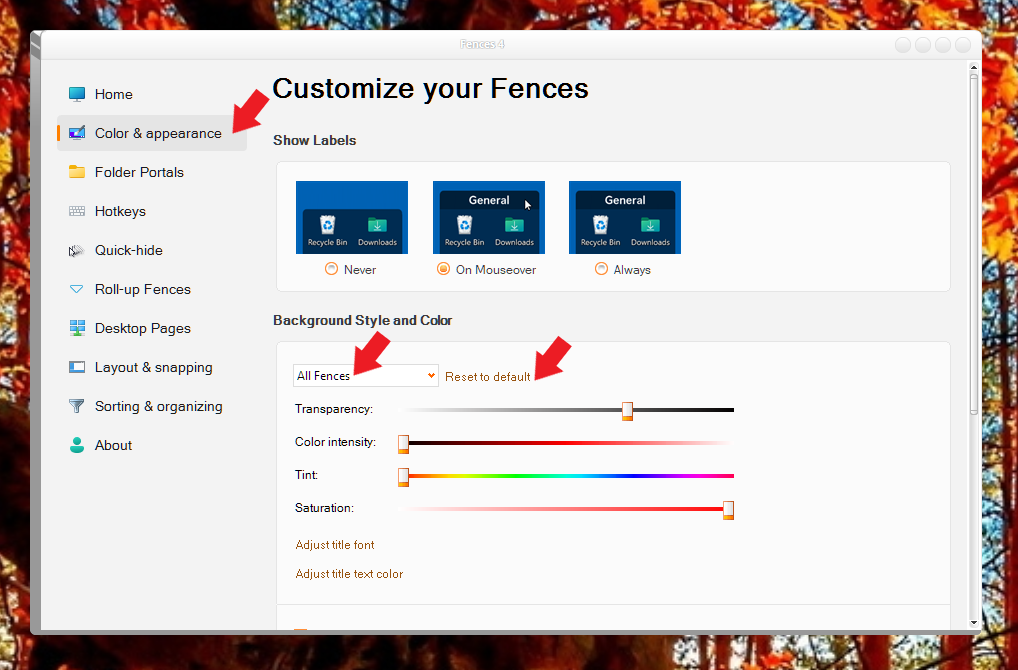
Are all the fences set to use the same title font and size? You can reset to default and test if the issue appear again. Refer screenshot below.

Thank you,

Basj,
Stardock Community Assistant

Reply #4 Top

Yes, they were set exactly as in your example.  I reset to defaults and some are still compressed compared to the defaulted ones.  No change to problem, in other words.

Reply #5 Top

Is that screenshot you posted above, came from the one monitor or composite from multiple monitors? If single, that is strange. Can you post a video of this happening? Interested to see how it happen.

Also, please try purge and reinstall steps as mention here : [Link]. Just make sure to redownload the latest version from your account page. Reboot after the purge. Reinstall and reboot again after the installation. Retest and report back here.

Thank you,
Basj,
Stardock Community Assistant.

Reply #6 Top

It's from a single monitor.  It doesn't happen in a way that video could capture.  It seems to happen each time the computer sleeps or the screen times out. When it wakes again, the Fences are screwed up--and it's never the same pattern.  This morning, all three of the Fences on the right were small fonts, and the four on the left were normal size.  I restarted my computer and all are normal for the moment.

My primary monitor is an ultrawide Samsung LC49G95T running at 5120x1440, 120 Hz.  All the Fences are displayed on that monitor, four on the upper left and three on the upper right.  I also have an LG Ultrawide monitor at 3440x1440 and 60Hz connected to the computer.  Both are running from an RTX 3090 card.  No Fences are displayed on this second monitor.  Could my setup have something to do with the problems?

Reply #7 Top

Just as a test, if you can, try running only with your primary monitor. With your secondary turn off. And see if the issue still happen when it wake up from sleep.

Thank you,

Basj,
Stardock Community Assistant

Reply #8 Top

I have been running for several days with the second monitor off.  So far, the problem has not reoccurred.  I suspect that the problem is related to running two ultrawide screens with different resolutions and different refresh rates.  I will let you know if the problem comes back.  Thanks!