re-activation failed

Hi,

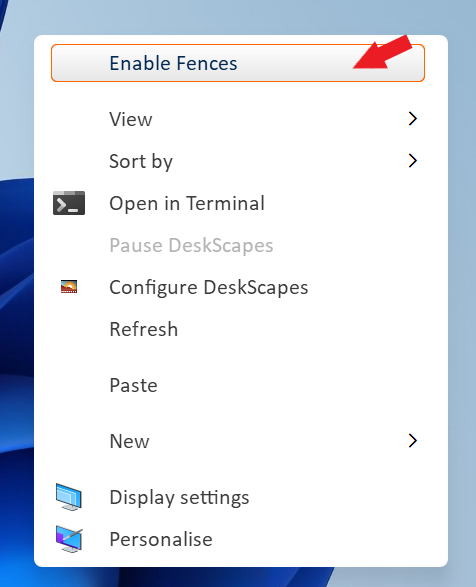
I installed fences on a new computer. On the old one I deactivated the licence and on the new computer I activated the licence with the key. But it still doesn’t work and there no error message. When I rightclick to the desktop there is still «activate fences» in the menu and it’s not possible to create a window.

I also tried as troubleshooting to move all icons in a folder which also doesn't work.

Michael

-----


Intel(R) Core(TM) i5-7300U CPU @ 2.60GHz   2.71 GHz
RAM 16.0 GB
Windows 10 Pro
Version    22H2

5,370 views 9 replies
Reply #1 Top

Hello,
Sorry to hear you are having issues. Please check if Fences listed on the taskmanager to startup twice. https://support.stardock.com/space/SHC/1331232868/Fences+is+not+starting+after+boot. Check it and report back.

Thanks
Basj,
Stardock Community Assistant.

Reply #3 Top

Please try purge and reinstall steps as mention here : [Link]. Just make sure to redownload the latest version from your account page. Reboot after the purge. Reinstall and reboot again after the installation. Retest and report back here.

Thank you,
Basj,
Stardock Community Assistant.

Reply #5 Top

To be clear, it can not be activated? or it can not be enable?

Thank you,

Basj,
Stardock Community Assistant

Reply #6 Top

When I rightclick to the desktop and select "activate fences" nothing happen. It's not possible to create a new window. I already moved all icons into an folder...

Reply #7 Top

You are referring to this yes? "Enable Fences"

Thank you,

Basj,
Stardock Community Assistant