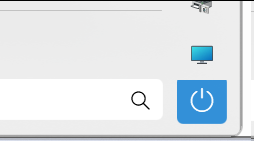
Start11: Power button misaligned/overlaps

Minor Start11 display bug

I'm using Start11 v1.36 (latest version), with "Modern style" Start menu - "Compact Modern Style"

Some combination of the display options I'm using makes the power button display slightly misaligned, and overlapping with the column of shortcut buttons above it.

This was happening in previous versions as well. I'd expect that whole column of buttons to be evenly aligned.

2,916 views 9 replies
Reply #1 Top

Hello,
Sorry to hear you are having issues. You on Windows 10 or 11? Also need to know its full version number. Use Winver.exe to get that.

Thanks
Basj,
Stardock Community Assistant.

Reply #3 Top

Did you disable search from your start panel?

Thank you,

Basj,
Stardock Community Assistant

Reply #5 Top

This one.

Thank you,

Basj,
Stardock Community Assistant

Reply #6 Top

That's the one I mentioned in my last post; I have it turned off. If I turn it on, the search input appears and the power button becomes aligned horizontally, but still cut off at the top:

Reply #7 Top

Yes, I saw that too. I have forward your problem/question to Stardock Support Team for their assistance. Please keep an eye on this thread for any updates. We appreciate your feedback and patience.

Thanks

Basj,
Stardock Community Assistant

Reply #8 Top

Hello,

Sorry to hear you are having trouble.

I have logged the issue.

Internal ref: ODNT-4969

Thanks for the feedback.

Sean Drohan
Stardock Product Lifecycle Manager