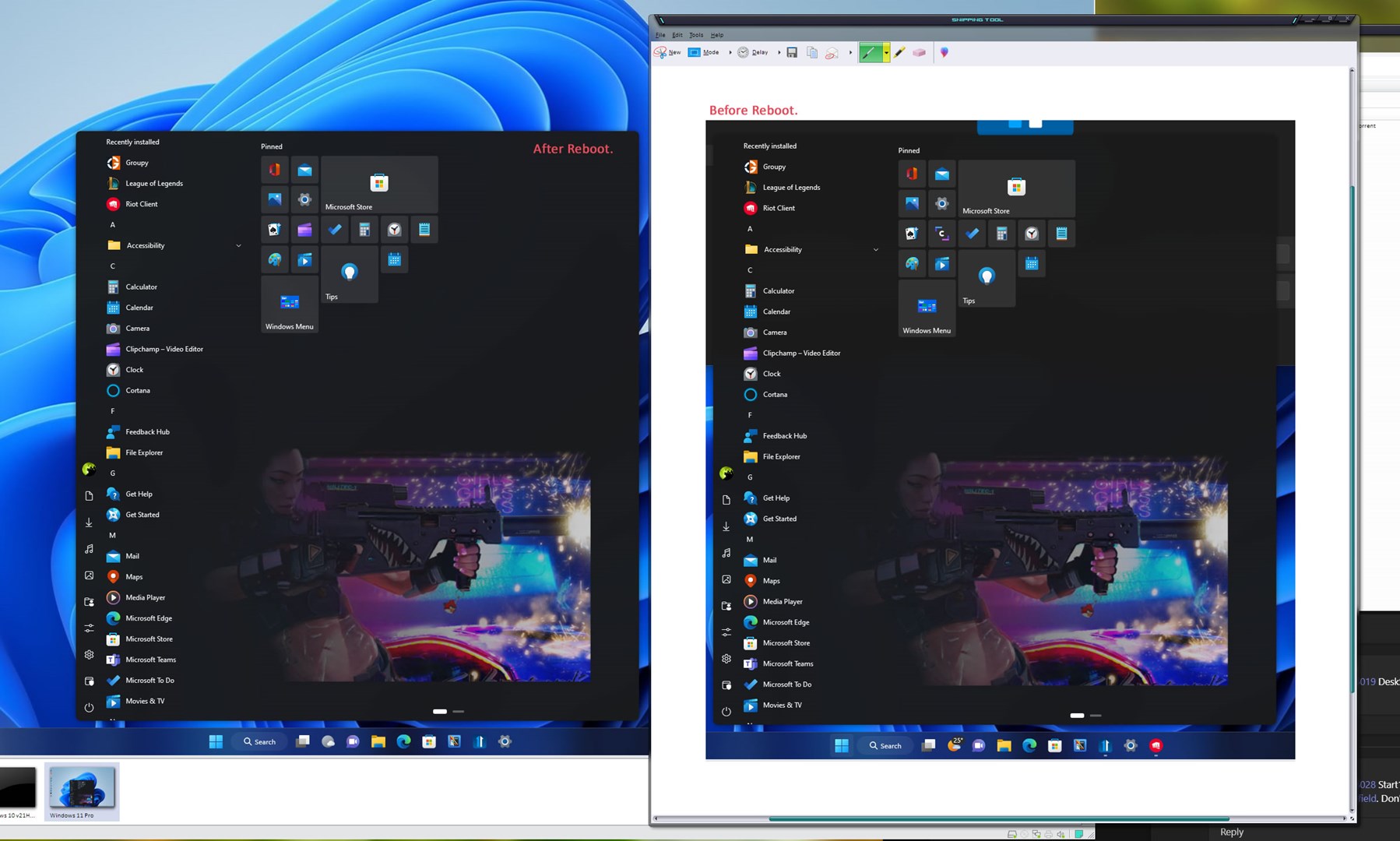
Start11 menu background position

Hello,

first I'd like to thank You for your Start11 app, it's amazing and I love it,

the only thing that bothers me so far is that if I set custom menu background it somewhat changes its scale based on ??? and is placed relatively to ???

possibly the wallpaper height scales to fit menu height but with upper shadow and invisible part beneath the taskbar added,

it took me a lot of effort to display the background i created pixel perfect (positioned where I want it to be and 1:1 bitmap scale),

this alone won't be an issue but the background position changes on each reboot (shrinks ratio),

when I set the same image as background again via configure menu, it suddenly positions itself correctly but after i restart PC it's misaligned and I have to set it once again,

it makes me wonder if the set background menu and the initializer on boot contain different logic for scaling and placement,...

It'd be nice to allow users to set pixel perfect background positioned for example based on top left corner or somehow describe the logic under the hood to allow that option

Thank you very much for making my start menu beautiful again in W11 ^_^  

1,699 views 4 replies
Reply #1 Top

Hello,
Sorry to hear you are having issues. Need to know more on your system and issue.

  1. Your Windows 11 full version numbers. Use Winver.exe to get that number.
  2. Start11 version.
  3. A video of this issue would help us understand it better.

Thanks
Basj,
Stardock Community Assistant.

Reply #2 Top

Windows 11 Pro, V 21H2 (build 22000.1335)

Menu background I'm using

https://drive.google.com/file/d/1oMQij8INhP8FRtUZ4sb7H8KE94JbPN0h/view?usp=share_link

Immediately after set up via "Configure Start11" > "Start menu" > "Setup menu" > "Customize menu visual appearance" > "Use custom menu background", "Select custom image" in dropdown

https://drive.google.com/file/d/1WtWpy4I_eFTfcxnd45rcodVoaPo0uMeQ/view?usp=share_link

After reboot

https://drive.google.com/file/d/1w_4Ez6o7gqtBFlBNcHX6zegPMK06WVG6/view?usp=share_link

As You can see it changes position and scale after reboot, so I guess the startup initializer and setup via the menu use different algo for placement or the relative placement it depends on somewhat changes

Reply #3 Top

Strangely, I can not recreate your issue. The Startpanel do look the same before and after reboot. Refer screenshot below. Have you try your issue on another system, just to see if you can recreate your issue on another system?

Thank you,

Basj,
Stardock Community Assistant

Reply #4 Top

Nevermind, I solved it by resizing the wallpaper canvas until it matched the desired position after reboot, height 790px seems to do the trick, the position is wrong after choosing it but on reboot it positions correctly