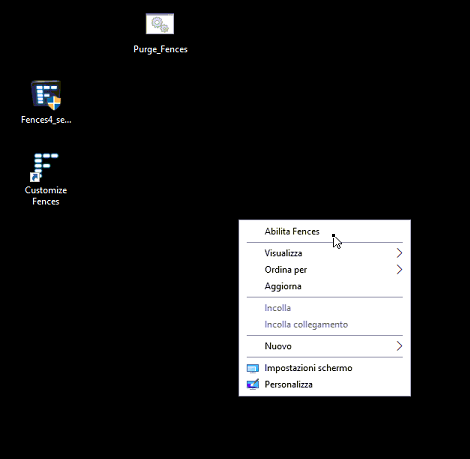
Fences doesn't start

OS win 10 22H2

Although I can see Customize Fences icon and I can configure anything of fences,

It doesn't work (I am not able to create tiles on the desktop), and I always have a right-click menu where I can see the menu item "activate fences", but clicking on it nothing happens 

So at the  moment I am not able to use it.

I tried:

1 - reboot the pc;

2 - uninstall and reinstall the software;

3 - the purge_fences.bat like administrator 

every time rebooting the system, but nothing is changed.

Any suggestions?

Many thanks for your help!


9,134 views 11 replies
Reply #3 Top

Please try purge and reinstall steps as mention here : [Link]. Just make sure to redownload the latest version from your account page. Reboot after the purge. Reinstall and reboot again after the installation. Retest and report back here.

Thank you,
Basj,
Stardock Community Assistant.

Reply #4 Top

Hello, it doesn't work. These are my steps:

  1.  I purge the application;
  2.  I reboot the notebook;
  3. I download the new release of fences;
  4. I installed it -> it asks for the activation key;
  5. I reboot the notebook:
  6. I tried, but I have the same issue.
Reply #6 Top

...nothing...

then this my steps:

  1. I created a new administrator local user
  2. I leave in enable status (using msconfig) only fences 
  3. I reboot, but nothing changed.
  4. after that, I tried from this user a purge -> reboot
  5. I reinstall fences and I try to choose trial mode -> reboot
  6. "Ironically", the information that I am in trial mode works fine with relative countdown, but unfortunately fences tiles do not appear yet
Reply #7 Top

it is always present in the right-click menu where I can see "Enable Fences", but clicking on it, nothing happens

Reply #8 Top

Hello again,

Need to verify something, is this a new installed or it was working before and it stop working recently?

Thank you,

Basj,
Stardock Community Assistant

Reply #11 Top

Hello Terrycut,

Is the issue resolved? Need your confirmation. Appreciate your feedback.

Thank you,

Basj,
Stardock Community Assistant