Fences disabled after updating nVidia drivers to 527.37 (clean install)

Running Fences 4.0.7.2

Windows 11 22H2 64.

I updated nVidia drivers to 527.37 using the clean install option. 

After the update my fences are still on screen although some positions have moved. Roll down works and there is a scrollbar where appropriate. I cannot move or resize the fences. There are no Fences menus on the fences and no Fences menu options when right clicking on the desktop. Draging the mouse on the desktop does not ask if I want to create a new fence.

I reinstalled Fences and updated to the latest version. No change.

Startup Apps shows Fences.exe and Fences.exe (2) both enabled.
 

3,812 views 4 replies
Reply #1 Top

Hello,
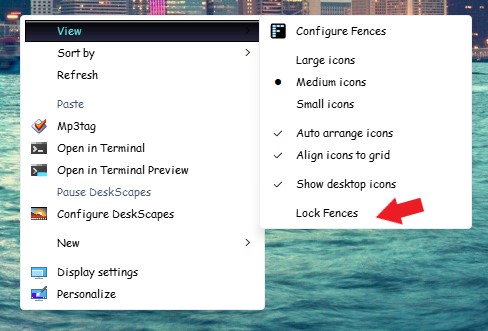
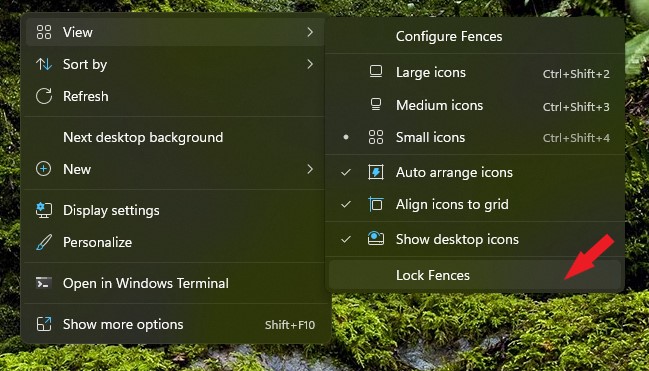
Sorry to hear you are having issues. Please check if your Fences is not lock. If it is lock, please unlock it and test it.

Thanks
Basj,
Stardock Community Assistant.

Reply #2 Top

Thanks for your quick reply. As I wrote in my report there are no Fences extensions to the menus. So my "View" menu starts with "Large icons" and there is no Lock Fences option.

regards

Reply #3 Top

Okay, that screenshot for older Windows 11 version. The current version, Microsoft have move it deeper inside the right click menu. It should be. Right click on desktop-> Show more option-> View-> Lock Fences. After you click on "Show more option" You should see something like the screenshot below.

Thank you,

Basj,
Stardock Community Assistant

Reply #4 Top

Again thanks for the quick reply. I found it where you say under Show more options -> view -> Lock Fences.  All working fine now. Thank you very much for your help.

regards

Graham