
Fences - unroll over applications is missing


Hi,

I just bought Fences and it is a fantastic application for windows 11.
But I have found a limitation in the way i use it and I can't find any parameter to fix it.
I have configures several fences rolled on the top of my screen so I can run applications just below them.
However passing the mouse over a fence unrroled it but behind the applications, so i can't see the content. I have to minimize all applications to be able to see teh content of the unrolled fences ...

So I wonder if there is a way (maybe an enhancement) to bring the fence content to the front when it is unrolled ?
Attached a picture where office fence unrolled behind chrome. Bring it to the front would be a nice option.
Thanks in advance
jean-michel

fence unroll behind applications

5,725 views 4 replies
Reply #1 Top

Hello,
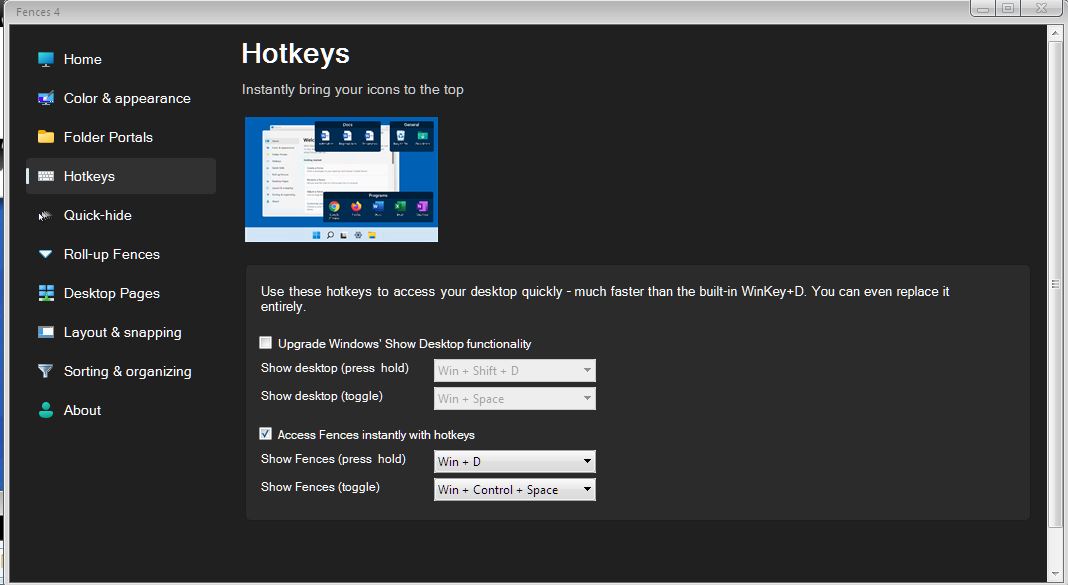
Sorry to hear you are having issues. Do you have Fences V3 or V4? If V4 there is an option to toggle your Fences to be on top.

Thanks
Basj,
Stardock Community Assistant.

Reply #2 Top

Thank you very much for your quick answer.

I use V4 (last release).
showing fences (toggle) is exactly the feature I need (thanks !) but works only once , when the hotkeys are pressed.
The enhancement I suggest in addition of this one is another option that toggles automatically the fences as soon as the mouse passes over the fence, so it can unroll automatically in front of the screen without keyboard action. Then as soon as the fence rolls again the fences moves to the back layer. Not sure it is doable but it could bring a more user friendly experience.
Thank you for this excellent job, this tool really facilitates the access to programs by categories.
regards
jean-michel

Reply #3 Top

You're suggestion is understandable and were suggested by others too. But, I believe that is not possible for Fences.

Thank you,

Basj,
Stardock Community Assistant

Reply #4 Top

Thank you,

I understand there are some limitations by core, thank you for your investigation though.
jean-michel
