Fences 3 wont launch

It wont launch via steam 
won't launch via .exe 

restarted multiple times/troubleshooted via reddit.
verified cache/files 

no added sub bars on right click or leftclick drag over icons to signify it's installed
it simply won't launch the setup.exe
9,974 views 11 replies
Reply #1 Top

Hello,
Sorry to hear you are having issues. Need to know more.

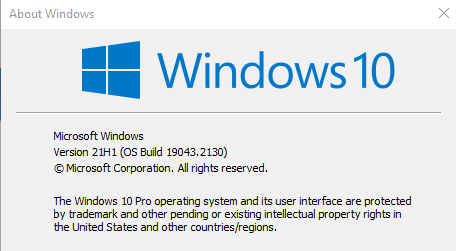
  1. You on Windows 7,8,10 or 11? Also need to know its full version number. Please use Winver.exe.
  2. Fences version number please.
  3. When you installed any error pop up before or after reboot?
  4. Are on ARM CPU?
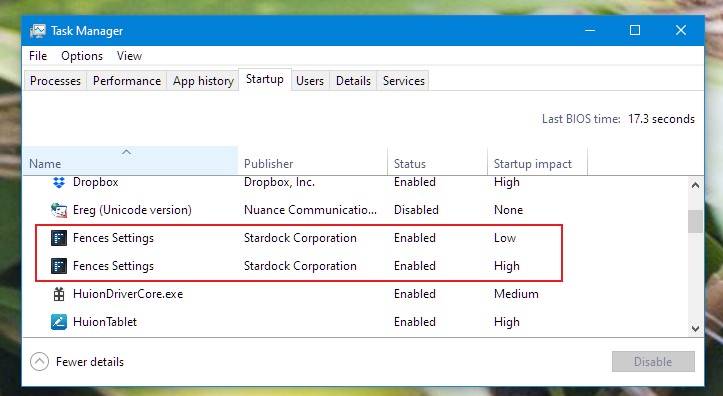
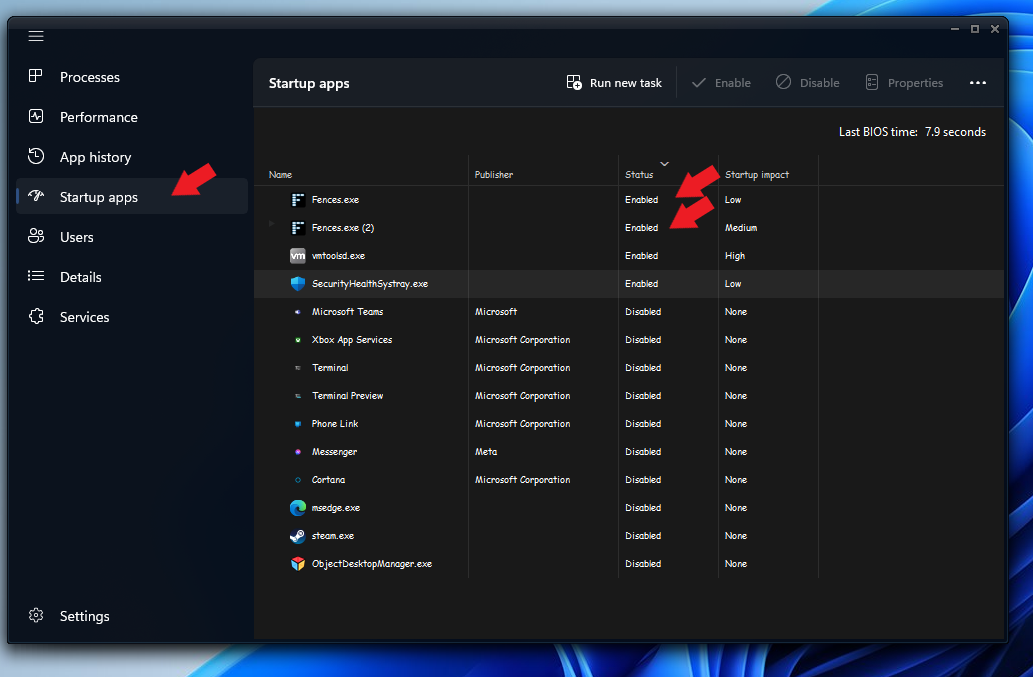
  5. Please check you have Fences Startup twice in your Taskmanager startup tab. (Something like Screenshot below)

Thanks
Basj,
Stardock Community Assistant.

Reply #2 Top


no error after downloading as i can't even do the setup.exe so therfore no error as it wont first time set up
no fences is in the task manager
i don't know the fences version, whatever is the main branch of steam. 
AMD CPU/ NVIDIA GPU

Reply #3 Top

Quoting Yinn-Kurai1758, reply 2

Please check you have Fences Startup twice in your Taskmanager startup tab. (Something like Screenshot below)
End of Yinn-Kurai1758's quote

Do you see this on your system?

On Windows 10 system it should look like below.

Thank you,

Basj,
Stardock Community Assistant

Reply #4 Top

no fences is in the task manager
i stated this previously. not in start up either. 

It won't even launch the set up from steam after downloading it. 
That is my issue,

This could be all fixed with a key to fences 4. 
paid for fences 2 years ago. 

Reply #5 Top

Hello,
I have forward your problem/question to Stardock Support Team for their assistance. Please keep an eye on this thread for any updates. We appreciate your feedback and patience.

Basj,
Stardock Community Assistant

Reply #6 Top

Will do thanks for the assistance so far. 

I tried re-downloading, verifying files, etc still no luck.
it was quite essential in my work flow to keep everything organized and now everything is just an absolute mess.

used to recommend this app to anyone in the field, but it's been a lot of trouble over the past year. 
hope to get this resolved.

Reply #7 Top

Hello,

Sorry to hear you are having trouble.

It has worked in the past, however, yes?  If so, what has changed (moved your Steam library, new HD, etc)?

Quoting Yinn-Kurai1758, reply 2

no error after downloading as i can't even do the setup.exe so therfore no error as it wont first time set up
End of Yinn-Kurai1758's quote

You would not manually download anything for the Steam version as you would use the Steam client - you are using it, yes?

Depending on where you're Steam library is, Steam versions are downloaded to:

\steamapps\common\

For example, Fences 4 would be in:

\steamapps\common\Fences 4

the setup is named:

Fences4-Steam-Setup (your Fences 3 version would be similarly named).

If you manually run it, does it install?

Sean Drohan
Stardock Product Lifecycle Manager


Reply #9 Top

it worked for a good year+, Honestly unsure i'm usually quite set in my ways, Perhaps i uninstalled it and reinstalled it on a different drive. 
however i've tried to do it on all my steam locations and it just doesn't launch the setup.

Reply #10 Top

Could we try get this resolved?
been troubleshooting all day no luck.

want my steam account name? 
if fences 4 works, it'll be a problem w fences 3 on my system.

Reply #11 Top

Quoting Yinn-Kurai1758, reply 10

Could we try get this resolved?
been troubleshooting all day no luck.

want my steam account name? 
if fences 4 works, it'll be a problem w fences 3 on my system.
End of Yinn-Kurai1758's quote

This does not read like a Steam or app thing, it reads like a 'something changed on your PC' thing.

I would like you to create a new Windows Administrator account (important that its an admin account):

https://support.microsoft.com/en-us/windows/create-a-local-user-or-administrator-account-in-windows-20de74e0-ac7f-3502-a866-32915af2a34d

And try under it.

Sean Drohan
Stardock Product Lifecycle Manager