
Start11 v1.3 - Taskbar issue

Just wondering if this has been reported:

Seems I cannot re-arrange icons on the taskbar, even if they're pinned or unpinned. It simply won't move the icon despite trying to move it to the desired location.

Using latest version of Windows 11 Home. v1.3 Start11.
2,997 views 10 replies
Reply #1 Top

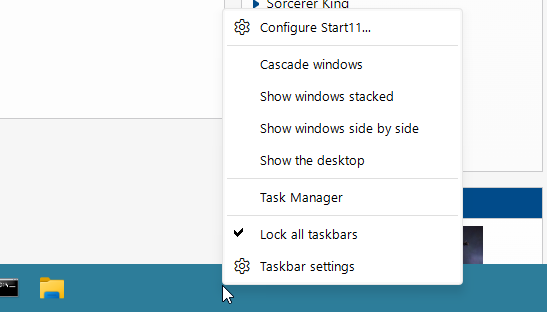
Check to see if your taskbar is locked

Paul Scroggins
Associate Technical Support Analyst

Reply #4 Top

Hello,
Sorry to hear you are having issues. May I know which version of Windows 11 you have? Use Winver.exe to get the full version number. Also, which icon you trying to rearrange?

Thanks
Basj,
Stardock Community Assistant.

Reply #6 Top

Quoting basj, reply 4

which icon you trying to rearrange?
End of basj's quote

Thank you,

Basj,
Stardock Community Assistant

Reply #7 Top

Galaxy, from UTS. Even trying to move the Outlook icon to the other side of the file explorer icon (or further, on the right of the Windows Media Player icon) won't work.

Reply #8 Top

Do you have any other taskbar/start panel application other than Start11 installed. If you do please remove those, restart and retest please.

I can not reproduce your issue on my system. I can rearrange those taskbar icons which ever way I want. Except the Search, Widget and Desktop page icons.

Please try purge and reinstall steps as mention here : [Link]. Just make sure to redownload the latest version from your account page. Reboot after the purge. Reinstall and reboot again after the installation. Retest and report back here.

Thank you,
Basj,
Stardock Community Assistant.

Reply #9 Top

I didn't quite follow the instructions with the purge - I did notice, at first, in the command prompt window that certain things couldn't be found (could be registry entries). Then BitDefender detected the .bat file as an infected file - in the end I restored the .bat file from BitDefender, started the explorer.exe process and went to uninstall a program (in Control Panel) and uninstalled Start11, not knowing what the quarantine of the .bat file did.

Restarted, downloaded v1.3 from the downloads page and installed it. Seems to have fixed the issue.

Reply #10 Top

Great, glad it work.

Thank you,

Basj,
Stardock Community Assistant