
Taskbar floating or disappearing on main screen while I work on stuff displaying on 2nd screen

Hi there, I've recently installed the 'Start 11' on my new windows 11 laptop, everything is great except one issue, let me describe it below:

I work with two external monitors (laptop screen disable), whenever I'm working on any contents that's displaying on the secondary screen (right screen), my taskbar on the main screen will somehow starting to float on the top section of the screen, sometime it may even disappeared. (see below screenshot)
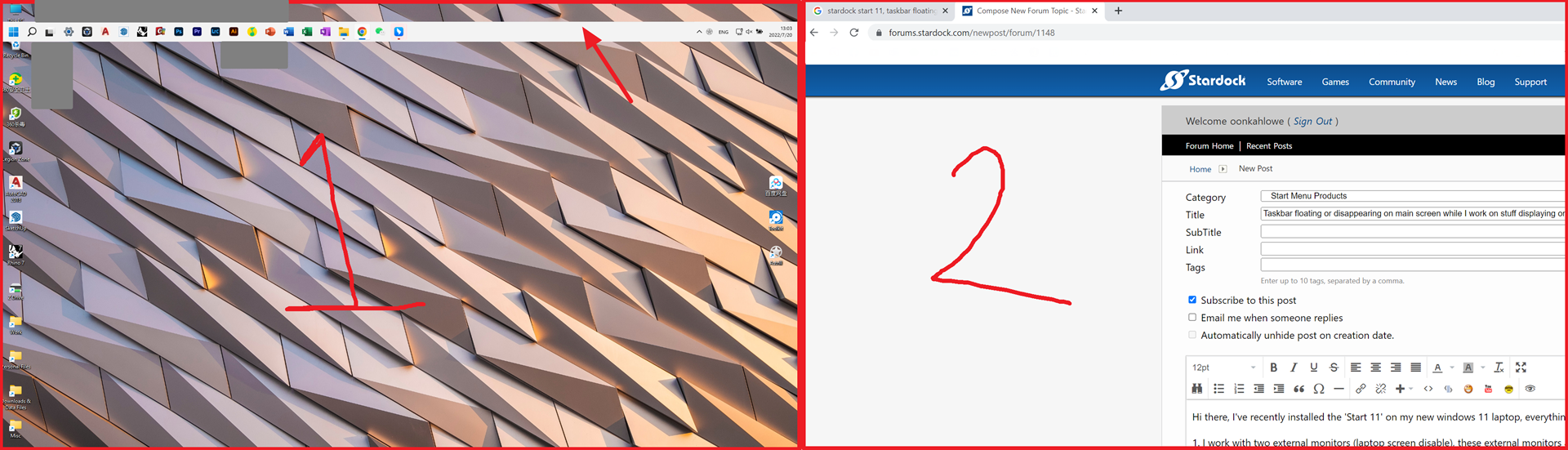
Whenever I need to access my taskbar on the main screen I would have to click on empty space on main screen and wait for the taskbar to jump to back to the bottom of the screen, where it is supposed to be. This is now a big issue for me since I navigate between two screens very often and I use the task bar to select and display the files/software I need all the time.

I've disabled every options that appear in the 'taskbar' section of the Start11 configuration menu.


I would really appreciate any help from dear fellows in this forum to resolve this issue.


Thanks.


2,048 views 5 replies
Reply #1 Top

Hello,
Sorry to hear you have an issue. I have forward your problem/question to Stardock Support Team for their assistance. Please keep an eye on this thread for any updates. We appreciate your feedback and patience.

Meanwhile, while waiting for them, please provide information on your system.

  1. Your system Windows version, Need to know which version of Windows 10 or 11 you have on? Use Windows own "Winver.exe" to get those version numbers.
  2. Which Start11 version you have installed?
  3. Also do you have Stardock ObjectDock installed?

Thanks

Basj,
Stardock Community Assistant

Reply #2 Top

Hi Basj,

Thanks for the response, below are the answers to your questions.

1. Windows 11 version 21H2 (OS Build 22000.795)
2. Start11 version 1.25
3. No, the only other stardock product I have installed on my laptop is Groupy (version 1.5).

Thanks

Reply #3 Top

Great, moving forward, please try purge and reinstall steps as mention here : [Link]. Just make sure to redownload the latest version from your account page. Reboot after the purge. Reinstall and reboot again after the installation. Retest and report back here.

Thank you,
Basj,
Stardock Community Assistant.