Items don't pin to start; open only on main display?

I just installed Stat11 last night, and am wondering about two things

First, most items won't pin to the start menu.  A few that I've tried but which won't stick include the native RDP app, Sonicwall VPN client, snipping tool, Steam, and a few others.  Is there a way to fix this?

Second, Start11 will open on whichever monitor the mouse is on. I'd prefer it if it only opened on the primary display. Is there a setting for this?

Thank you in advance. 

1,748 views 7 replies
Reply #1 Top

Hello,

Sorry to hear you are having issues.

Full numbered version of Windows ( use winver.exe for that info )

Version of Fences 4 ?

ooppss ment Start11 ?


AzDude
Stardock Community Assistant

Reply #3 Top

Hello,
Sorry to hear you are having issues. Which Start11 style you're using? Windows 7/Modern/Win10 or Win11?

Thanks
Basj,
Stardock Community Assistant.

Reply #4 Top

Hi basj. Sorry I didn't include that. The problem occurs in the Windows 7 and Modern styles. Pinning seems to work ok in Win10/11 styles. I'm using the default substyles. 

As to my other question: is it possible to have the menu open only on the primary monitor?

Reply #5 Top

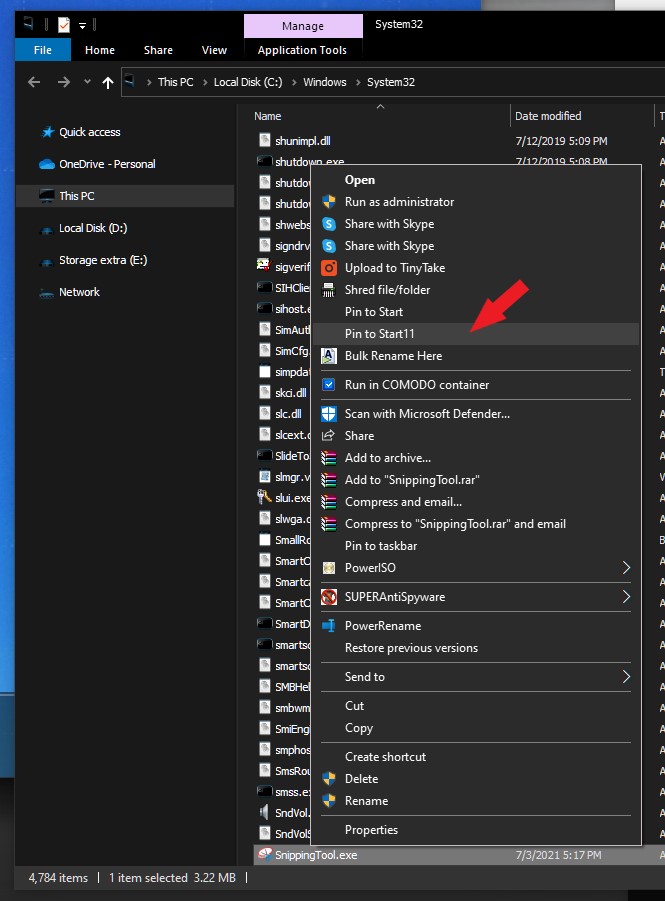
I have no issue on pinning Snippingtool.exe to my Windows 7 Style Start11. I did it by going directly to where the actual application located and right click on it than click on "Pin to Start11". It work every time. But, if it do not appear on your system. It might be, you need to add more space for those icons. Adjust the vertical and/or horizontal space for the Start11 menu.

Thank you,

Basj,
Stardock Community Assistant

Reply #6 Top

Ok. That worked for me. Thank you.

There are two places where it doesn't work, or seems to work inconsistently in the modern style:

1. When I search for an app and right-click on a result to add it

2. If I right-click on an app in the recent apps list

Sometimes it will add, and sometimes it won't.  Office apps will consistently add for example.  

I don't want to post a video here because it has my name in it. Is there a way to send you guys one privately? I'm ok now that I know a workaround, but it might be helpful for you guys to track down the bug. 

And, sorry to be a pest, but is it possible to have the menu open only on the primary monitor?

Reply #7 Top

I try the search app part. Once you get that app in the search result, if right click and "pin to Start11" don't appear or don't work. Select the open file location. And right click the xxx.exe in there instead.

As for the menu open only on the primary monitor. I believe there is no such option available yet.

Thank you,

Basj,
Stardock Community Assistant