
Start11 working on one user but not the other

I installed Start11 on Windows 11 with the User 1 admin account. At first, the start menu did not work (did not change as selected for Windows 10), but I removed it and re-installed it and it worked. As I looked at User 2, Start11 does not work on that user, though I select Windows 10 menu, it still has the Windows 11 menu. If I uninstall it from User 2, I imagine it will also uninstall from User 1? And if so, I will lose all the configuration I did of the start menu on User 1? This is fine if I have to, but how do I ensure it works on both Users?

8,262 views 17 replies
Reply #1 Top

Hello,
Sorry to hear you are having issues. Need to know more on your system.

  1. Your Windows 11 full version numbers. Please use Winver.exe to get its full version numbers.
  2. Start11 version installed.

Its should work for all user, but I believe, you can have different setting for different users as mention by Dev here : https://forums.stardock.com/512688/get;3853615.

Please try, uninstall start11, reboot (important), reinstall the latest version from your product page : https://store.stardock.com/myaccount/products. Reboot, retest and report back.

Thanks
Basj,
Stardock Community Assistant.

Reply #2 Top

Hi, thanks for the reply. I'm on Windows 11 Home Version 21H2 OS build 22000.708

I tried to do as suggested: uninstall, reboot, reinstall via the link provided above, reboot, and it still only works on the user I installed it on, User 1. When I go to User 2, no matter what setting I change the start menu to (whether I set it to Windows 10 start menu, or Windows 7, or anything), it stays on the Windows 11 menu.

Reply #3 Top

Hello,
I have forward your problem/question to Stardock Support Team for their assistance. Please keep an eye on this thread for any updates. We appreciate your feedback and patience.

Basj,
Stardock Community Assistant

Reply #4 Top

Thank you. And I forgot to mention that I am using Start11 version 1.24 if that helps for anything. Looking forward to more info.

Reply #5 Top

Hello,

Let's check and see if it set tp be active for the other user.

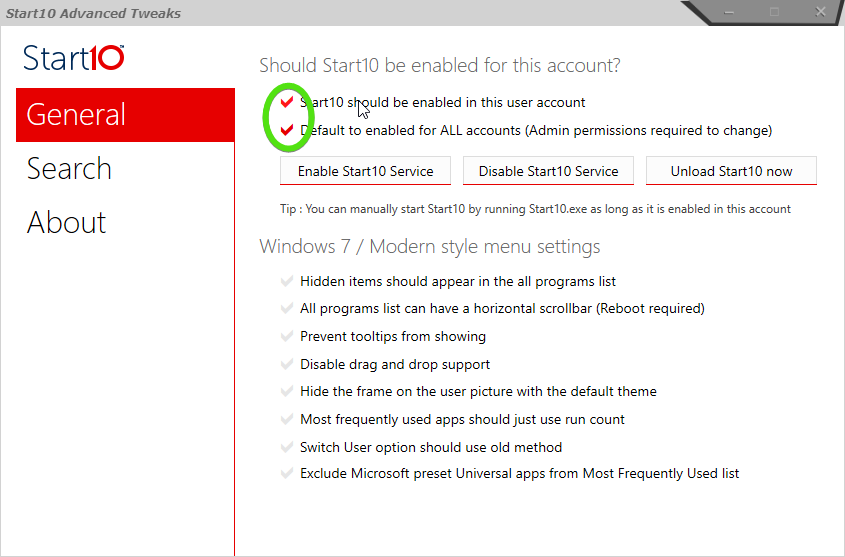
While signed in as the 2nd user, Run Start10tweak.exe, which can be found in: C:\Program Files (x86)\Stardock\Start11


Review the "Should Start10 be enabled for this account?" To make sure the settings are correct. 

Run Start11


Let me know if that takes care of your issue

Paul Scroggins
Associate Technical Support Analyst

Reply #6 Top

Hello, I reviewed and it is activated, but the start menu is still under Windows 11, even after I change it with Start11 under User 2.

Reply #7 Top

Hello,

Can you check in Services to make sure Stardock Start11 is set to run on Startup ("Automatic")

Paul Scroggins
Associate Technical Support Analyst

Reply #8 Top

Thank you - where is it? I looked and can't find where to set it to run at startup, in neither User 1 or User 2? Thank you

Reply #9 Top

Quoting e_jms, reply 8

Thank you - where is it? I looked and can't find where to set it to run at startup, in neither User 1 or User 2? Thank you
End of e_jms's quote

Search "Services" from the star menu is the easiest way to get there

Paul Scroggins
Associate Technical Support Analyst

Reply #11 Top

Hello, are there are any updates of anything else I can try to do to fix this? It is still not working on other users. Thank you

Reply #13 Top

Hello,

Sorry to hear you are having trouble.

When under the 2nd user, are you able to open the Start11 config an also see that it is set to be used:

Also while under the 2nd user, do you have the registry entries for Start8 (not a typo):

Computer\HKEY_CURRENT_USER\Software\Stardock\Start8

Lastly, and again, while under the 2nd user, if you clean boot under it, does it then work:
https://forums.stardock.com/505872/start11-support-faq#cleanboot

Sean Drohan
Stardock Product Lifecycle Manager

Reply #14 Top
  • Yes for the Start Menu, it was on
  • Yes for the Registry key, it was there
  • I did the clean boot and it still doesn't work.

But now after doing this, it NO LONGER WORKS ON THE FIRST USER! Not only that, but now the configuration of my Chrome is not the same. WTF?? What kind of software is this that is now messing up my ENTIRE computer?? It went from working on one user, to no user AND messing up!! Who is going to help me put this back together now?? What the heck did I pay for here?? Tell me what to do to put it back LIKE IT WAS before this mess!

Reply #15 Top

Quoting e_jms, reply 14

What kind of software is this that is now messing up my ENTIRE computer??
End of e_jms's quote

Not the type that would have the ability to do that, e_jms.  Start11 has been installed on thousands of PC without any such issues reported.  It just reads like there is something else at play here - something fundamental to the PC. 

If you are using restore points, it might be prudent to roll back to the most recent one.

As for the 2nd user issue, something that was not asked (but should have been), is that too an Admin account?  If not, please create a 3rd Amin account to see if it too has the issue.

Sean Drohan
Stardock Product Lifecycle Manager

Reply #16 Top

The 2nd user yes, is also Admin. And forget it, I'm not doing anything else here, I've wasted enough time and would have much preferred to be told right from the start that this is not supported for multiple users. I've had enough of this, good luck.

Reply #17 Top

Quoting e_jms, reply 16

The 2nd user yes, is also Admin. And forget it, I'm not doing anything else here, I've wasted enough time and would have much preferred to be told right from the start that this is not supported for multiple users. I've had enough of this, good luck.
End of e_jms's quote

Start11 does indeed work with any number of users on a PC. 

If you do find the root of the issue, we would like to hear what you found was the cause.

Sorry we could not help more.

Sean Drohan
Stardock Product Lifecycle Manager