"Fences does not appear to be loaded. You may need to reinstall fences"

Had to uninstall and re-install Fences 3 on a new win11 pc. I got this error message as soon as I opened the Customise Fences icon. I re-installed it as per the error message - same problem.

I then deinstalled v3 and reinstalled v4 - same problem.

Have tried various things such as use a specialist uninstaller and searched/deleted any refs to stardock via IE but none worked.

Can anyone help get me up and running again.

Many thanks


5,136 views 5 replies
Reply #1 Top

Hello,
Sorry to hear you are having issues. Have you tried purge and reinstall steps as mention here : [Link]? If not pleast try it. Just make sure to redownload the latest version from your account page. Reboot after the purge. Reinstall and reboot again after the installation. Retest and report back here.

Thank you,
Basj,
Stardock Community Assistant.

Reply #2 Top

Thanks for the quick reply.

Same error message I'm afraid.


Rob

Reply #3 Top

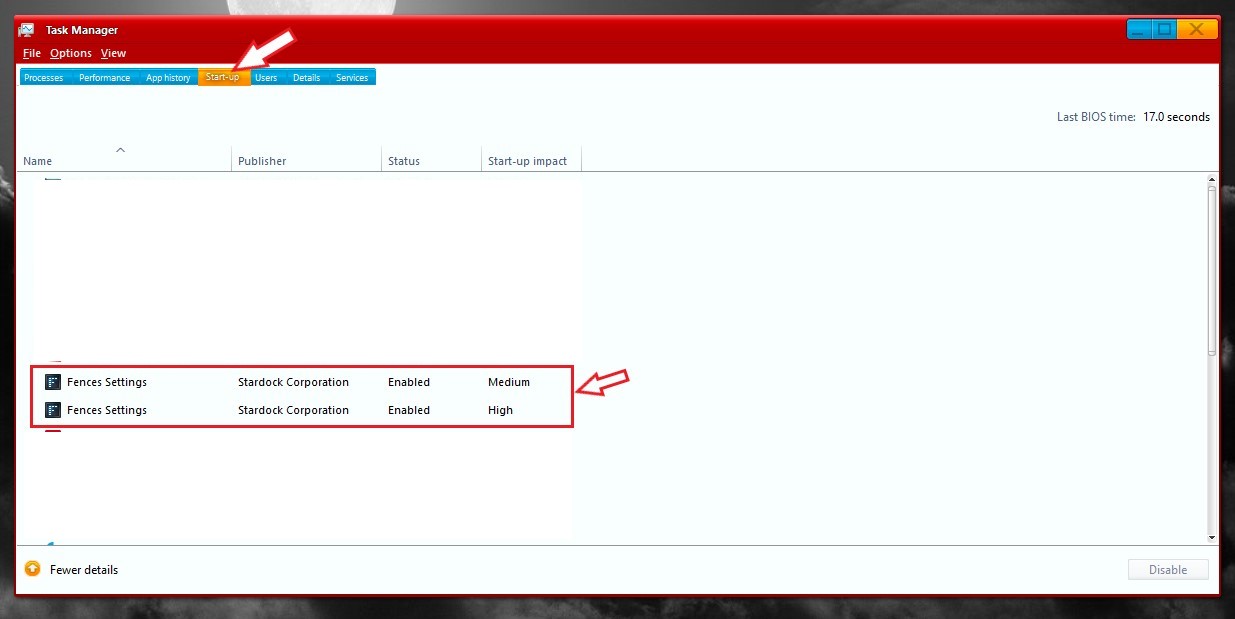
Please try checking on your taskbar manager and look at your startup tabs and check if Fences is listed there twice and it is enable on startup on both.

Thank you,

Basj,
Stardock Community Assistant

Reply #4 Top

There is one instance of Fences in the start up tab. It is enabled. If I right click and look at the properties it is for fences.exe file

Reply #5 Top

It should be two instances for Fences to work properly. Try cleanboot and see if something that might be blocking Fences from working properly. First uninstall Fences, reboot and do the cleanboot steps : https://forums.stardock.com/486084/fences-support-faq#cleanboot. Create a new admin account than install Fences under that account.

Thank you,

Basj,
Stardock Community Assistant