Taskbar double height

When the taskbar has normal height, everything is ok.

When I change it to double height, the system icons do not display properly. The clock, date, lan, sound etc are not visible. The desktop icons are not saved in this setting and every time I reboot, all the desktop icons are back in a random place. 

Windows version: 21H2 Build 22000.708

2,538 views 7 replies
Reply #1 Top

Hello,
Sorry to hear you are having issues. What version of Start11 you on? And do you set your taskbar to autohide?

Thanks.
Basj,
Stardock Community Assistant.

Reply #3 Top

Please try, uninstall, reboot(important), reinstall, reboot and retest. Report back.

Thank you,

Basj,
Stardock Community Assistant

Reply #5 Top

From your screenshot, when you on single row height taskbar. You have double deck taskbar tray icons. Which is, for me, not normal. Do you have any other application install to make those to happen? Can you try disable/uninstall that application, reboot and see if your issue resolve.

Thank you,

Basj,
Stardock Community Assistant

Reply #6 Top

Hello

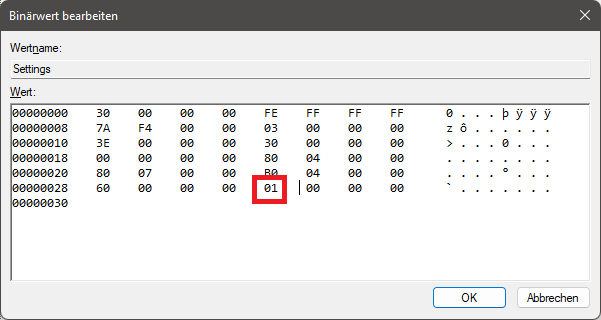
This is it. I have never set something like this but you can define it here:

Computer\HKEY_CURRENT_USER\Software\Microsoft\Windows\CurrentVersion\Explorer\StuckRects3

and set the value here to 01 instead of 02.

Now everything is ok.

Reply #7 Top

Great to hear everything is ok now. But, I am not sure if that is from Start11 or not. Anyway, I have forward your problem/question to Stardock Support Team for their assistance. Please keep an eye on this thread for any updates. We appreciate your feedback and patience.

Basj,
Stardock Community Assistant