
Fences 3.1.3.3

Folders fence stopped appearing

Hi

I have been using the following configuration for a while now and everything was OK:
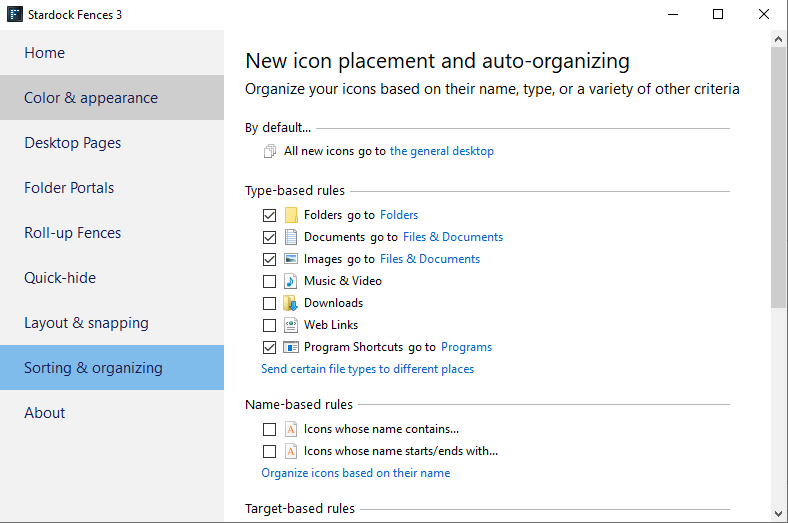
then, a few days ago, the Folders fence stopped appearing.

I tried showing and un showing fences (double click), didn't work.

Any Ideas?

Thanks

4,922 views 2 replies
Reply #1 Top

Hello,
Sorry to hear you are having issues. But, what don't show up? All Fences don't show up? Did you accidentally create a new Fences desktop page? Have you tried restore layout snapshot? What have you tried to resolve it.

Thanks
Basj,
Stardock Community Assistant.

Reply #2 Top

Quoting basj, reply 1

what don't show up?
End of basj's quote

The original "Folders" fence, created after installing fences

Quoting basj, reply 1

Did you accidentally create a new Fences desktop page?
End of basj's quote

Not that I am ware of. checked by grabbing and pulling the edge of the screen as explained under "Desktop Pages" on the configuration menu.

Quoting basj, reply 1

Have you tried restore layout snapshot?
End of basj's quote

after looking on layout snapshots (didnt know it exists) I found out that somehow, the Fence got hidden behind the Windows taskbar.

Now it is restored.

I would expect though, that you would automatically prevent fence title bar to get behind the taskbar. I should mention that I am working with "Roll-up Fences" Enabled and that I placed the fences title bars just above the Windows taskbar.

Thank you for your help