Start11 behaviour and loss of configuration

Hi there,

I've used your start menu programs since Windows 8, so Start8, 10 and now 11.

On Start11 there are a few gripes that I have

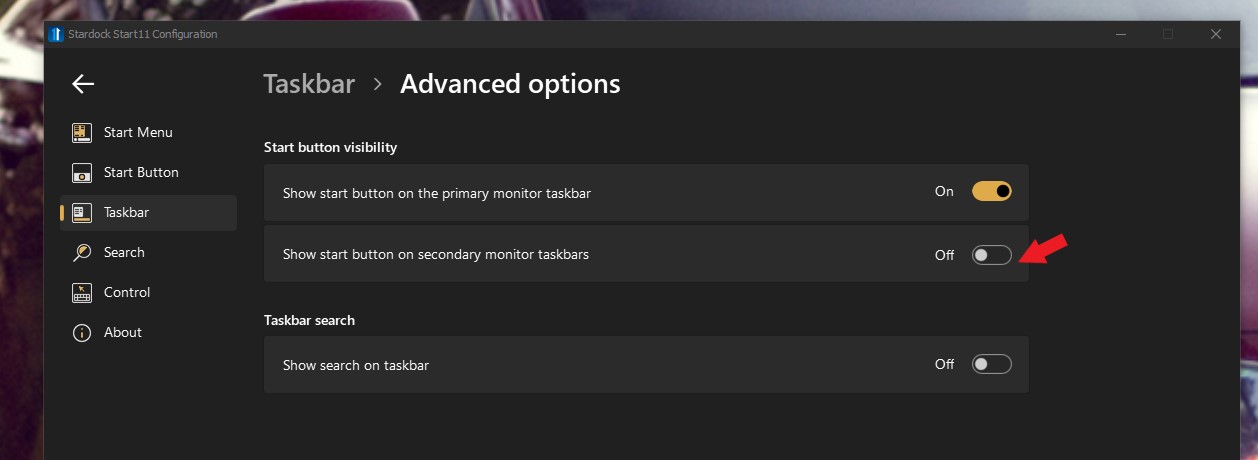
  • You can no longer remove the additional start buttons off of other screens
  • Right clicking on an item in the taskbar gives 'close all windows on this display' rather than 'close window' - you can shift right click and get the Windows menu to close just the one but I don't know why this was changed. Why would I want to close all windows when I have it specifically set to never combine icons.
  • Moving a program along the taskbar on additional monitors also moves the pinned apps around
    • sub note to this is that the window behaviour is odd, moving a new window to another monitor places it at the start or middle of the taskbar list rather than the end as it always did in Start10
  • Clicking on some of the taskbar running apps results in dead clicking and you have to mash it multiple times to get the app onscreen, or just alt-tab but seems to be something not right.
  • on my laptop the small icon search sometimes shows large icons instead, though this may be down to Windows scaling so not sure how to account for that.

I'm running version 1.22 on Windows 11 21H2 - 22000.675 (so no dev/beta channel builds) on both my desktop and work laptop (the license for my work laptop is not on the same account I am posting from)

Max
 

4,168 views 14 replies
Reply #1 Top

Hello,
Sorry to hear you are having issues. I will try to address your concern.

  • I can remove Start button from my secondary monitor. by turning this off (refer to screenshot below).

  • This one has been request by others, I am sure Support / Dev Team have notice them too.
  • I don't see this happening on my system. I move my browser around to my second monitor but the pinned browser still stick on my primary monitor. Can you post a video of this issue.
  • Please try the latest version V1.24 Beta and see if this is still an issue. It best to uninstall old version, reboot, install the latest version, reboot and retest it.
  • A screenshot or a video could help us understand this better.

Thanks
Basj,
Stardock Community Assistant.

Reply #2 Top

Hi Basj,

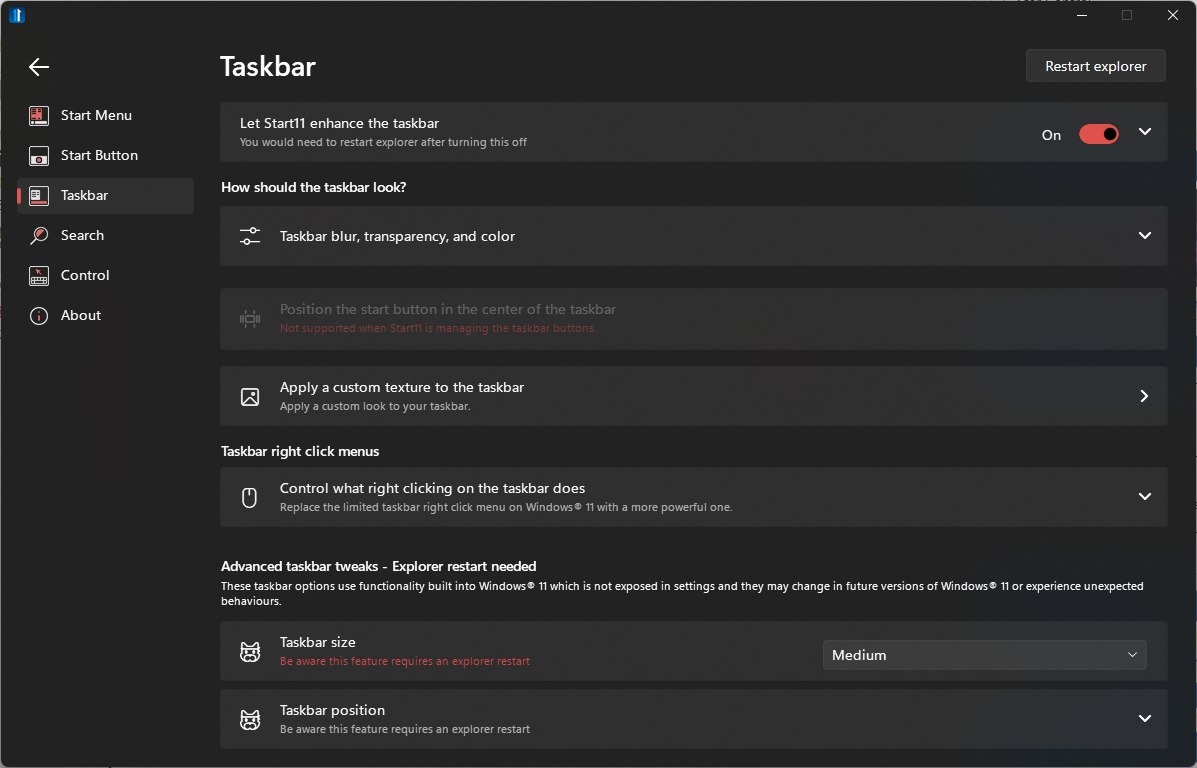
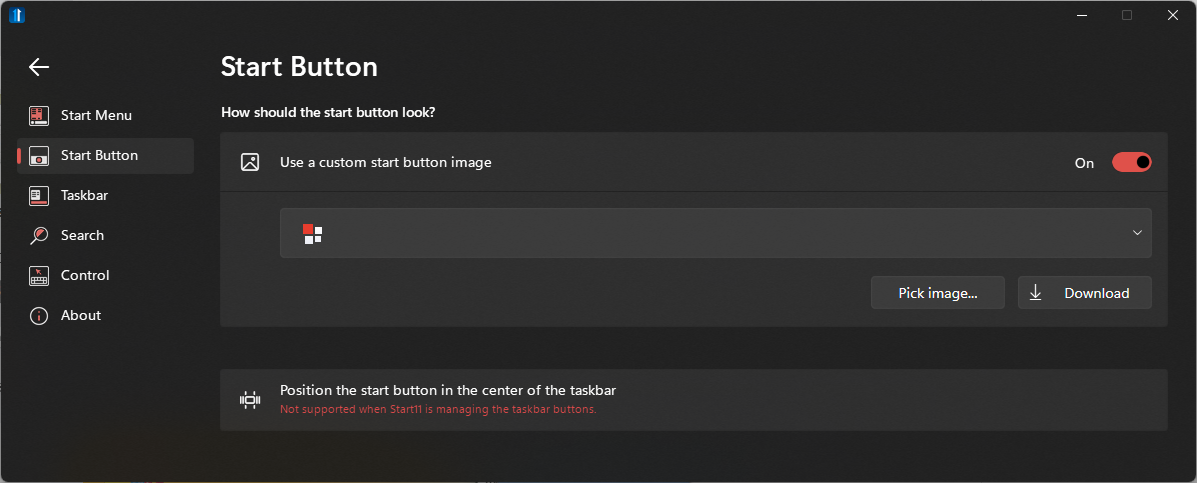
Where are you getting the advanced option in the Taskbar menu? Even if I expand all drop down boxes there is nowhere that takes me to the advanced options page. There is more taskbar settings in the 'Let Start11 enhance the taskbar' but no option for start buttons. I have checked on both my machines running 1.22 and its the same.

What I mean about the moving pinned apps is this. I have it set to only show the icon on the display that the window is open. If I have Firefox pinned to position 1 on my main monitor, then I open Outlook and move it to my second display, when I get a new Firefox window and move it to the same display as Outlook it will always be position 1 on the secondary taskbar - due to its position on my primary taskbar/pinned app location. If I then click and drag the Firefox icon on the secondary display taskbar and move it to the right of Outlook it moves the icon position on my primary display all the way to the right. However, if I click and move Outlook it doesn't effect it but it does mean any Outlook e-mails or windows that open on my primary display are then the position ahead of Firefox - this happens with any app just Firefox and Outlook are chosen examples.

I'd rather not use a Beta at present but if thats the only option to get some of the features that are missing I guess I can try it.

Max


Reply #3 Top

Try this->Start Button tab->Advance taskbar options.

Provide a video, its easier to see it.

If you not wish to you Beta, it understandable, you should wait for the beta too come out from the beta.

Thank you,

Basj,
Stardock Community Assistant

Reply #4 Top

Hi Basj,

Not there either, there is not advanced button - this is again the same on both systems:

I will get a video later when I am not working.

Max


Reply #5 Top

Hello,
I have forward your problem/question to Stardock Support Team for their assistance. Please keep an eye on this thread for any updates. We appreciate your feedback and patience.

Basj,
Stardock Community Assistant

Reply #6 Top

Quoting maxwilk, reply 4

Not there either, there is not advanced button - this is again the same on both systems:
End of maxwilk's quote

Then no doubt both your systems are Win11 - 'Advanced' only shows on Win10.

Sean Drohan
Stardock Product Lifecycle Manager

Reply #7 Top

I'm not sure thats a surprise that I am using Start11 on Windows 11? I said that in all my responses. Hence me raising this ticket and saying that this functionality is missing from previous software, again stated in my first post. :hrmph:  


Reply #8 Top

Also to follow on from the icon moving issue, see the below thread.

If I have Outlook open on monitor 2 and Firefox on monitor 1, note that the reminders is on monitor one:

I then open a new Firefox window and move it to monitor 2, which should add it to the end of the open windows on that screen - it does not:

If I select Outlook and drag it to the left, as that's where I want it, it moves the windows on monitor 1 ahead of the application moved past:

If I do it the other way, drag Firefox to the right of Outlook, it moves the pinned app on the primary taskbar:

This is not the default behaviour in previous versions of Windows nor with Start8 or Start10.


Reply #9 Top

Any further input on the above bug about moving Windows causing it to move pinned apps? Also the icons seem to respring a lot when you close a program. Not sure if thats a Windows 11-ism or if that because of Start11.


Reply #10 Top


Right clicking on an item in the taskbar gives 'close all windows on this display' rather than 'close window' - you can shift right click and get the Windows menu to close just the one but I don't know why this was changed. Why would I want to close all windows when I have it specifically set to never combine icons.
End of quote

Good call.  I have created an internal ticket for it to be looked at.

Internal ref: ODNT-3939

Moving a program along the taskbar on additional monitors also moves the pinned apps around
sub note to this is that the window behaviour is odd, moving a new window to another monitor places it at the start or middle of the taskbar list rather than the end as it always did in Start10
End of quote

Any further input on the above bug about moving Windows causing it to move pinned apps? Also the icons seem to respring a lot when you close a program. Not sure if thats a Windows 11-ism or if that because of Start11.
End of quote

If you mean this, that if you click\hold\drag an open app to a position that preceeds a pinned app (open or not), that it responds by reordering to that very position, that is expected behavior.

https://cdn.stardock.us/support/uploads/2022-05-26_11-17-21.mp4

I did notice another issue entirely when testing this however... 

Edge (perhaps anything with a history) right-click remove recent sites has the entire context menu jump.
 
This does not happen if TB icons are combined
 
Created ticket for it.
 
Internal ref:  ODNT-3940
 
Thanks for the feedback. 

Sean Drohan
Stardock Product Lifecycle Manager


Reply #11 Top

Quoting sdRohan, reply 10


Right clicking on an item in the taskbar gives 'close all windows on this display' rather than 'close window' - you can shift right click and get the Windows menu to close just the one but I don't know why this was changed. Why would I want to close all windows when I have it specifically set to never combine icons.
Good call.  I have created an internal ticket for it to be looked at.

Internal ref: ODNT-3939
End of sdRohan's quote

Hmmm, after speaking with the devs, this may not be something we can do readily...

The close all windows thing is because that's the native jumplist window and on Windows 11 it only shows close all
Sean Drohan
Stardock Product Lifecycle Manager
Reply #12 Top

In your examples where you are dragging icons you are only using one display. Of course when I do that on the single display it will move ahead of the already pinned apps as otherwise you would be unable to re-order them.

My screenshots, couldn't do a video as its a work laptop so GDPR and all, show two taskbars from different monitors. My point was that if I drag it on the secondary monitor it moves the app ahead of a pinned app or re-orders the pinned apps. Likewise, regardless of if an app is pinned or not, on the second monitor when you move an application over to it the app, used to, always add to the end of the opened list on that taskbar - I use the 'only show on taskbar where window is open' option. Whereas now this behaviour is influenced by the order of pinned apps on your primary taskbar.

I am going on holiday today so I cannot take a video on my personal PC to better show the issue but I am sure you will see what I mean if you get 2 monitors up and running and drag them around.


Reply #14 Top

Quoting maxwilk, reply 12

I am going on holiday today so I cannot take a video on my personal PC to better show the issue but I am sure you will see what I mean if you get 2 monitors up and running and drag them around.
End of maxwilk's quote

Are you able to post this now?

Also, are you using Explorer Patcher?

Sean Drohan
Stardock Support Manager