Start11 Ver 1.2 - Problem getting top taskbar to unhide

Hi. I just purchased and installed Start11.

I have it set to put the taskbar at the top of the primary monitor and use the Win11 setting to autohide. Same setup on the secondary monitor.

The problem is that when I move the cursor to the top of the main monitor, the taskbar will only unhide if the cursor is over the tray part of the taskbar or the start/search portion of the taskbar. Anywhere else the taskbar needs a mouse click to unhide.

However on the secondary monitor the taskbar unhides properly.

Any suggestions on how to fix this would be appreciated.

Thanks.
1,820 views 5 replies
Reply #1 Top

Hello,

Sorry to hear you are having issues.

Try the latest beta version 1.22 might fix your issue .


AzDude
Stardock Community Assistant

Reply #2 Top

Thanks for the suggestion.

I just installed the Beta 1.22 version but I still have the same problem.

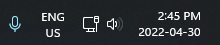
However with testing I've noticed that while the taskbar unhides properly when I move the cursor to any part of  the tray, it doesn't for any of the other items at the extreme right of the taskbar eg. these items:

I don't know if this was the case for the original 1.2 version or if this is a new issue due to the beta.

Reply #3 Top

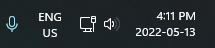
Just had a thought. I temporarily changed the location of the taskbar on the primary monitor to the bottom and it unhides exactly as expected at any point along the taskbar......... except the far right location as mentioned previously:

Hopefully this provides enough clues as to what is going on.

Reply #4 Top

Further info I have discovered:

As previously mentioned, the taskbar will only automatically unhide when the cursor enters certain locations.

However for those takbar locations that won't unhide, if the cursor actually enters an area on the taskbar where an app is pinned eg. File Explorer I can click and open that app all without the taskbar unhiding. Obviouslly that's pretty hit amd miss.

And if I just hover the cursor in that location for awhile I'll get the tooltip eg.

but no taskbar and no app opening.


In case it helps here's the Windows version info I should have included previously:

Edition    Windows 11 Pro
Version    21H2
Installed on    ‎2022-‎01-‎26
OS build    22000.613
Experience    Windows Feature Experience Pack 1000.22000.613.0

Reply #5 Top

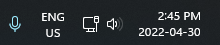
I just installed the 1.23 Beta and it has resolved almost all of the issues I identified previously. The only part of the taskbar that resists unhiding is the far right part:

Moving the cursor to the area and clicking does brings it out. Since the rest of the taskbar is now responding as expected I suspect that this can be resolved in future releases.

Big thumbs up to the Stardock gang!