Two issues with Start11

No apps in dock, won't appear when set to top

Hi, I just installed Start11 and right off the bat I noticed that my applications that were pinned to the Taskbar have all disappeared.  When I click "Restart Explorer" all of my applications reappear, briefly, and then disappear again.

Also, when I position the Taskbar at the top of the screen it only appears once with the mouse, and after that the only way I can make it appear is by pressing the windows key.  

Note that a restart didn't fix the issue.  Please advise, thanks!

5,607 views 13 replies
Reply #1 Top

A little more info

Version of Windows ..full numbered version

Version of Start11 ?

Reply #2 Top

You need to install the 1.22 beta version of Start11 to resolve your first issue.

There was a bug in 1.2 where if you have more than 1 monitor and the primary monitor is to the right of the secondary monitor and you have windows set to only show the taskbar on the primary monitor (or use a tool like DisplayFusion to provide secondary taskbars) then the taskbar will appear without running apps on it. 

Does this sound like your setup?

Reply #3 Top

Ha, this is precisely my setup!  How do I download the beta version>

Reply #5 Top

Go to your account page My Dowloads and click on

Individual downloads and you will see the beta version to download.

Reply #7 Top

Open the Start11 app go to About to find your version and report back , please .

Reply #8 Top

The beta is not available to trial users

Paul Scroggins
Associate Technical Support Analyst

Reply #9 Top

Ah, forgot I was still on a trial.  I've made the purchase and installed the beta but the same issues persist. 

To note: If I disable "Let Start11 enhance the taskbar" then the taskbar will hide and reappear as it should. But if I turn that on then it permanently hides.

Reply #10 Top

Hello,
Sorry to hear you are having issues. Not sure if you have done this. But, it is best to uninstall what ever version you have. Reboot, install the V1.22, reboot again. And retest. See if that help.

Thanks
Basj,
Stardock Community Assistant.

Reply #11 Top

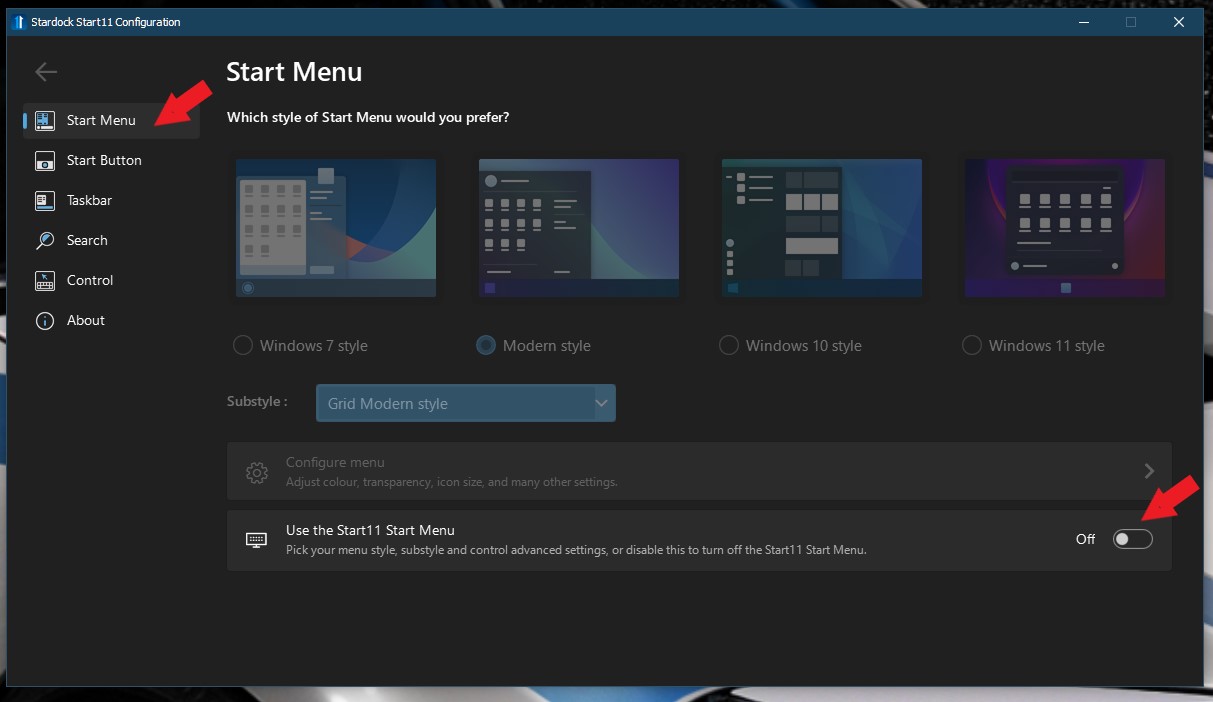
Hi Basj, thanks for the suggestion.  When I initiate the Uninstaller I get a message that tells me to turn off Start11 if it is running.  I'm not sure what this means as there is nowhere in particular that turns off Start11 in the Stardock Start11 Configuration app.  There are a lot of On/Off dialogues for the Start Menu, Button, Taskbar, etc.  Am I to toggle each of these off before uninstalling?  Should I also reposition the Taskbar to the bottom?

Reply #12 Top

You can stop its process in Taskmanager and or try disable Start11 here :

Thank you,

Basj,
Stardock Community Assistant

Reply #13 Top

Well I did everything you guys have mentioned but the Taskbar still won't appear when I put the mouse to the top of the screen. 

NOTE: This only happens when I have "Let Start11 enhance the taskbar" enabled.  I did not realize that before.  But yeah, when that is enabled the Taskbar will not come back after it disappears, unless I hit the Windows key.

It's actually no big deal because I prefer to have that functionality disabled anyway.  So without it, save for a few glitches here and there, everything seems to be OK.

Thanks for all your help!