
How to use Desktop Pages with Fences 3

I've been using Fences for a while now and I am now trying to use Desktop Pages for the first time. I can't seem to get it to work the way I think it is supposed to. When I swipe left or right with my mouse and drags all my fences and then when I let go the fences bounce back. I am not getting a new blank screen to create new fences because my fences won't stay off the screen.

Its like trying to swipe left and right on a mobile phone on the home screen but that screen keeps bouncing back, not allowing me to make new shortcuts on a new screen.

Can anyone explain what I am doing wrong? Maybe there is a video somewhere that explains how to create Desktop Pages that someone can link?

Thank you!
5,661 views 2 replies
Reply #1 Top

Never mind I figured it out. In order to make a new Desktop Page in Fences, one has to drag an already created fence to the edge of the screen which then creates a new Desktop Page. This is not explained in the Desktop Pages section of the Fences 3 software. I had to locate a video on the net to figure this out. I'd recommend that the dev's add a bit more explanation on how to achieve multiple desktop pages by adding a video link or foot note to the Desktop Page section of Fences.

Thanks!

Video explaining how to use desktop pages. Time stamp 56 seconds in.

https://www.youtube.com/watch?v=Jl52OgyvKYk

Reply #2 Top

Hello,
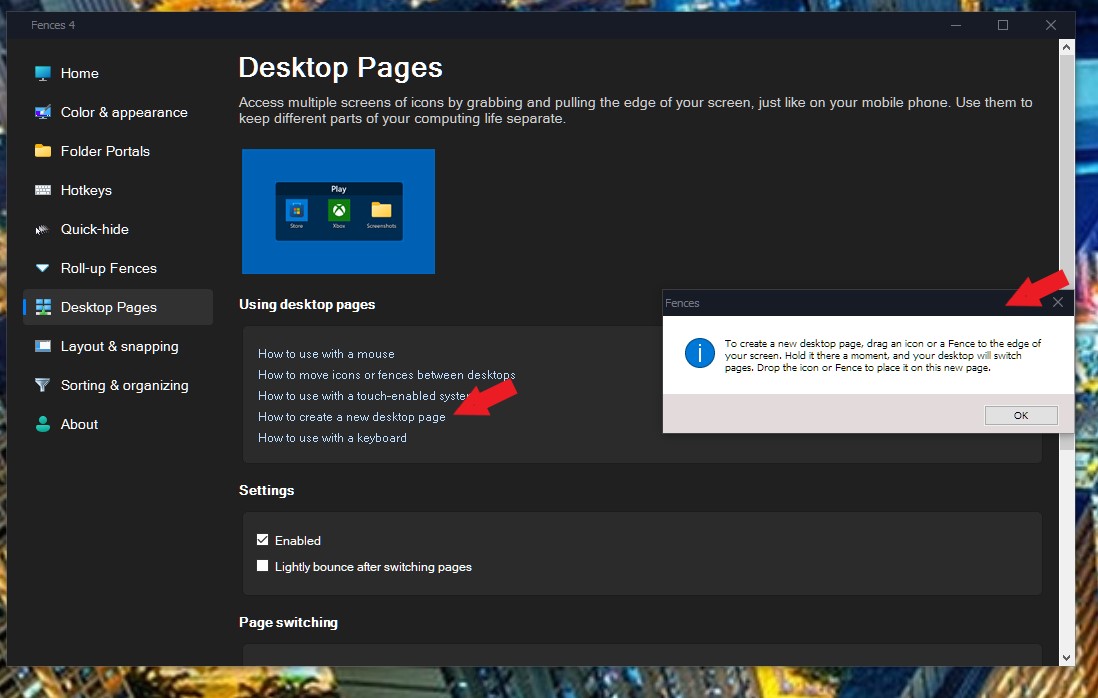
Sorry to hear you are having issues. But, there already a guide build in the Fences Config Windows on how to use Fences desktop pages. For example, how to create a new desktop page. Refer to screenshot below.

Thanks
Basj,
Stardock Community Assistant.
