
Order of Start Menu Items

Is there anyway in the actual start menu to cause folders to appear first in alphabetical order and then the individual apps that don't create folders upon installation.

1,921 views 10 replies
Reply #1 Top

Hello,
Sorry to hear you are having issues. Which Start11 menu style you're using?

Thanks
Basj,
Stardock Community Assistant.

Reply #2 Top

Bringing the post back from the dead...

I too would like to see my menus sorted alphabetically by folder first and then by non-foldered shortcuts.
This used to be an option in previous versions but I don't see anything now.

I'm using the Modern Style Windows 7 menu.

Reply #3 Top

Quoting Rmart, reply 2

Bringing the post back from the dead...

I too would like to see my menus sorted alphabetically by folder first and then by non-foldered shortcuts.
This used to be an option in previous versions but I don't see anything now.
I'm using the Modern Style Windows 7 menu.
End of Rmart's quote

Hello,
I have forwarded your request to the Stardock Support Team for their review and recommendations. Please keep an eye on this thread for any updates. We really do appreciate your feedback, Thanks

Basj,
Stardock Community Assistant.

Reply #4 Top

Quoting Rmart, reply 2

Bringing the post back from the dead...

I too would like to see my menus sorted alphabetically by folder first and then by non-foldered shortcuts.
This used to be an option in previous versions but I don't see anything now.


I'm using the Modern Style Windows 7 menu.
End of Rmart's quote

I don't think this was an option before?

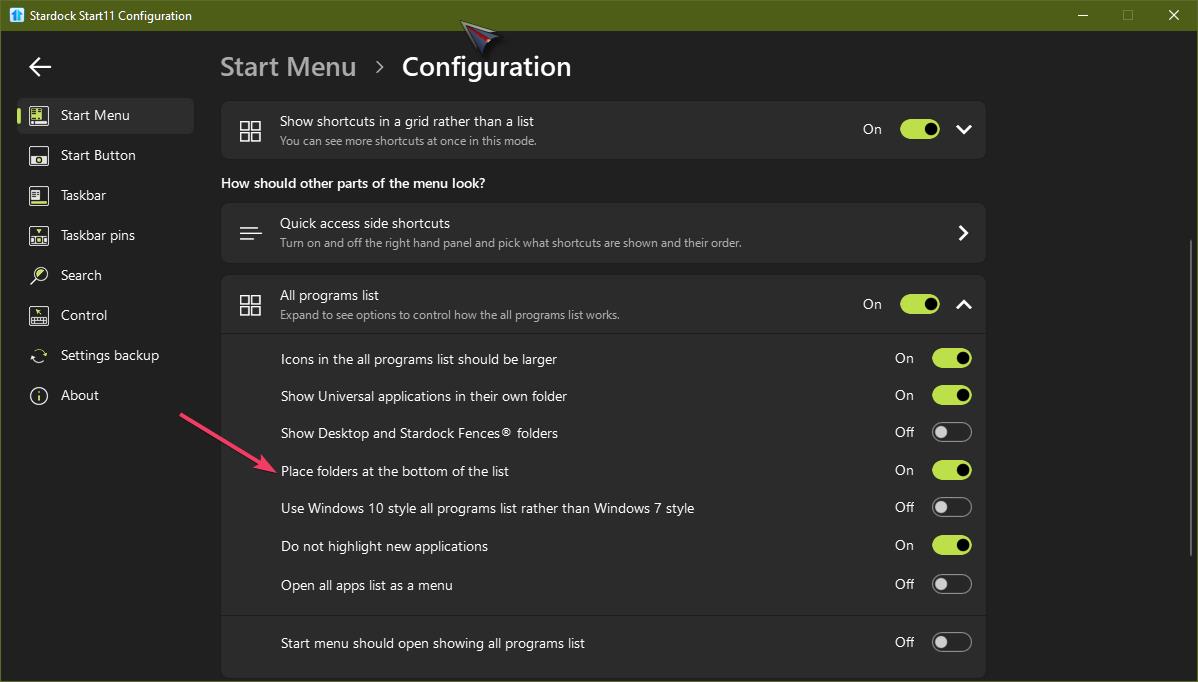
You can have folders and shortcuts all sorted A-Z or you can have folders put to the bottom of the list and shortcuts not in folders first.

Reply #5 Top

Hmm...

I don't have the old PC anymore, a power surge took it out but I seem to recall that I had folders showing and then loose shortcuts. I very definitely notice the disorganized look of shortcuts mixed with folders and if it was that way before I wouldn't notice it now.
You would know though, I remember you from the early days of Windowblinds and DesktopX.

I wonder why it looks different to me.

Reply #6 Top

Just to remind, there is this option, which folder at the bottom and shortcuts first in All program list for Win 7/Modern style.

Thank you,

Basj,
Stardock Community Assistant

Reply #7 Top

Thank you, I overlooked that option. That works :)


R

Reply #8 Top

Great, glad that work for you.

Thank you,

Basj,
Stardock Community Assistant

Reply #9 Top

All right, I've configured my start menu with subfolders to get rid of the issue BUT, it's still driving me nuts that my Documents menu (right side panel) has the Documents folder sorted alphabetically instead of folder alphabetically and then individual files below that alphabetically.

When I look at the Documents folder in Win Explorer when I sort by Name that's how it's sorted, folders above individual files.

Is that an option that can be added to a future update?


TY :)

Reply #10 Top

Quoting Rmart, reply 9

All right, I've configured my start menu with subfolders to get rid of the issue BUT, it's still driving me nuts that my Documents menu (right side panel) has the Documents folder sorted alphabetically instead of folder alphabetically and then individual files below that alphabetically.

When I look at the Documents folder in Win Explorer when I sort by Name that's how it's sorted, folders above individual files.

Is that an option that can be added to a future update?

TY :)
End of Rmart's quote

Hello,
I have added your request to the Stardock Support Team for their review and recommendations. Please keep an eye on this thread for any updates. We really do appreciate your feedback, Thanks

Basj,
Stardock Community Assistant.