Mouse not appearing on Secondary KVM until disconnect and reconnect

Hi there,


I've been using Multiplicity quite a bit now, and this seems to have just started happening (not sure what has changed). Before, when I connected to my desired KVM device,  my mouse would work (appear on screen) just fine.

However, all of a sudden,  my mouse does not appear and the only way to fix it, is to disconnect and reconnect before it appears.

It's strange to me however that when I first connect to the KVM, my keyboard does work(I can write in my password on the login screen), and my current workaround is guessing where my mouse is, bringing it to the top and pressing disconnect.

So far, I've tried the things mentioned in the FAQ which is Enable fake pointer support if there is no mouse attached on windows 8/10 as well as enabling Prevent flicker when switching from  fullscreen.


Any suggestions as to what I can try out? Just to reiterate, this process DID work smoothly at one time with no problems!

Some information:

Both devices windows running windows 10, both up to date

Both devices have latest multiplicity version installed - Version 3.57 Build 00103


Thank you!  Please let me know if there is more information required.


Cheers

4,037 views 5 replies
Reply #1 Top

Hello,
I have forward your problem/question to Stardock Support Team for their assistance. Please keep an eye on this thread for any updates. We appreciate your feedback and patience.

Basj,
Stardock Community Assistant

Reply #3 Top

Hi there, apologies for the late reply as I haven't been able to get to this until today.

Unfortunately, doing the PURGE on both PC's did not help.

Reboot and reinstalled the latest versions, but mouse is still unavailable on secondary KVM. My temporary solution for now is using my keyboard shortcut I used for "Enter KVM mode by pressing" and just exiting and reentering.

Please advise for next possible steps to try! 


Thank you


Reply #4 Top

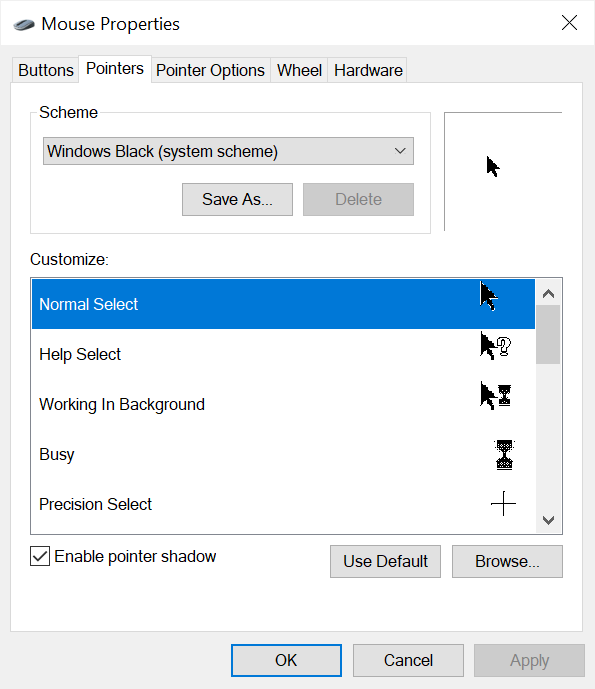
Try changing the cursor scheme on the Secondary:

Sean Drohan
Stardock Product Lifecycle Manager

Reply #5 Top

Hi there, I just tried again this morning!

Unfortunately, no luck.

Some more information that might be helpful:

My mouse appears on the secondary, up until I click on the screen, then it dissapears.

As for the purge script, I'm not sure exactly what it does, but on both my machines (primary and secondary) it remembered the other's computer. I.e. it seems like no data was lost, was that intentional?

Thank you! Please let me know if there are other things I can try. 

Other than me re-connecting again at first boot, everything works perfectly.