Touchscreen focus

Switch focus option not accessible

Hello,

I use Multiplicity (KVM license) on my bench. On my bench I have two computers with each one a touchscreen.

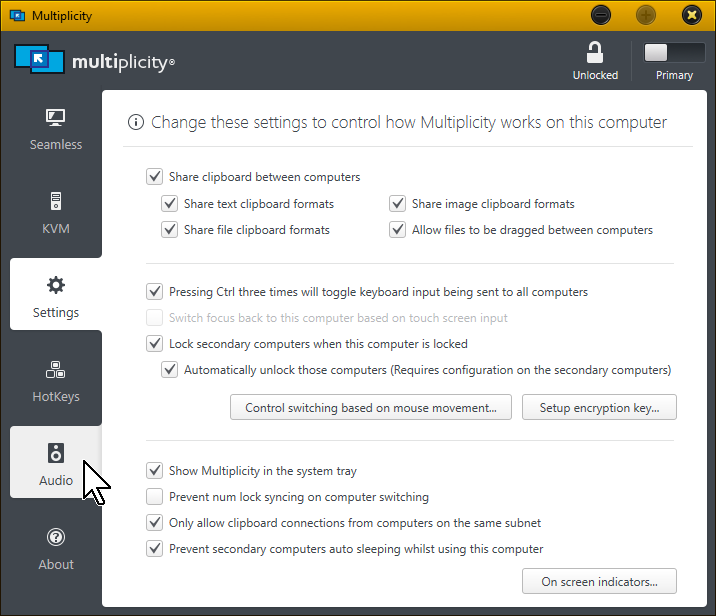
I want to change focus when I use touchscreen. There's an option into Settings : Switch focus ... but not acccessible on both Primary or Secondary.

How to have access to this option ?


Thanks for your answer
4,074 views 7 replies
Reply #1 Top

Hello,

I have forwarded your report to the Stardock support team for their review and recommendations.

Please keep an eye on this thread for any updates.

We really do appreciate your feedback, thanks.

Reply #2 Top


There's an option into Settings : Switch focus ... but not acccessible on both Primary or Secondary.

How to have access to this option ?
End of quote

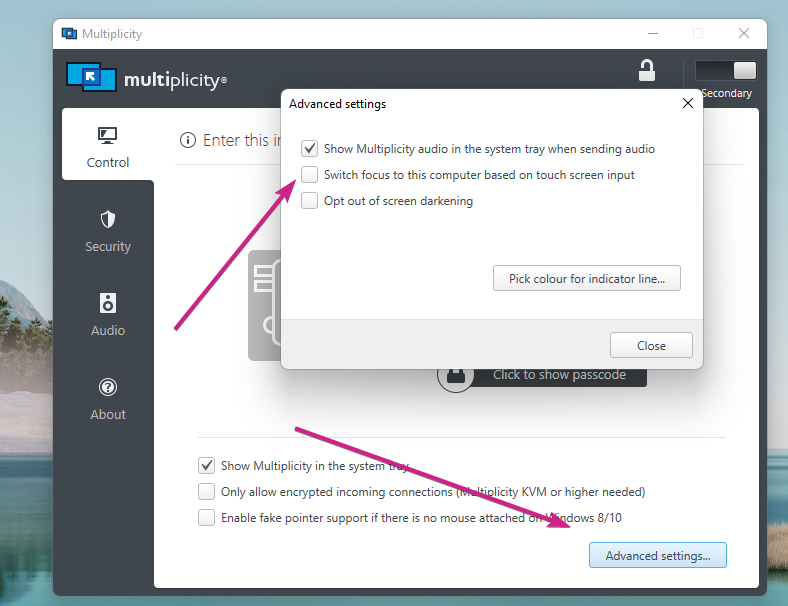
It shows on my Secondary as it has a touchscreen.

But does not on my Primary because I don't have one attached:

The only thing I could think of is that MP (Windows actually) does not see them as touchscreens.  Ensure that the actual drivers are installed for the monitors in question and not something 'generic'.

Sean Drohan
Stardock Support Manager

Reply #3 Top

I have check into Windows [Device Manager], touch screen are detected into category : [Mice and other pointing device]. So touch is not view by Windows like a touch screen device.

How Multiplicity detect touch screen are available ? What kind of device type Multiplicity is waiting ?

So in my system I have :

  • two mouse on my Primary (mouse and touch screen)
  • one mouse on my Secondary (touch screen) 

Is there a way in Multiplicity to configure change focus on mouse events from Primary AND Secondary ? Or something like that...

Reply #4 Top

Multiplicity detects touch based on a device being attached that has > 1 touchpoint.  In other words multitouch devices.  Devices with only one input are exposed like Mice and thus undetectable separately from mouse input.

Reply #5 Top

OK, I understand

So, is there a alternative configuration to change focus if I use mouse (who is in reality a mono touch screen) on Primary AND Secondary or not ?


Reply #7 Top

Quoting JBAir, reply 6

Do you have a solution for me with this kind of touch screen ?
End of JBAir's quote

Not at this time I am afraid.

Sean Drohan
Stardock Support Manager