
Windows button U/S

Had to reinstall last version

Worked well for four hours, able to see separate items on taskbar which I had set to the centre of the screen


Then, on restart for another purpose, Windows button migrated to left of screen but other icons remained centred,
And when I tried to use the Windows button, unable to get it to open.
Wouldn't open on click, or click shift.


Tried reinstalling the beta. the same problem persisted.
Have now reverted to the previous stable release.

1,495 views 7 replies
Reply #1 Top

Hello,
Sorry to hear you are having issues. Need to know more on your system.

  1. Windows 7, 8, 10 or 11? And its version numbers.
  2. Start11? its version please.

Thanks
Basj,
Stardock Community Assistant.

Reply #2 Top

Edition Windows 11 Home

Version 21H2

Installed on ‎29/‎12/‎2021

OS build 22000.556

Experience Windows Feature Experience Pack 1000.22000.556.0

Start 11 version was the new BETA v ersion installed yesterday (March 17.)

Reply #3 Top

Please try purge and reinstall steps as mentioned here: [link]. Just make sure to redownload the latest version from your account. Reboot after the purged. Reinstall, and Reboot again after the installation. Retest it. Report back here.

Thank you,

Basj,
Stardock Community Assistant

Reply #4 Top

Uninstalled and purged all Stardock entries in registry and files/folders.

Installed latest beta. Tried to activate. It refused to accept.

This is turning into a shitshow.

John


Reply #5 Top

Have you tried to deactivate the old one first and reactivate it. Use this guide : https://forums.stardock.com/486311/accounts-and-activation-support-faq#deactivateproduct. Try that and report back.

Thank you,

Basj,
Stardock Community Assistant

Reply #6 Top

OK. 
I now have TWO activation keys via j.d.********@gmail.com  A clean install of the software STILL won't accept EITHER KEY!

I also have the john***le***@outlook.com one which is working p[erfectly on my studio computer.

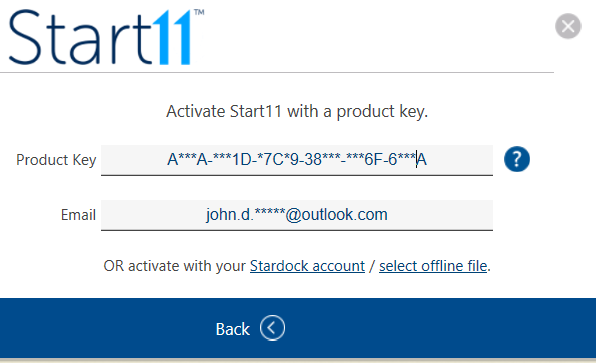
I fill inm the CORRECT KEY and EMAIL address in the "activate with a key" form which pops up ( see screenshot in the previous post)>
But the button to DO THAT NEVER SHOWS UP.

IO shouldn't have to go through these hoops to USE the software I HAVE PAID FOR.

ALSO ref above solution: I only have access to an account for the outlook.com email address.

If I try to sign in on j.d.renegade, the form tells me to create an account. When I do, it rejects ANY PASSWORD regardless of using the guyided special characters etc. 

So I am unable to sign in and deactivate anything. This really is a shitshow. and I'm £12 down on my gmail.com accounts.


where are you based?

Reply #7 Top

Understand the frustration. The might be an error somewhere in your purchase. Please raise a support ticket using the link below. Include all details on your purchase and Support will help you from there. Do know that Support will go through all support tickets base on the order they submitted. Your patience is much appreciate.

https://stardock.atlassian.net/servicedesk/customer/portal/4

Stardock is in Plymouth, MI.

Thank you,

Basj,
Stardock Community Assistant