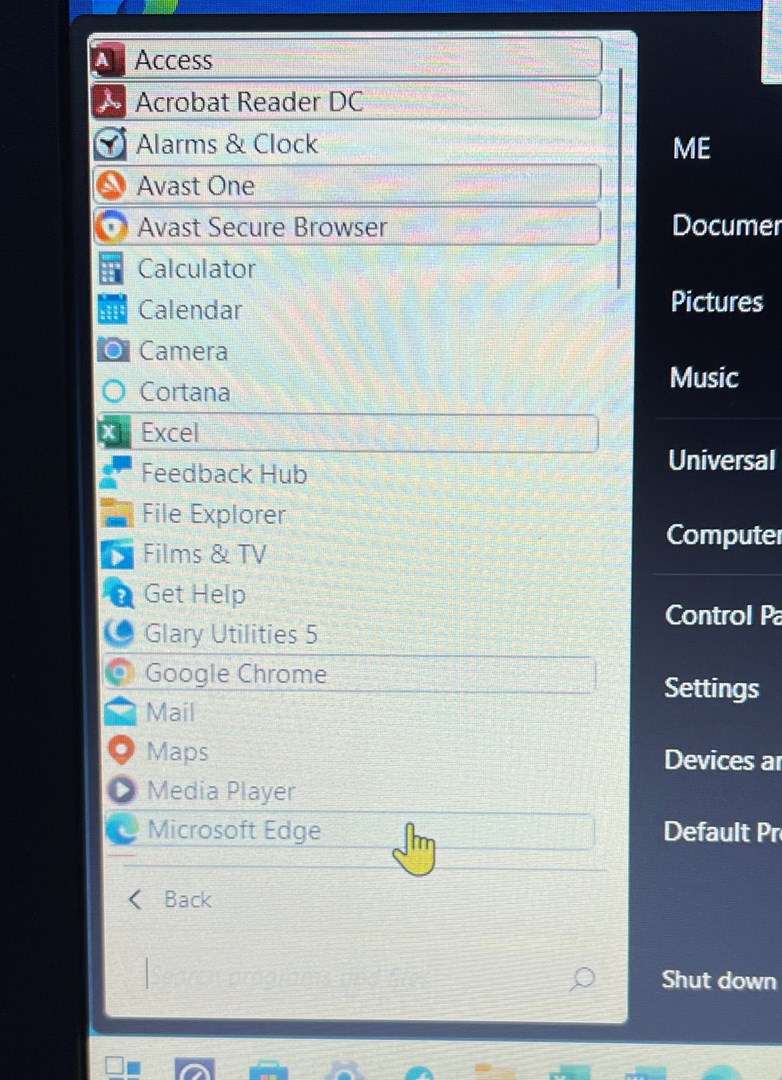
Lost in so many menus in Stardock11

How to turn off the highlights on recently added programs when using the Windows7 style?

Hi. First post here, new to using Stardock 11 and after a lot of searching in it and in the forum I cant find how to turn off the 'highlights' on recently added programs when using the Windows7 style?

Does anyone know where it is located and could direct me to it?

Many thanks


1,817 views 5 replies
Reply #1 Top

Hello,
Sorry to hear you are having issues. From what I read elsewhere, the new program high lights will remove itself after 2 days. (My mistake, please read Dev respond below)

Thanks
Basj,
Stardock Community Assistant.

Reply #3 Top

The reply you were given is incorrect, that is for Windows 10/11 styles only.

---

The highlight option for the Win7/Modern style can be controlled by the registry key here : 


HKEY_CURRENT_USER\SOFTWARE\Stardock\Start8\Start8.ini\Start8


Create a key of type REG_SZ and give it the name Highlight and assign it a value of 0. Then sign out and in again and the highlighting is disabled. If you had previously had Start10 installed this setting would have carried over to Start11.

----

This setting was left off the start11 configuration screens but we will see about adding it back.

Reply #4 Top

Thanks Neil,

If I uninstall 11, install 10, remove 10, and reinstall 11. Restarting each time. Do you think that would work?

mike

Reply #5 Top

Tried the new key suggestion, probably my fault but it didn’t work. 
Menu looks ugly with the odd highlights. 
Thanks anyway. 
mike