Trial and features

Hello,

I'm interesting to use Multiplicity in one of my product. I have some question about some product feature and license:

  • I want to evaluate Multiplicty but the platform where I want to make evaluation can't be connected to internet. Is there a way to make Offline evaluation ?
  • When we buy a license:
    • It's a perpetual license ?
    • The license is attached to the hardware?
  • Can you confirme me that Multiplicity work with two computer with touch screens ? I can "take control" of a one of the computer just by using his touch screen ?

Thanks

3,222 views 5 replies
Reply #1 Top

Hello,

I have forwarded your report to the Stardock support team for their review and recommendations.

Please keep an eye on this thread for any updates.

We really do appreciate your feedback, thanks.

Reply #2 Top

Hello,

Sorry to hear you are having trouble.


I want to evaluate Multiplicty but the platform where I want to make evaluation can't be connected to internet. Is there a way to make Offline evaluation ?
End of quote

For the purchased version there is, not for the trial.

When we buy a license:
It's a perpetual license ?
The license is attached to the hardware?
End of quote

Once purchased, that version is yours forever.

The activation is tied to the 1st PC that activates as a Primary (the controlling PC) but users can reset that at will.

Can you confirme me that Multiplicity work with two computer with touch screens ? I can "take control" of a one of the computer just by using his touch screen ?
End of quote

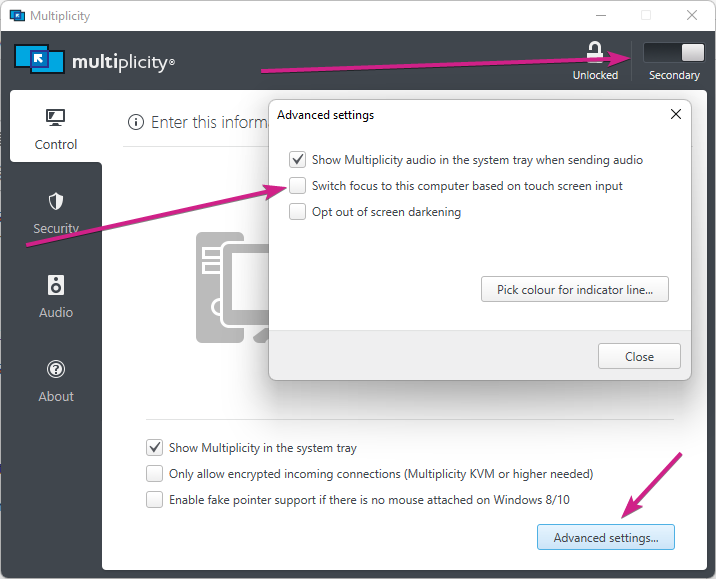
It depends on what the connection type is... For Seamless, you can 'touch' the Secondary's Monitor and the cursor will go there.  For a KVM connection (remote), accessing the Secondary would react to the same touch options as any other app.

Sean Drohan
Stardock Support Manager

Reply #3 Top

I'm not sure to understand "seamless", sorry. The two compters are connected using a simple Ethernet connection. Touch screen used USB connection.

To give an exemple if I used KM version:

  • on my two computers I have a notepad open.
  • If I click on the touch screen of the computer 1 to select the notepad application of the computer 1, and I can edit this notepad content?
  • And after I click on the touch screen of the computer 2 to select the notepad application of the computer 2, and I can edit this notepad content?

Sorry for my questions, but in some other tools (not all) like yours touch screen are not working well...


Reply #4 Top

Quoting JBAir, reply 3

I'm not sure to understand "seamless", sorry.
End of JBAir's quote

This will help:

https://forums.stardock.com/486104/multiplicity-support-faq#seamlesskvm

Quoting JBAir, reply 3

To give an exemple if I used KM version:
End of JBAir's quote

This is where the problem lies with MP, it's very hard to detail in writing but immediately seen when in use.  If you have not, I cannot recommend enough installing the fully functional trial (its MP Pro btw, the trial) to see how this works.

That said, the feature in MP that I am referring to:

Sean Drohan
Stardock Support Manager