

Taskbar display problem
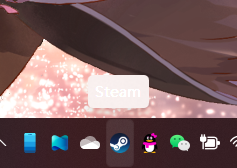
When I set Windows mode to "Light"
The icons on taskbar showed like that
The text on the floating window is the same color as the floating window, so I can't see the text in the floating window clearly
Stardock will be closed for the week starting on Monday, June 29th and we will be returning on Monday, July 6th. We will be monitoring support tickets and forums during this time but expect delays in responses during this time.
When I set Windows mode to "Light"
The icons on taskbar showed like that
The text on the floating window is the same color as the floating window, so I can't see the text in the floating window clearly

Hello,
Sorry to hear you are having issues. But, need more information on your system
Thanks
Basj,
Stardock Community Assistant.
Sorry!
Windows 11 (Build 22000.527)
Fences 4
I am sorry, but, from what I know, Fences has no effect on taskbar tooltip. Please tell us how do you verify that fences is the root cause of this issue. BTW, is the tooltip white text on white background issue only on Steam or any items on the taskbar tray?
Thank you.
Basj,
Stardock Community Assistant.
When I launch Fences the taskbar tooltip changes as described above. Yes, any items on the taskbar will like this
Please try purge and reinstall steps as mentioned here: https://forums.stardock.com/486084/fences-support-faq#reinstalling Just make sure to redownload the latest version from your account. Reboot after the purged. Reinstall, and Reboot again after the installation. Retest it. Report back here.
Thank you.
Basj,
Stardock Community Assistant.
Found the problem. Caused by incompatibility with Startallback. Thank you!
Welcome Guest! Please take the time to register with us.