
Moving from primary monitor to secondary

When coming out of sleep my ASUS zenbook Pro 15 Stardock Fences arrange themselves on to the secondary monitor which is a built in screen Xpert mousepad. This makes the program un usable. I have the latest Fences 4.0.0.3. My system is Windows 11 with all updates up to date with windows update. This also happened with Fences 3.


I have reinstalled Fences. I have reset the PrimaryMonitorLast to Display 1 but this gets set back to Display 2. I think that this change in the register is the reason for the change.


Unfortunately without a solution Fences will have to be removed as it halts productivity.

Any help?

Thanks

G
4,000 views 3 replies
Reply #1 Top

Hello,

Sorry to hear you are having issues. I have forward your problem/question to Stardock Support Team for their assistance. Please keep an eye on this thread for any updates. We appreciate your feedback and patience.

Thanks

Basj,

Stardock Community Assistant

Reply #2 Top

Hello,

Sorry to hear you are having issues.

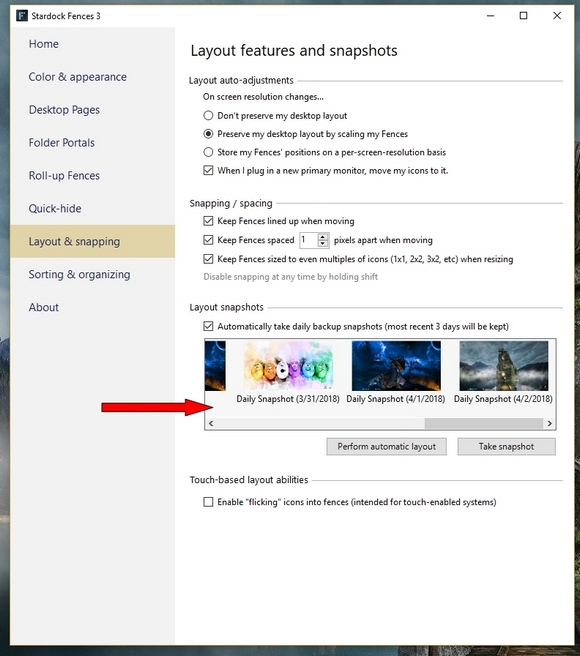
Please try restoring from a snapshot see if that works for you .


AzDude
Stardock Community Assistant

Reply #3 Top

Hi AzDude,


Thank you for your suggestion I have however repeated this supposed solution repeatedly. Sometimes I get a day maybe a little more but then the error occurs again.


I also have used the method of turning off monitor two and then rebooting with only one active monitor. This then forces the icons and therefore fences back on to the primary monitor. I then re activate monitor 2. But this is not a good solution.

I have been using fences for years now but will have to stop. I will not buy Fences 4 with this error. I have ten days left of the trial and then I will have to take it off this machine.

Thank you again

Gabbie