Reply #1 Top

Hello,

Sorry to hear you are having issues. What program did you bought? Start11? And you're on Windows 7,8,10 or 11?

Thanks.

Basj,

Stardock Community Assistant.

Reply #3 Top

Also, it worked at first, although the Start 111 menu was quite small.  Then it reverted to the standard Windows 11 start menu.


Reply #4 Top

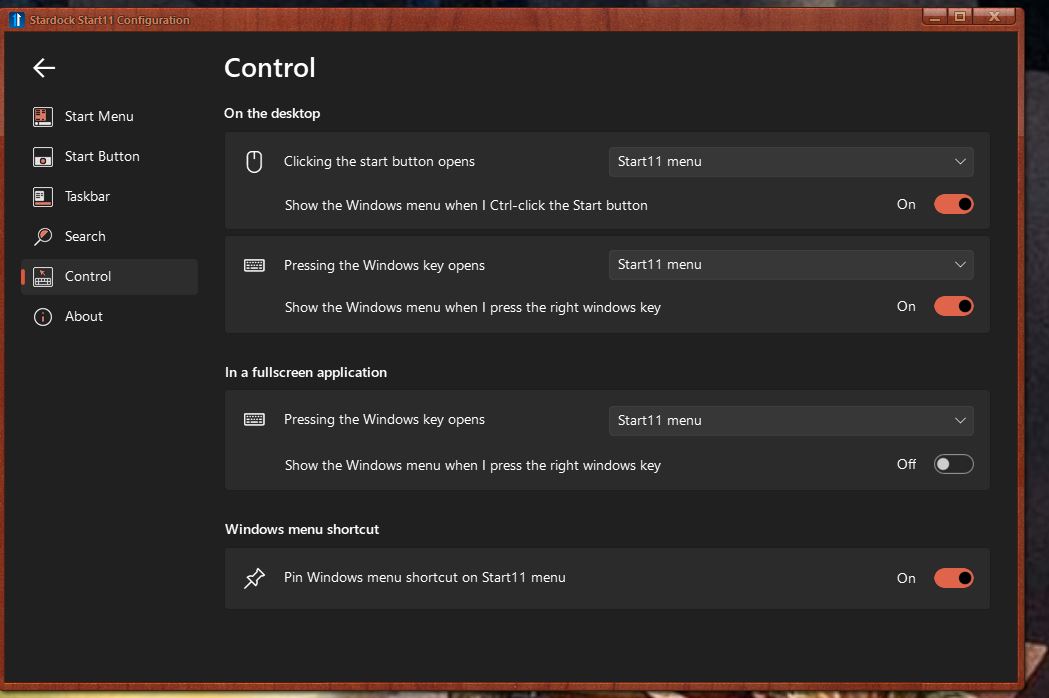
I am confused, you said you reverted to Standard Windows 11 Start menu? And you expect Windows 7 style to appear? Did you change back the setting to Windows 7 style? And your Control setting is set correctly?

Thank you.

Basj,

Stardock Community Assistant.

Reply #5 Top

I did not do anything to revert to the Windows 11 start arrangement, but I do not know how to access the screen you sent me.

If I could set the control for the start button as on the screen you sent me that might well solve my problem.


Thank you.

Reply #6 Top

Hello,

If you have your Windows 11 panel, just type in "Start11" and press Enter. This should open up your Start11 configuration Windows. Click on "Control" tab and it should bring to the same panel I screenshot above.

Thank you.

Basj,

Stardock Community Assistant.