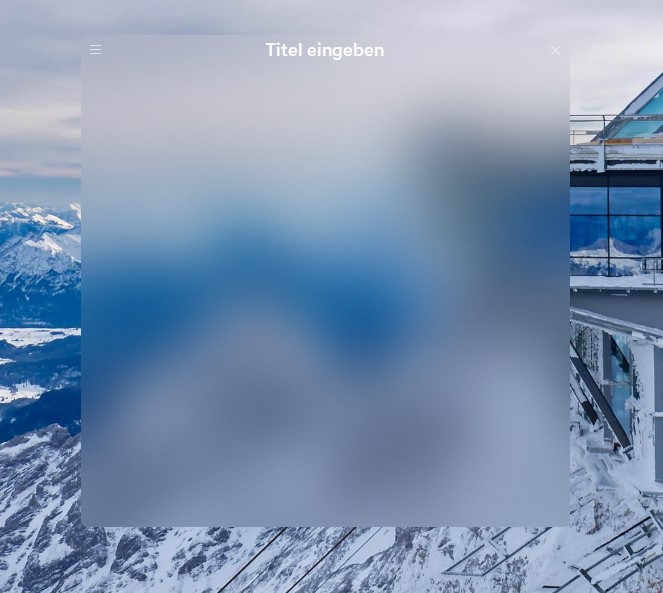
Fences not or half transparent despite full transparency

Hello together,

I like Fences by Stardock. Unfortunately, lately I have the problem that on my 3 monitors Fences is no longer transparent although I have set it that way and it always worked before.

I use 3 monitors. On the laptop it is fully transparent.
Monitor Laptop

On monitor 2 it is half transparent or not transparent at all depending on the position on the monitor. On monitor 3 it is not transparent at all. Anybody have an idea how I can change the whole thing?

I have already uninstalled it and cleaned the registry, but no success.

Greets Dirk
5,853 views 3 replies
Reply #1 Top

Hello,

Sorry to hear you are having issues. Need more information on your system.

  1. Your Windows versions. (Win 7,8,10 or 11?) and its full version numbers.
  2. Fences versions numbers.
  3. A screenshot of your issue will help us understand better.

Basj,

Stardock Community Assistant.

Reply #2 Top

Hello Basj,

the screenshots are stored in the thread under Monitor 1,2,3 as link URL.

But I have listed them here again:

Laptop Monitor 1

The fence is completely transparent

Laptop Monitor


Monitor 2

The fence is transparent in the upper area, from a "line" on it becomes intransparent. Depending on how I move the fence it becomes more or less transparent.

Monitor 1 halb transparent

Monitor 3

The fence is completely intransparent

Monitor 2

When I move the fence on the monitors back and forth, it becomes transparent or not. 


My Windows 11 Version is 22H2, Fence Version 4.0.0.3


Dirk

Reply #3 Top

Please try purge and reinstall steps as mentioned here: https://forums.stardock.com/486084/fences-support-faq#reinstalling Just make sure to redownload the latest version from your account. Reboot after the purged. Reinstall, and Reboot again after the installation. Retest it. Report back here.

Thank you.

Basj,

Stardock Community Assistant.