
Suggestions and bugs

I have a few to suggest and a bug

Ok so I'm on windows 11 using the Windows 10 style in Start11

I would like to see default options for pinned apps. Currently I use small icons and a darker color than the default when pinning apps, so it would be nice to have the option to change the default settings instead of manually doing it to each new pinned app.

Also, there's no option to change the highlighted app color in the start menu; so adding that would be nice too.

When new apps are installed, it shows NEW underneath in the start menu, there seems to be no way to remove it like normal on Windows 11/10 menu (right click the program and it'll remove the NEW text)


There's also a bug. If you right click on an app and close the start menu, the app stays highlighted. Only way to remove it is by right clicking on it again.


1,226 views 4 replies
Reply #1 Top


Ok so I'm on windows 11 using the Windows 10 style in Start11

I would like to see default options for pinned apps. Currently I use small icons and a darker color than the default when pinning apps, so it would be nice to have the option to change the default settings instead of manually doing it to each new pinned app.

Also, there's no option to change the highlighted app color in the start menu; so adding that would be nice too.
End of quote

Hello,
I have forward your request to the Stardock Support Team for their review and recommendations. Please keep an eye on this thread for any updates. We really do appreciate your feedback, Thanks


When new apps are installed, it shows NEW underneath in the start menu, there seems to be no way to remove it like normal on Windows 11/10 menu (right click the program and it'll remove the NEW text)
End of quote

This should be remove automatically after sometimes. I believe the Dev mentioned it somewhere. If I am not mistaken, within 2 days. Ref [https://forums.stardock.com/508528/get;3827868]


There's also a bug. If you right click on an app and close the start menu, the app stays highlighted. Only way to remove it is by right clicking on it again.
End of quote

Not sure about this one. Yes it still get highlighted when you open it again. But on my system, if I click anywhere on the startmenu the highlight will be gone. Except on the App list. on that section you just need to click on any other app on that list.

Thanks

Basj,
Stardock Community Assistant.

Reply #2 Top

Quoting basj, reply 1


This should be remove automatically after sometimes. I believe the Dev mentioned it somewhere. If I am not mistaken, within 2 days. Ref [https://forums.stardock.com/508528/get;3827868]
End of basj's quote

Okay. I'd suggest an option to be able to remove it ourselves or option to not show at all, etc.


Not sure about this one. Yes it still get highlighted when you open it again. But on my system, if I click anywhere on the startmenu the highlight will be gone. Except on the App list. on that section you just need to click on any other app on that list.

End of quote

https://imgur.com/KKwIBV7


Here's the bug in action, you right click on it but click to close the start menu and it'll stay highlighted until you do what you say or right click on it again.


Thanks :)

https://imgur.com/KKwIBV7

https://imgur.com/KKwIBV7

Reply #3 Top

Hello,
I have forward your problem/question to Stardock Support Team for their assistance. Please keep an eye on this thread for any updates. We appreciate your feedback and patience.

Basj,
Stardock Community Assistant

Reply #4 Top


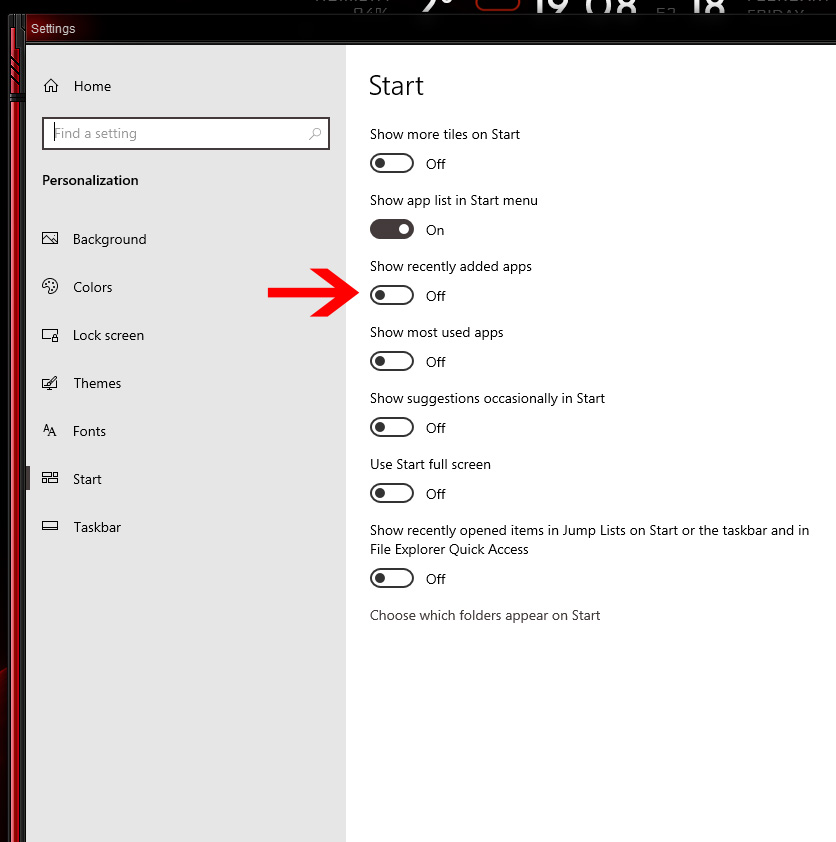
When new apps are installed, it shows NEW underneath in the start menu, there seems to be no way to remove it like normal on Windows 11/10 menu (right click the program and it'll remove the NEW text)
End of quote
I am not sure this will solve your issue, but you could try this: Go to Windows Settings and search for start and uncheck this if it's selected: