Dark background

For the past week or so, the background to my fences is jumping to dark.  If I reboot or reinstall it goes away then comes back.

I have v4.0.0.3 running on Windows 10.  It happened before last week's Windows Update & after.

Thanks.

6,870 views 12 replies
Reply #1 Top

Hello,
Sorry to hear you are having issues. Can we have a screenshot or a video capture of what you mean by "jumping to dark"?

Thanks
Basj,
Stardock Community Assistant.

Reply #3 Top

Hello,

Sorry to hear you are having issues.

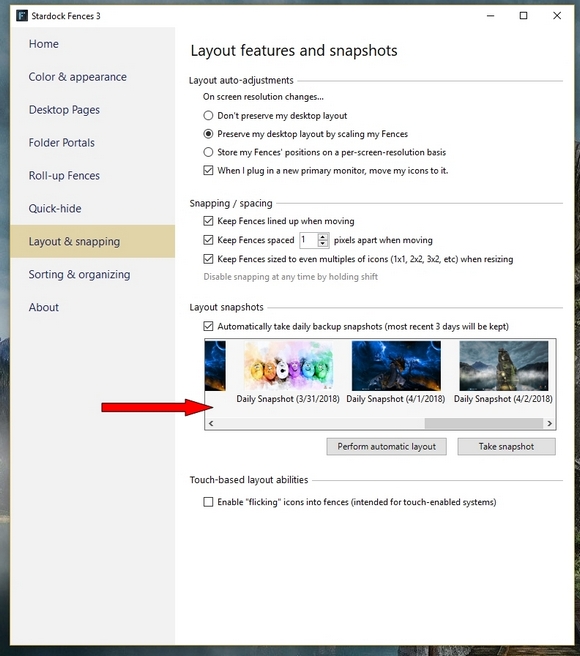
Try using a snapshot to restore 


AzDude
Stardock Community Assistant

Reply #6 Top

Thanks.  I have reinstalled.

As I said in my original note, it was fine after I reinstalled a couple of days ago, so I will need to see if the problem returns.

Reply #7 Top

If it does reappear do the Purge which is different than a regular uninstall reinstall.

Reply #9 Top

Hello,

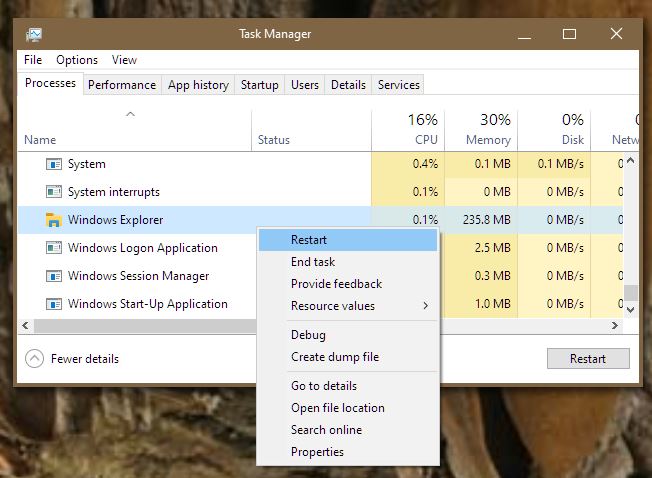
If you restart explorer.exe does the issue go away?

Thank you,

Basj,
Stardock Community Assistant

Reply #11 Top

Same issue here after Fences install going to black.  Something is messing with Windows Explorer.  I've found that restarting Windows Explorer will fix the problem temporarily.  Go into the task manager with any open file window, right click on the Windows Explorer process, and select 'restart.'  I never knew this existed until this issue started occurring.  It's not a permanent fix, but it will clear the 'black' issue.  I'm also experiencing a problem when I right-click on any file in Windows Explorer.  The cursor stalls on the hourglass icon.  It can take minutes for it to come back.  I want the old version of Fences or a fix to the latest version. 

Reply #12 Top

Hello,

I have forwarded your report to the Stardock support team for their review and recommendations.

Please keep an eye on this thread for any updates.

We really do appreciate your feedback, thanks.