Start11 not opening when using the right side Windows Key

I have 2 Windows keys on my keyboard, the left opens Start11, and the right opens the old Win11 start menu.

As mentioned in the title, I have a keyboard with 2 Windows keys on it, a left and right one.

The left opens Start11 as intended. Works perfectly.

The right one opens the Win11 start menu (ew).

I have the settings for Start11 set to open the Start11 menu when the key is pressed, but it doesn't specify anything further.

Is this intended? Is there a fix for it? I'd prefer that both open the Start11 menu.

2,866 views 4 replies
Reply #1 Top

Hello,
Sorry to hear you are having issues. I have forward your problem/question to Stardock Support Team for their assistance. Please keep an eye on this thread for any updates. We appreciate your feedback and patience.

Thanks

Basj,
Stardock Community Assistant

Reply #2 Top

This is me alternating WinKeys (left \ right) and also after changing the setting for how the right one behaves:

https://cdn.stardock.us/support/uploads/2022-02-11_13-40-38.mp4

Are you having a different experience?

Sean Drohan
Stardock Support Manager

Reply #3 Top

nickburnsap,

I was having the same issue and I found this thread outlining it. Had to create an account to reply with a fix.

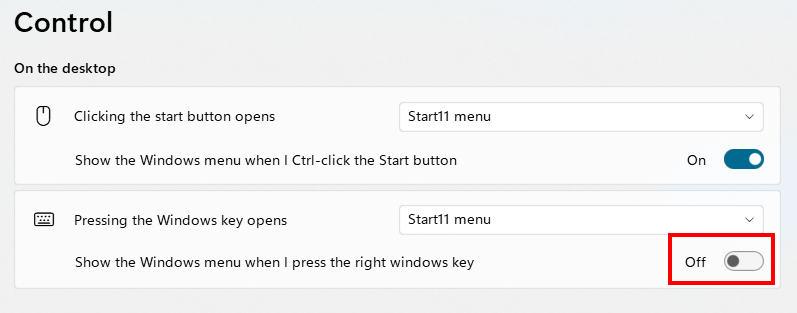
By deselecting the "Show the Windows menu when I press the right Windows key" toggle, pressing the right Win key will open the Start11 menu instead of the built-in Start menu.

The wording is a bit confusing, and it might be nice to have Stardock differentiate between the default Windows 11 Start Menu and the Start11 menu in this option menu.

Deselect the circled option...

Let me know if this works for you.